Tech Ideas & Best Practices
Introduction
If you still rely on SharePoint Alerts for notifications, time is running out. Microsoft will fully retire SharePoint Alerts in July 2026. Since January 2026, creating new alerts has been blocked, and existing alerts now expire every 30 days unless renewed manually. Many organizations are unprepared for this change. Alerts have been a core SharePoint feature since the early 2000s.
This blog explains the retirement schedule, Microsoft’s recommended replacements (SharePoint Rules and Power Automate), and gives a step-by-step migration plan based on real client migrations.
The Retirement Timeline
Microsoft is retiring SharePoint Alerts in phases. Here’s how the changes have rolled out:
- July 2025: New alert creation was blocked for newly onboarded tenants.
- September 2025: New alert creation is blocked for all existing tenants.
- October 2025: Existing alerts started expiring 30 days after their first run. Users began seeing banners in SharePoint and in alert emails warning about retirement. Alerts could be manually extended for an additional 30 days, but only through direct user action.
- January 2026: Creation of new alerts is now fully blocked for every tenant. Attempting to create an alert displays a banner directing users to Rules or Power Automate.
- July 2026: Full retirement. All remaining alerts stop working permanently, with no further extensions.
Risk: The 30-day expiry of Alerts already causes unreliability. If an alert isn’t extended, notifications stop with no warning. Teams using alerts for compliance, security, or monitoring face immediate risks.
Next, it's important to understand why Microsoft is making this change.
Classic SharePoint Alerts rely on legacy infrastructure dating to SharePoint 2010 or earlier. Alerts don’t integrate with Microsoft’s modern notification tools, such as Teams, Adaptive Cards, or the Power Platform. You can’t customize emails, add logic, or route notifications. Admins lack a central way to audit or control alerts, and digest summaries are inconsistent.
Microsoft wants to shift notifications and automation to the Power Platform (primarily Power Automate and Power Fx). This fits the technology direction, but the new tools have gaps. Organizations need a clear migration plan and sometimes expert help.
With the retirement reason clear, let’s examine alternatives to SharePoint Alerts.
Option 1: SharePoint Rules (Simple Replacement)
SharePoint Rules are the direct successor to most classic alerts. They’re built into every modern SharePoint list and document library. Just open the “Automate” menu at the top. No code required; any user with Edit or Contribute permissions can create a rule.
Four triggers are available:
- When a column changes
- When a column value changes to something specific
- When a new item is created
- When an item is deleted
Rules can email notifications or move/copy files to another library. Use Rules for simple needs such as:
- “Alert the legal team when contract status changes to ‘Under Review.’”
- “Move documents to the archive when status is ‘Completed.’”
Limitations:
- No daily/weekly digests each event triggers a separate email.
- No way to monitor “all changes” you must pick a specific event.
- Not available on Site Pages libraries.
- No integration with Teams, Slack, or external apps.
- Requires Edit permission (classic Alerts needed only Read).
Option 2: Power Automate (Advanced Replacement)
For more advanced tasks, Microsoft recommends Power Automate. It can:
- Send daily/weekly digest emails summarizing all changes.
- Send notifications to Teams, Slack, or other services.
- Include conditional logic, approvals, and multi-step workflows.
- Use templates for common scenarios.
Limitations:
- Complexity: Building a digest flow requires some technical know-how.
- Governance: Flows run under the creator’s account, so management is trickier.
- Licensing: Not all M365 plans include Power Automate.
- No “convert alert to flow” button each must be rebuilt manually.
The gap: The biggest feature missing from Rules is the digest summary. Many organizations use Alerts’ daily/weekly digests for compliance or reporting. As of April 2026, Rules still don’t support this, and the community wants it. For digest needs without the complexity of Power Automate, consider third-party tools like VirtoSoftware’s Alerts & Reminders or ManageEngine M365 Manager Plus.
How to Migrate Step-by-Step Guide
Here’s a practical checklist you can use this week:
Step 1: Audit your existing alerts
- Go to each SharePoint site > Site Settings > User Alerts (admin view) to see all active alerts.
- Or use PowerShell to export all alerts across the tenant.
- Document: who set the alert, what it monitors, and notification type (immediate, daily digest, weekly digest).
Step 2: Categorize by complexity
- Simple (immediate, single event): Migrate to SharePoint Rules.
- Digest (summaries): Migrate to Power Automate or a third-party tool
- Complex (logic, multi-list, external apps): Migrate to Power Automate
Step 3: Create Rules for the simple ones
- Open the list/library > Automate > Create a rule.
- Select the trigger and recipients.
- Test it
Step 4: Build Power Automate flows for digest needs
- Use Microsoft’s template “Send a weekly digest of SharePoint list items” as a starting point.
- Customize the HTML email table and set recurrence.
Step 5: Communicate the change
- Announce: “SharePoint Alerts are being retired. Here’s what’s changing.”
- Update training/help docs.
- Set a deadline: all alerts must be migrated by June 2026 (one month before the cutoff).
What SharePoint Designs Recommends
For most organizations, a mix of Rules (for simple notifications) and Power Automate (for digests and advanced scenarios) will cover 90% of use cases. The final 10% organizations with hundreds of alerts, complex routing, or compliance needs may need a structured migration project.
We’ve helped clients migrate in 23 countries. The proven approach: audit, categorize, migrate simple alerts to Rules, and build reusable Power Automate templates for digests.

SharePoint Alerts Are Retiring in July 2026 - Here’s What to Do Before They Stop Working
If you still rely on SharePoint Alerts for notifications, time is running out. Microsoft will fully retire SharePoint Alerts in July 2026

Testing SharePoint applications manually requires a structured approach to ensure functionality, usability, security, and integration of all work seamlessly. Whether you're working on SharePoint Online or on-premises solutions, a well-defined checklist helps avoid production issues and improves overall quality.
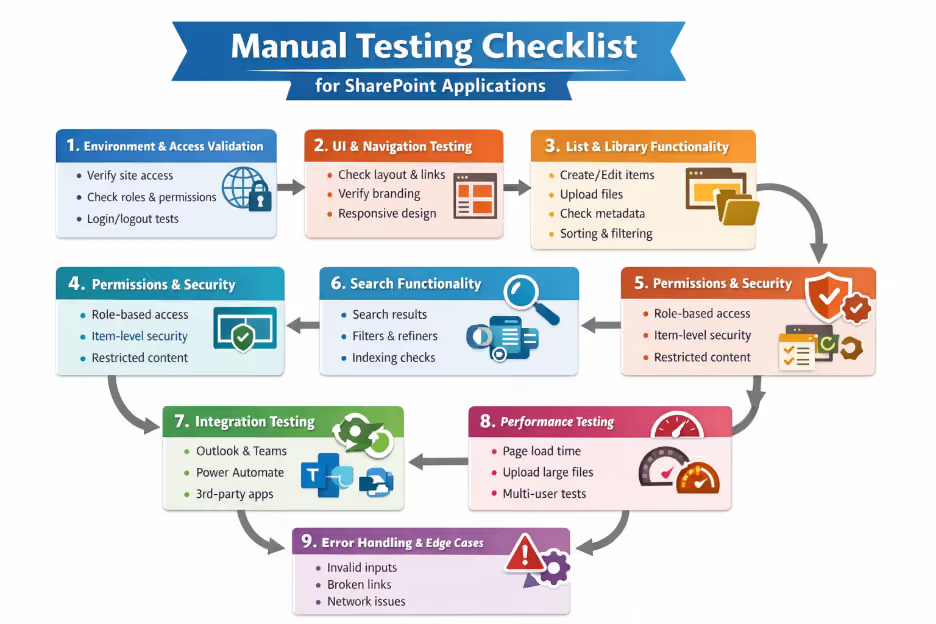
Let’s walk through a comprehensive manual testing checklist—with real-world examples.
1. Environment & Access Validation
Before diving into testing, ensure your environment is correctly set up.
Checklist:
- Verify SharePoint site URL accessibility
- Confirm user roles and permissions
- Check login/logout functionality
- Validate multi-browser support (Chrome, Edge, etc.)
Example:
A user with Read-only access should not be able to edit or delete documents in a document library.
2. UI & Navigation Testing
SharePoint applications rely heavily on usability.
Checklist:
- Validate site layout and responsiveness
- Check navigation links (Quick Launch, Top Navigation)
- Verify branding elements (logos, themes)
- Ensure pages load correctly without UI breaks
Example:
Clicking on “HR Policies” in the navigation bar should be redirected to the correct document library page without errors.
3. List & Library Functionality
Lists and document libraries are the backbone of SharePoint.
Checklist:
- Create, edit, and delete list items
- Upload, download, and version documents
- Validate metadata fields
- Check sorting, filtering, and grouping
Example:
Uploading a document should automatically assign metadata like “Department = Finance” based on default settings.
4. Forms & Workflows Testing
Many SharePoint apps use forms (Power Apps) and workflows (Power Automate).
Checklist:
- Validate form input fields (mandatory, data types)
- Check form submission behavior
- Verify workflow triggers and approvals
- Test email notifications
Example:
Submitting a leave request form should trigger an approval workflow and send an email to the manager.
5. Permissions & Security Testing
Security is critical in SharePoint applications.
Checklist:
- Verify role-based access (Owner, Member, Visitor)
- Test item-level permissions
- Check inheritance breaking scenarios
- Validate restricted content visibility
Example:
A confidential document should only be visible to the HR team and not to general employees.
6. Search Functionality
SharePoint’s search is a key feature for users.
Checklist:
- Verify keyword search results
- Check filters and refiners
- Validate indexing delays
- Test search for documents, lists, and pages
Example:
Searching for “Project Plan” should return relevant documents with matching titles or content.
7. Integration Testing
SharePoint often integrates with other tools.
Checklist:
- Validate integration with Microsoft 365 apps (Outlook, Teams)
- Check Power Automate and Power Apps connectivity
- Verify third-party integrations
Example:
Clicking “Share in Teams” should correctly post the document link in the selected Microsoft Teams channel.
8. Performance Testing (Manual Observations)
Even in manual testing, basic performance checks matter.
Checklist:
- Measure page load times
- Test large file uploads
- Check behavior under multiple users
Example:
Uploading a 100MB file should not cause the browser to freeze or crash.
9. Mobile & Responsive Testing
Users often access SharePoint on mobile devices.
Checklist:
- Test responsiveness on mobile/tablet
- Verify touch interactions
- Validate SharePoint mobile app behavior
Example:
A document library should display properly on a mobile screen without layout distortion.
10. Error Handling & Edge Cases
Always test unexpected scenarios.
Checklist:
- Invalid inputs in forms
- Network interruptions
- Unauthorized access attempts
- Broken links
Example:
Entering an invalid email format in a form should show a proper validation message instead of submitting.
Leave Request Workflow
Scenario Overview
A SharePoint-based Leave Management system where:
- Employee submits a leave request
- Workflow triggers approval
- Manager approves/rejects
- Employee gets notified
Example 1: Employee Submits Leave Request
Test Steps:
- Login as Employee
- Open Leave Request form
- Enter details:
- Leave Type: Casual Leave
- From Date: 10 Apr
- To Date: 12 Apr
- Reason: Personal work
- Click Submit
Expected Result:
- Form should be submitted successfully
- Leave request entry created in SharePoint list
- Status should be “Pending Approval”
Example 2: Workflow Trigger Validation
Test Steps:
- Submit a leave request
- Check workflow/Power Automate run history
- Expected Result:
- Workflow should trigger automatically
- Workflow status should be “Running” or “Completed”
- No errors in flow execution
Example 3: Manager Receives Email Notification
Test Steps:
- Submit leave request as Employee
- Login to Manager email (Outlook)
- Expected Result:
- Manager should receive email with:
- Employee name
- Leave dates
- Approve/Reject link or button
Example 4: Manager Approves Request
Test Steps:
- Login as Manager
- Open approval email or SharePoint item
- Click Approve
- Expected Result:
- Request status updated to “Approved”
- Approval comments saved (if applicable)
- Workflow completes successfully
Example 5: Employee Receives Approval Notification
Test Steps:
- Manager approves request
- Login as Employee
- Check email / SharePoint notifications
- Expected Result:
- Employee receives confirmation email
- Email contains:
- Approval status
- Leave details
- SharePoint list shows Approved status
Example 6: Rejection Scenario (Edge Case)
Test Steps:
- Manager selects Reject
- Adds rejection reason
- Expected Result:
- Status updated to “Rejected”
- Employee receives rejection email with reason
Final Thoughts
Manual testing of SharePoint applications is not just about clicking through pages, it’s about validating real user scenarios, ensuring data security, and confirming seamless integrations.
%201.avif)
Manual Testing Checklist for SharePoint Applications (With Examples)
Testing SharePoint applications manually requires a structured approach to ensure functionality, usability, security, and integration of all work seamlessly.

SharePoint Online pages are the building blocks of every modern Microsoft 365 intranet. Whether you need a department homepage, a project hub, a resource library, or an announcement post, pages are how information gets organized and shared across your organization. This guide covers everything from creating your first blank page to adding web parts, configuring layouts, and publishing in one place, clearly and without jargon.
What is a SharePoint Online Page?
A SharePoint Online page is a modern, web-based content canvas that lives inside a SharePoint site. It is built by placing web parts modular content blocks onto a layout, then publishing the result to make it visible to people with access to the site.
Pages are stored in the Site Pages library of each site. Every site starts with a home page by default, and you can create as many additional pages as your content requires , there is no practical limit.
Before You Start - What You Need
- Edit permissions on the SharePoint site (Site Member or Site Owner role)
- A modern SharePoint site (Team site or Communication site), Quick Chart web part and modern pages are not available on classic sites
- Access to SharePoint Online via Microsoft 365, no additional licence required beyond a standard M365 Business or Enterprise plan
- A clear purpose for the page knowing whether it is a resource hub, department page, or landing page will guide your template and web part choices
Note: If you do not see the New button on your site, your SharePoint administrator may have disabled page creation. Ask them to enable it in SharePoint Admin Center → Settings → Pages → Allow users to create new modern pages.
How to Create a Page in SharePoint Online - Step by Step
Step 1: Navigate to your SharePoint site
Open your browser and go to the SharePoint site where you want to create the page. You must be signed in to Microsoft 365 with an account that has Edit or Owner permissions on that site.
Step 2: Click New → Page
From the site home page or any existing page, click the New button in the top command bar. A dropdown menu will appear. Select Page from the options.
Alternative entry points: You can also go to Site Contents → Site Pages library → New, or use the SharePoint App Bar → Create → Page.

Step 3: Choose a template
The Template Gallery opens. You will see built-in templates including Blank, Visual, Basic Text, Showcase, and others. Select the template that best fits your content structure, then click Create page.
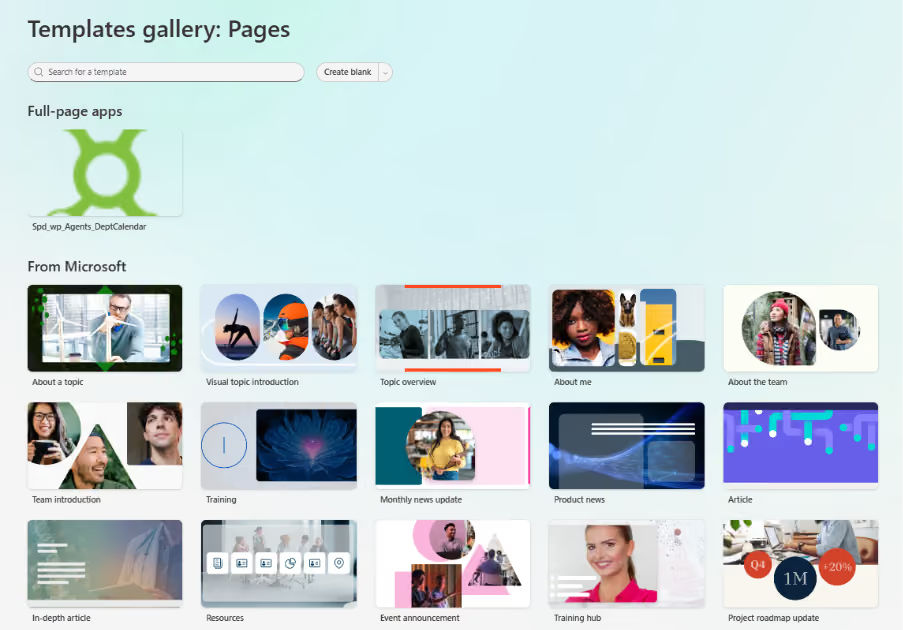
Template guidance:
- Blank - clean canvas, full control, best for experienced page builders
- Basic Text - pre-configured text and image layout, ideal for articles and documentation
- Visual - image-heavy layout, well suited to department landing pages and homepages
- Showcase - highlights featured content, good for project hubs and resource centres
Pro tip: If your organization has saved custom page templates, they will appear in the Template Gallery under 'Saved on this site'. Using a template saves significant setup time and ensures brand consistency.
Step 4: Add a page title
Click inside the Add a title area at the top of the page and type your page title. This title appears in the browser tab, in search results, and in the Site Pages library.

- Keep titles clear and descriptive, they are indexed by Microsoft Search
- Avoid vague titles like 'New Page' or 'Untitled', they make the page hard to find later
- The title also becomes the default file name in the Site Pages library (spaces are replaced with hyphens)
Step 5: Add a banner image (optional but recommended)
Click the image icon in the title area to upload or select a banner image. You can choose from Stock images, OneDrive, your site's image library, or upload from your device.

After selecting an image, use the focal point tool to control which part of the image is shown when the banner is cropped at different screen sizes. Set the focal point on the most important part of the image usually a face or a key visual element.
Step 6: Configure the title area layout
Click the Edit properties icon (pencil icon) in the title area to open the web part property pane. Under Layout, choose from six options:

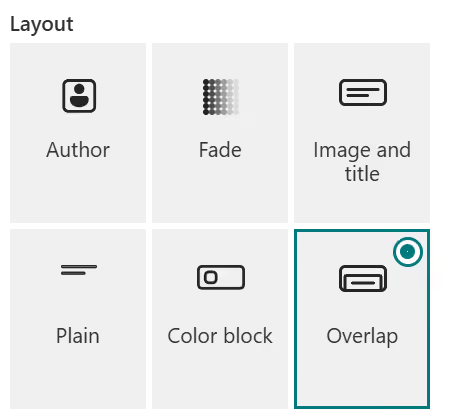
- Image and title - full-width banner with the title overlaid on the image (most visual)
- Plain - no image, clean white title area, works well for text-heavy pages
- Colour block - solid colour background behind the title, good for branded pages
- Overlap - page title overlaps the section below, creates depth
- Compact - minimal title height, maximises content area
- No title - removes the title area entirely for fully custom layouts
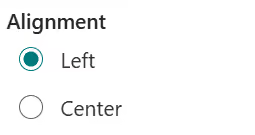
Under Alignment, choose Left or Centre to control where the title text is positioned within the title area.
Step 7: Once you have configured the page, click Publish at the top right corner to make the page live.

Step 8: Add web parts to your page
Click the + (plus) icon that appears when you hover between sections or at the bottom of the page. A web part picker opens. Search for the web part you need or browse by category.
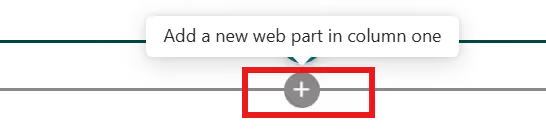
Select the web part you wish to add (for example: Text, Image, Quick links, Document library, etc.).
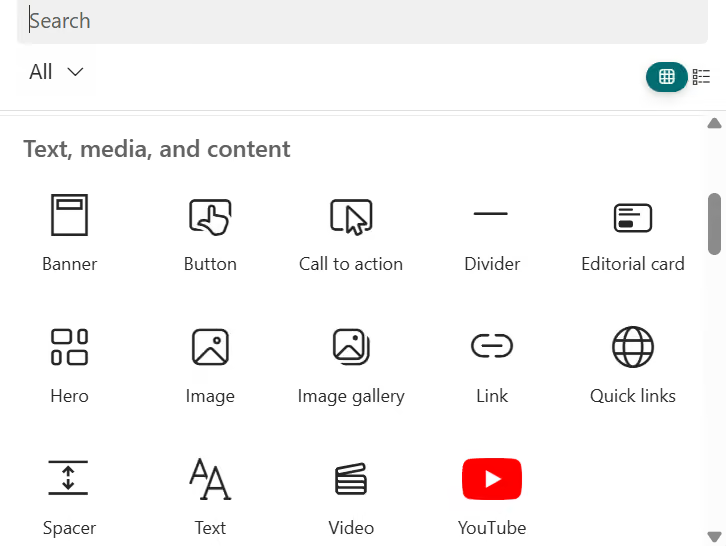
After selecting a web part, it is placed on the page and its property pane opens on the right side. Configure the web part settings, then click anywhere outside the pane to close it. Repeat for each web part you need.
Moving web parts: click and hold the move icon (four-directional arrow) on a web part to drag it to a new position. Web parts can be moved within a section or between sections.
Deleting a web part: click the web part to select it, then click the Delete (bin) icon that appears in the toolbar.
Step 9: Organize content with sections and columns
SharePoint pages use sections as horizontal rows of content. Each section can contain one, two, three, or four columns. Click the + icon on the left side of the page (in edit mode) to add a new section.
- Single column - full-width content, best for text articles and announcements
- Two columns - side-by-side layout, good for pairing an image with text
- Three or four columns - grid layout, ideal for icon-based quick links or metric cards
- Full-width section - edge-to-edge layout, powerful for Hero and Banner web parts
Collapsible sections: you can set a section to be collapsible, letting users expand or collapse content blocks. This is useful for long pages with categorised content such as FAQs or policy libraries.
Step 10: Save and publish
When your page is ready, Click save & Publish
Looking for a professionally designed SharePoint intranet? Book a Free Live Demo
%201.avif)
How to Create a Page in SharePoint Online - A Complete Step-by-Step Guide for 2026
SharePoint Online pages are the building blocks of every modern Microsoft 365 intranet.

Is it possible to change the blue colour of SharePoint quick chart without any code change?
Yes, you can change the SharePoint Quick Chart color without code by using an out-of-the-box (OOTB) workaround. Create the chart in Excel, customize the colors, and embed it in SharePoint using the File and Media web part for full design control.
TL;DR: Change SharePoint Quick Chart color using Excel + File & Media web part. No coding required.
The Quick Chart web part in SharePoint is a convenient tool for visualizing simple data. However, it has a notable limitation: it does not support advanced color customization or theme alignment. For organizations aiming to build branded and visually consistent SharePoint experiences, this restriction can significantly impact the overall user interface and design quality. Since the out-of-the-box Quick Chart web part in SharePoint does not support theme-based colour customization, an effective alternative is to use the File and Media web part.
This article outlines a practical, out-of-the-box (OOTB) workaround to overcome this limitation without requiring any custom development or SPFx solutions.
Understanding the Limitation
The SharePoint Quick Chart web part provides only minimal styling options. Specifically:
- No support for custom color palettes
- No integration with SharePoint themes
- Limited control over chart appearance
As a result, organizations cannot align charts with their branding or design systems using the default configuration.
OOTB Workaround: Using Excel and File & Media Web Part
A reliable and effective approach is to create the chart in Excel and embed it into SharePoint. This method leverages existing SharePoint capabilities while enabling complete control over chart design.
This solution is entirely out-of-the-box, requiring no code or additional tools.
Step-by-Step Implementation
1. Create the Chart in Excel
Instead of using the Quick Chart web part, design your chart in Microsoft Excel.
2. Customize the chart design in Excel
- Set individual colours for text, bars, and plot areas of the chart as per the requirement.
- Apply your theme-specific styling (let’s say for example, you are creating a Batman themed intranet, using yellow bars with black background).
3. Adjust the background and layout:
- Change all rows and columns to a black background.
- Set the chart background to black for consistency.
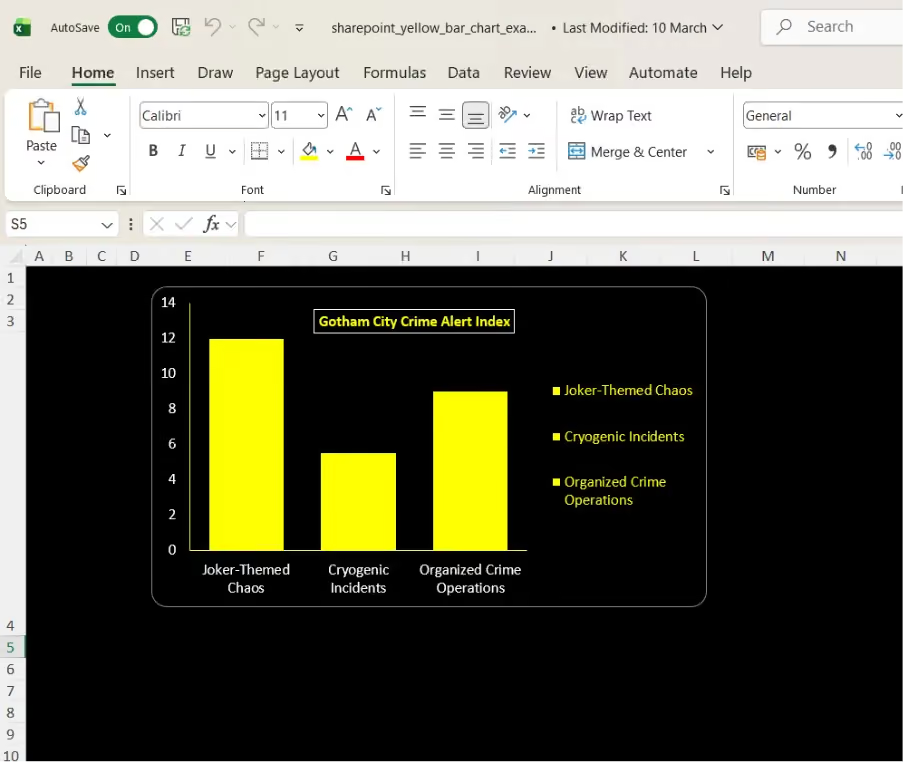
4. Upload the Excel file to the Document Library available in Site Contents.
5. Embed it in SharePoint using the File and Media web part.
6. After embedding the excel need to do configuration
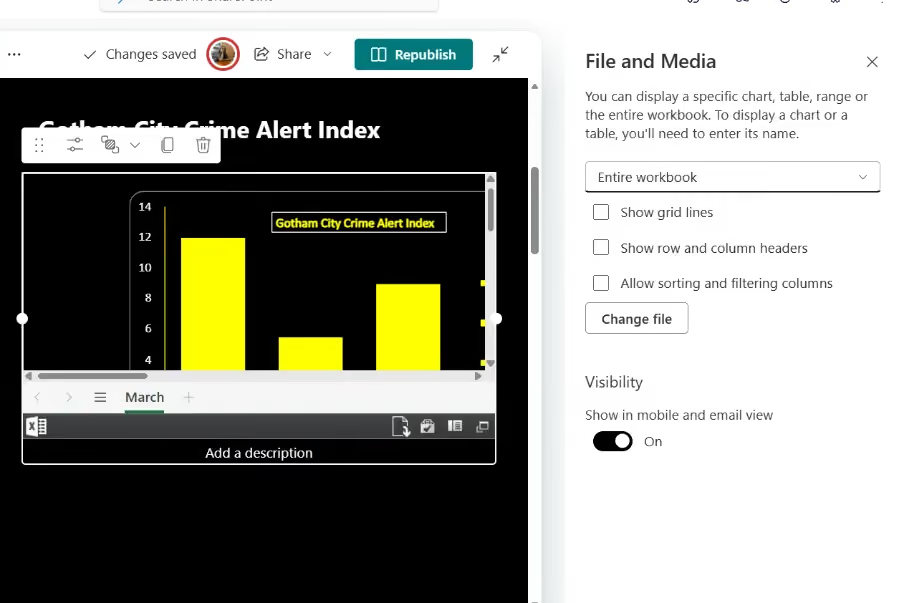
7. Select the “Entire Workbook” option from the dropdown menu to ensure the full chart view is displayed.
8. Uncheck the three available options (Gridlines, Row and column header, Sorting and filtering Columns.) to hide the Excel sheet structure and keep the view clean and presentation friendly.
Using Excel with the File and Media web part enables complete customization of chart design, making it a practical alternative to the limited styling options of the Quick Chart web part.
Why This Approach is Effective
This method addresses the inherent limitations of the Quick Chart web part while avoiding the complexity of custom development. It is particularly beneficial for:
- Business users who require quick customization
- Organizations avoiding SPFx or custom code
- Teams building visually consistent intranet pages
If you are looking to enhance your SharePoint experience beyond default capabilities:
We help organizations design and implement modern SharePoint solutions, including:
- Custom web parts using SPFx
- Branded intranet experiences
- Advanced dashboards and visual components
Contact us to explore how your SharePoint environment can be transformed into a more engaging and functional digital workplace.

Overcoming SharePoint Quick Chart Color Limitations Using an Out-of-the-Box Approach
Is it possible to change the blue colour of SharePoint quick chart without any code change? yes, using a simple OOTB workaround.

Introduction to SharePoint Consulting Companies
SharePoint consulting companies help organizations design, implement, and optimize Microsoft SharePoint environments. Their expertise covers modern intranet development, document management systems, workflow automation, and Microsoft 365 integrations.
For busy business leaders and IT teams, working with a SharePoint consultant ensures:
- Faster intranet deployment
- Reduced development costs
- Improved employee experience
- Scalable digital workplace solutions
The right consulting partner can transform SharePoint from a simple document repository into a powerful digital workplace platform.
What Do SharePoint Consulting Companies Actually Do?
SharePoint consulting firms provide specialized services to help organizations maximize their Microsoft ecosystem investments.
Core Services
1. Sharepoint Intranet Development
- Design modern employee portals
- Build communication sites and department hubs
- Improve internal communication and engagement
2. Document Management Systems
- Structured document libraries
- Metadata tagging and search optimization
- Compliance and governance setup
3. Workflow Automation
- Automate approvals and business processes
- Integrate Power Automate workflows
- Reduce manual tasks
4. Microsoft 365 Integration
- Connect SharePoint with Microsoft Teams
- Integrate Power Apps and Power BI
- Build custom employee apps
5. Migration and Modernization
- Upgrade legacy SharePoint environments
- Migrate from file servers or other intranets
- Modernize classic SharePoint portals Related Article: Elevate Your Business with Specialized SharePoint Consultancy Services
Related Article: Elevate Your Business with Specialized SharePoint Consultancy Services
Why Businesses Hire SharePoint Consultants?
Organizations often struggle to build effective intranets using default SharePoint functionality alone.
Here are the most common challenges consultants solve:
- Limited out-of-the-box customization
- Slow intranet development cycles
- Poor employee adoption
- Complex Microsoft 365 integrations
SharePoint consulting firms bring technical expertise, design strategy, and best practices that significantly reduce implementation risk
Top 9 SharePoint Consulting Companies in 2026
Below are some of the most reputable SharePoint consulting firms based on industry expertise, innovation, and client reviews from platforms like Clutch and G2.
1. SharePoint Designs
Best for Modern AI-Powered SharePoint Intranets SharePoint Designs is one of the best SharePoint Intranet consultant specializes in building modern SharePoint intranet experiences that are visually engaging, scalable, and easy to deploy.
The company offers prebuilt AI-assisted SharePoint templates and web parts, enabling organizations to launch intranets much faster than traditional development approaches.
Key Services
- SharePoint intranet consulting
- Prebuilt SharePoint templates and web parts
- AI-assisted intranet solutions
- Employee onboarding portals
- Document management systems
- Microsoft Power Apps integrations
Why Businesses choose Sharepoint Designs
- Faster intranet launch using prebuilt components
- Modern website-like user experience
- AI-driven intranet features
- Cost-effective solutions for SMBs and enterprises
Estimated Pricing
Review Ratings
- Clutch: 4.8 / 5 ⭐
- G2: 4.7 / 5 ⭐
2. Powell Software
Best known for its Powell Intranet platform, which enhances SharePoint with advanced employee experience features.
Highlights
- Strong governance features
- Employee engagement tools
- Deep Microsoft Teams integration
Estimated Pricing
$6 – $12 per user per month
Ratings
- Gartner: 4.3 / 5 ⭐
- G2: 3.9 / 5 ⭐
3. Brainvire
A global IT consulting company offering enterprise SharePoint development and Microsoft ecosystem consulting.
Highlights
- Large enterprise implementations
- SharePoint migrations
- Custom portal development
Estimated Pricing
$20,000 – $100,000 per project
Ratings
- Clutch: 4.8 / 5 ⭐
- TrustPilot: 4.0 / 5 ⭐
4. Techcronus
Provides scalable SharePoint consulting for enterprises across North America and Europe.
Highlights
- Custom SharePoint solutions
- Microsoft 365 consulting
- Enterprise collaboration platforms
Estimated Pricing
$10,000 – $60,000
Ratings
- Clutch: 4.3 / 5 ⭐
- TrustPilot: 3.8 / 5 ⭐
5. Flexsin
Focuses on SharePoint integration and consulting services for organizations looking to streamline operations.
Highlights
- SharePoint migration service
- Microsoft ecosystem integrations
- Managed support services
Estimated Pricing
$8,000 – $40,000
Ratings
- Clutch: 4.3 / 5 ⭐
6. IDS Logic
Specializes in improving operational efficiency through SharePoint automation and collaboration tools.
Highlights
- Workflow automation
- Intranet portals
- SharePoint consulting
Estimated Pricing
$7,000 – $30,000
Ratings
- Clutch: 4.3 / 5 ⭐
- Trust Pilot: 3.7 / 5 ⭐
7. ManekTech
Provides experienced SharePoint developers for businesses requiring dedicated development resources.
Highlights
- Custom SharePoint application
- Microsoft 365 development
- SharePoint migration services
Estimated Pricing
$25 – $50 per hour
Ratings
- Clutch: 4.5 / 5 ⭐
- Trust Index: 3.9 / 5 ⭐
8. Samarpan Infotech
A development-focused SharePoint consulting company known for building custom web parts and portals.
Highlights
- Custom intranet modules
- SharePoint web part development
- Enterprise collaboration systems
Estimated Pricing
$5,000 – $20,000
Ratings
- Clutch: 4.9 / 5 ⭐
9. ScienceSoft
A Microsoft consulting partner providing enterprise-grade SharePoint solutions and digital workplace consulting.
Highlights
- Enterprise intranet architecture
- SharePoint modernization projects
- Microsoft cloud consulting
Estimated Pricing
$30,000 – $150,000+
Ratings
- Clutch: 4.7 / 5 ⭐
- G2: 4.6 / 5 ⭐
How to Choose the Right SharePoint Consultant
Use the following checklist before selecting a consulting partner.
1. Evaluate Intranet Expertise
Look for consultants experienced in modern SharePoint communication sites and employee experience platforms.
2. Review Portfolio
Analyze their previous intranet implementations and case studies.
3. Check Third-Party Reviews
Platforms like Clutch, G2, and GoodFirms provide verified client feedback.
4. Consider Deployment Speed
Companies offering prebuilt templates or frameworks can launch intranets much faster.
5. Compare Pricing Models
Consultants may charge:
- Fixed project pricing
- Hourly consulting fees
- SaaS-style intranet platforms

Related Article: The Complete Guide to Hiring a SharePoint Consultant for Your Business
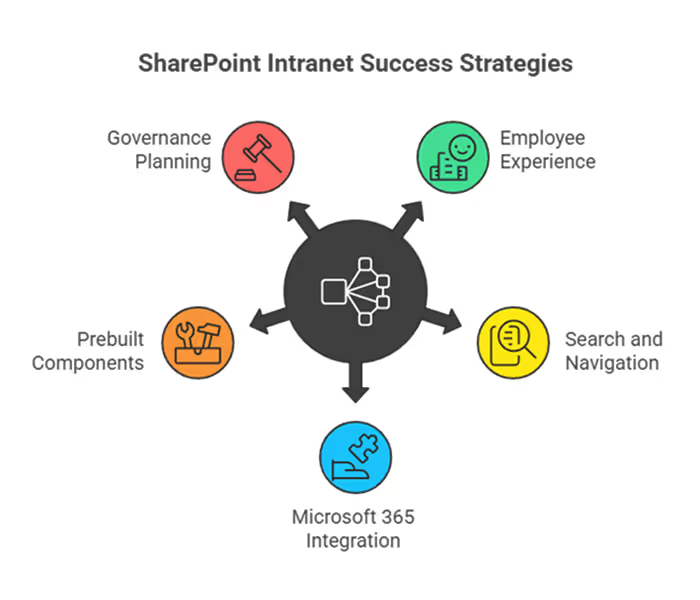
Top Tips for Building a Successful SharePoint Intranet
Follow these best practices to ensure your intranet delivers real value.
1. Prioritize Employee Experience
A modern intranet should be intuitive and visually engaging.
2. Focus on Search and Navigation
Employees must be able to find documents and information quickly.
3. Integrate Microsoft 365 Tools
Combine SharePoint with:
- Microsoft Teams
- Power Apps
- Power Automate
- Power BI
4. Use Prebuilt Components
Prebuilt templates and web parts accelerate development and reduce costs.
5. Plan Governance Early
Define permissions, document structures, and content ownership from the beginning.
Conclusion & Next Step
Choosing the right SharePoint consulting partner is critical for building a successful digital workplace.
The companies listed above offer a range of services from custom enterprise development to fast intranet deployments using prebuilt templates.
If you're planning a modern SharePoint intranet, working with an experienced consultant like SharePoint Designs can help you launch faster while delivering a more engaging employee experience.
Next Step
Explore how modern SharePoint solutions can transform your digital workplace and improve collaboration across your organization.
Top 9 SharePoint Consulting Companies in 2026 (Expert Guide)
Choosing the right SharePoint consulting company helps organizations build modern intranets, automate workflows, and improve collaboration faster.

Most SharePoint intranets don’t fail because SharePoint is bad.
They fail because they’re built without looking at real SharePoint intranet designs that employees love to use.
In almost every organization, the story starts the same way:
“We already have SharePoint, let’s build an intranet.”
Six months later, no one remembers the URL.
Let’s change that by walking through real-world SharePoint intranet sample sites, based on patterns that consistently work across companies.
SharePoint Intranet Homepage Examples (That Employees Return To)
In one company, the intranet homepage looked impressive but useless.
Big banners. Too many links. No idea where to start.
After reviewing modern SharePoint intranet homepage examples, they focused on simplifying the experience.
The new homepage focused on:
- One clear welcome message
- 3–5 key actions employees use daily
- Targeted news instead of company-wide noise
- A visible Microsoft Search bar
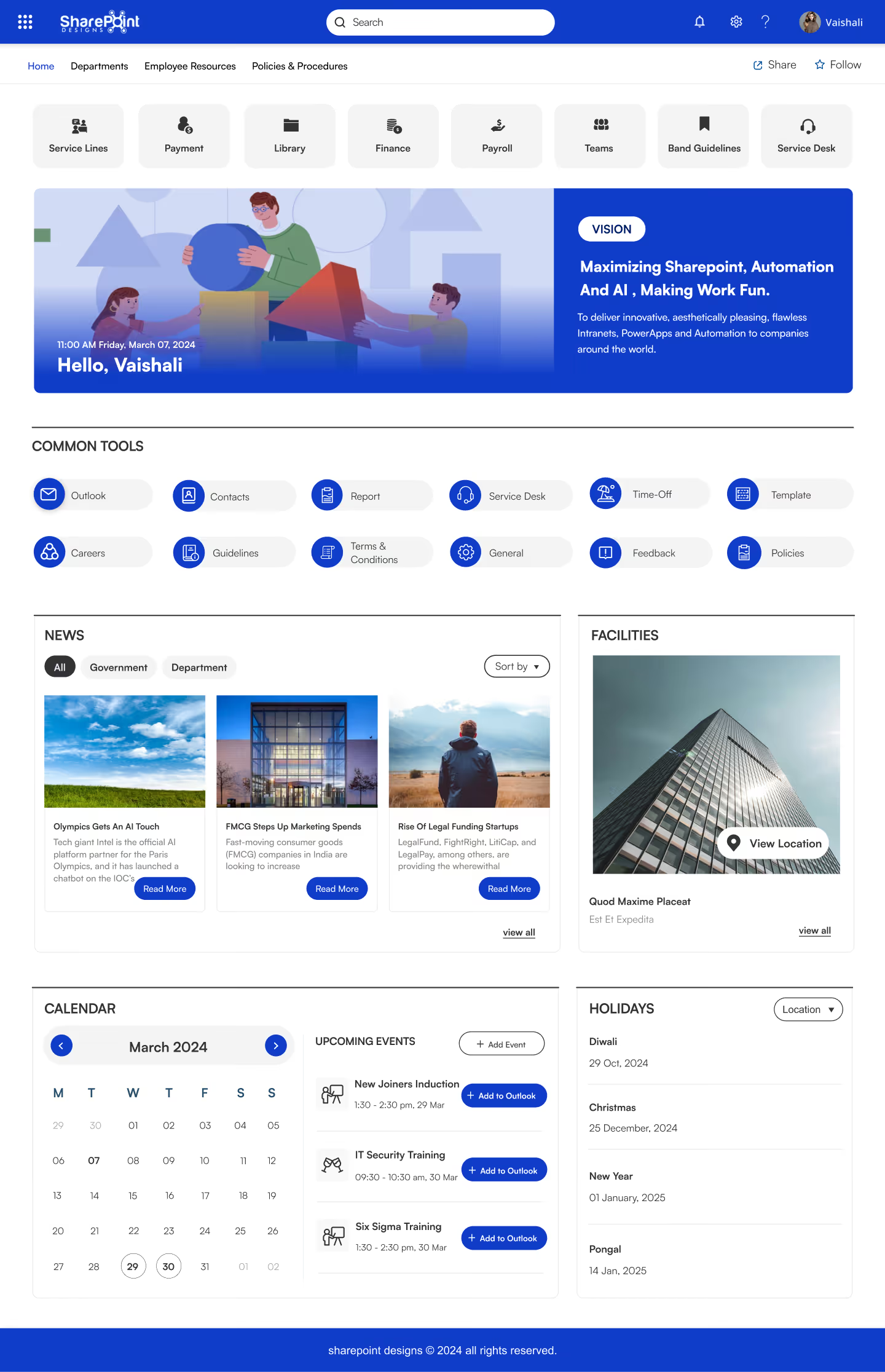
One thing we’ve noticed across multiple intranet redesigns is that clarity almost always beats visual complexity. In similar cases, teams that narrowed their homepage to just a few key actions saw nearly 2× higher repeat visits within the first two months.
Usage didn’t increase because of design.
It increased because the homepage finally answered one question:
“What should I do here?”
The industry line is woven naturally into the benefits rather than being a separate list — keeps it punchy and scan-friendly for ads, landing pages, or brochures. Want me to write this as a Google Ad headline + description set or a landing page hero section?
SharePoint Intranet Homepage Best Practices
SharePoint HR Intranet Template (That Reduce Daily Questions)
HR teams often become accidental support desks.
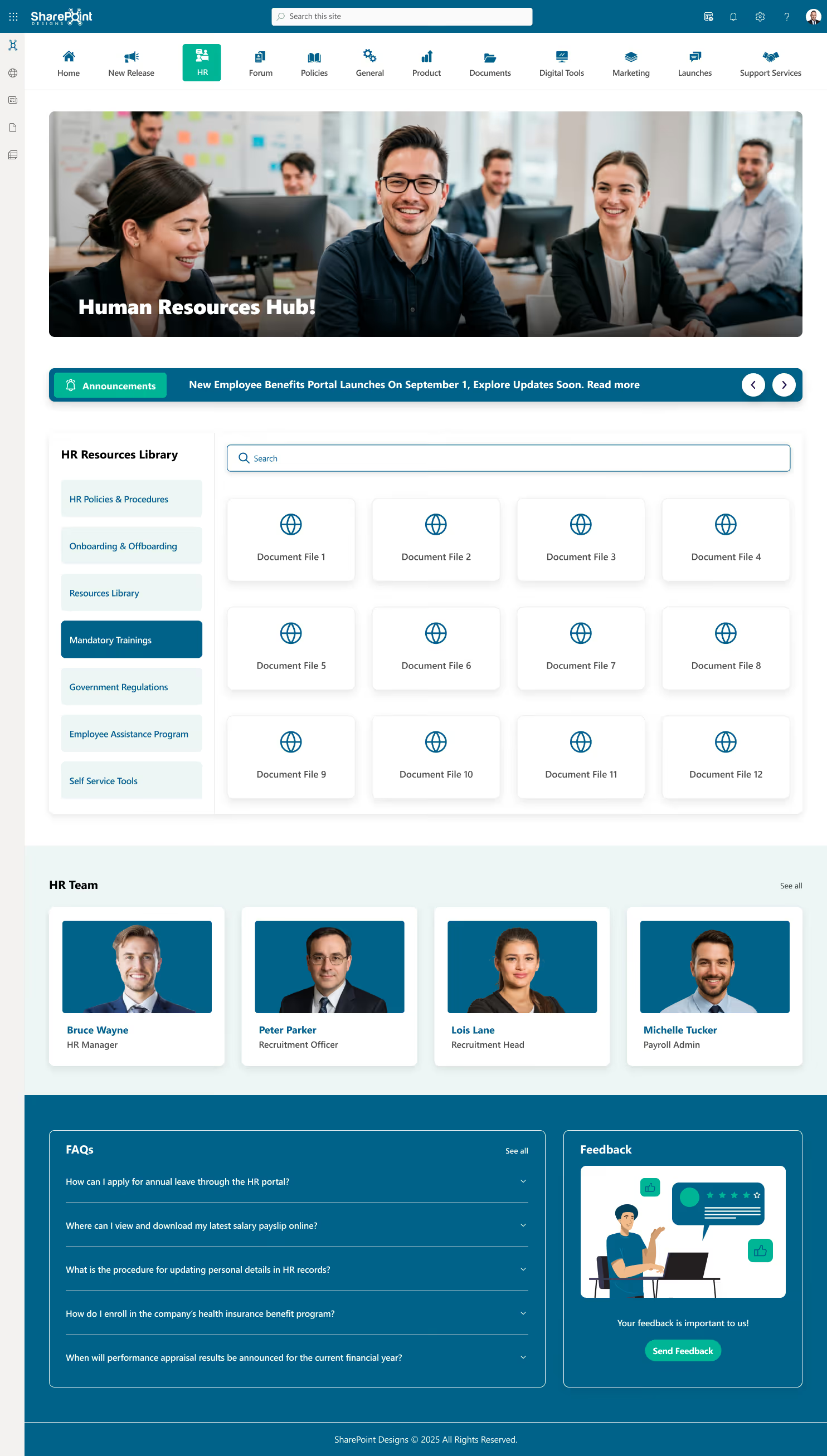
A growing company solved this by implementing one of the most common SharePoint intranet design ideas: an HR portal template.
The HR intranet included:
- Leave policies and benefits explained in plain language
- Onboarding checklists for new hires
- People directory with role and contact details
- FAQs based on real employee questions
Within weeks, repetitive HR emails dropped.
When HR content mirrors real employee language, repeat questions typically decline by 30–45% within the first quarter.
SharePoint Intranet Examples: Real Stories of What Actually Works
Most SharePoint intranets don’t fail because SharePoint is bad. They fail because they’re built without looking at real SharePoint intranet designs that employees love to use.

This question comes up a lot when teams start redesigning their intranet.
What Makes a SharePoint Intranet Feel Like a Website?
If that’s on your mind too, don’t scroll too far, here’s the simple answer.
A website-like SharePoint intranet is built with clean layouts, clear navigation, strong visual hierarchy, and role-based content, so employees can find what they need quickly without training.
One of the biggest misconceptions about SharePoint is that it’s only good for documents. In reality, some of the most website-like experiences inside organizations today are built on SharePoint using modern pages, web parts, and thoughtful layout choices.
Most people don’t complain that SharePoint doesn’t work, they complain that it doesn’t feel right.
“It feels clunky.”
“It looks like a document dump.”
“It doesn’t feel like a real website.”
And yet, many organizations run SharePoint intranets that employees actually enjoy using. They open them daily, trust the content, and instinctively know where to click. The difference isn’t the platform, it’s how SharePoint is designed and structured.
Let’s look at real SharePoint intranet examples that feel like real websites, based on what employees actually see and experience, following the same principles covered in our guide on how to make SharePoint look like a website focusing on layout, navigation, and user intent.
Instead of building an intranet from scratch, explore our professionally designed SharePoint templates used by organizations worldwide.
SharePoint Intranet Examples That Feel Like Real Websites with Use cases
This question comes up a lot when teams start redesigning their intranet.

A SharePoint site template is a prebuilt site layout (pages, navigation, web parts) that you apply when you create a site. Every SharePoint Online tenant includes basic Microsoft templates (Settings → Apply a site template). For branded, department-ready intranet sites, the 10 templates below cover the most common use cases.
Trusted by Organizations Worldwide
800+ clients · 23 countries · 10 apps on Microsoft AppSource · 11+ years.
Executive Summary
Modern SharePoint templates serve as prebuilt, governance-friendly frameworks that ensure:
- A consistent intranet experience across departments and regions
- Faster deployment cycles without reliance on custom development
- Better content structure, navigation, and findability
- Higher employee engagement due to intuitive design and personalization
- Scalability for enterprise-level intranet growth
This article covers:
- Template types: Site templates vs page templates
- Common intranet challenges templates solve
- Strategic considerations for intranet planning
- Detailed templates aligned to real business scenarios
- Governance and brand structure that maintains long-term intranet quality
The goal is to provide a practical guide for organizations aiming to build a SharePoint intranet that is durable, discoverable, and aligned with organizational goals.
Why SharePoint Templates Matter?
Organizations frequently struggle with intranet adoption because the platform lacks clarity, structure, and consistency. Despite SharePoint’s flexibility, many intranets decline in effectiveness over time due to:
- Unstructured content growth
- Inconsistent page creation
- Limited governance
- Overreliance on IT for updates
- Poor navigation models
- Out-of-date design patterns
Modern SharePoint templates directly address these challenges by offering repeatable, governed structures that reduce content fragmentation and improve navigation. When implemented strategically, templates provide a predictable experience for employees and contribute to measurable improvements in communication, productivity, and compliance.
Understanding SharePoint Templates: Site Templates and Page Templates
A key element of intranet governance is understanding how SharePoint templates function at different levels. SharePoint Site templates establish the overall framework for an intranet area. They define navigation, default pages, branding, and structural rules. These templates are typically used for departmental hubs, HR portals, knowledge centers, or corporate communication sites.
SharePoint Page templates, on the other hand, control how individual pages are laid out. They ensure that news articles, knowledge pages, onboarding content, or landing pages follow a consistent design and information hierarchy. When used together, site and page templates prevent the visual and structural fragmentation that commonly affects growing intranets.
This distinction is often overlooked, yet it is foundational to building an intranet that remains usable as content volume increases.
How to apply Microsoft's built-in SharePoint site templates
- Open the site (you need site owner permission).
- Select Settings (gear icon) → Apply a site template.
- Choose a template on the "From Microsoft" tab and select Use template.
- Adjust the theme, navigation and content.
Built-in templates are a quick start for a single site. When you need consistent branding and department-ready layouts across the intranet, the templates below close that gap.
Out-of-the-Box vs Custom vs Strategic Templates
Organizations usually build SharePoint intranets in three ways: using Microsoft’s out-of-the-box templates, creating a fully custom intranet, or adopting strategic SharePoint templates. Out-of-the-box templates enable quick setups but lack branding, governance, and long-term scalability.
Custom intranets offer full flexibility but come with higher costs, longer timelines, and ongoing dependency on developers.
Strategic SharePoint templates bridge this gap by combining speed, structure, and usability. They provide modern UX, built-in governance, and consistent branding while remaining flexible enough to evolve with business needs. SharePoint supports this approach through its template framework, and SharePoint Designs builds on it by offering user-friendly prebuilt intranet templates that are easy to deploy and designed for long-term adoption.
10 SharePoint Site Templates for HR, Onboarding, Compliance and More (2026)
Building an effective intranet requires more than attractive layouts. Organizations now expect intranets to streamline communication

The healthcare industry stands at a pivotal crossroads. Clinicians today spend a staggering amount of time on administrative documentation time that should be devoted to patients. Microsoft has responded to this challenge with a groundbreaking solution: Dragon Copilot, an AI-powered clinical assistant designed to streamline documentation, surface critical information, and automate routine tasks across every care setting.
At SharePoint Designs, our team has thoroughly explored Microsoft Dragon Copilot and its transformative capabilities. In this blog post, we break down everything you need to know from its core features to its real-world impact on healthcare organizations.
What Is Microsoft Dragon Copilot?
Microsoft Dragon Copilot is an extensible AI workspace purpose-built for healthcare. It unifies natural language dictation, ambient speech technology, and advanced AI capabilities within a single intelligent platform. The result is an end-to-end clinical assistant that empowers physicians, nurses, and care teams to work smarter not harder.
Available via web browser, mobile app, desktop application, and embedded within leading Electronic Health Record (EHR) systems such as Epic, Dragon Copilot scales across specialties, care settings, and devices making it one of the most versatile AI clinical solutions available today.
Core Features: The Three Pillars of Dragon Copilot
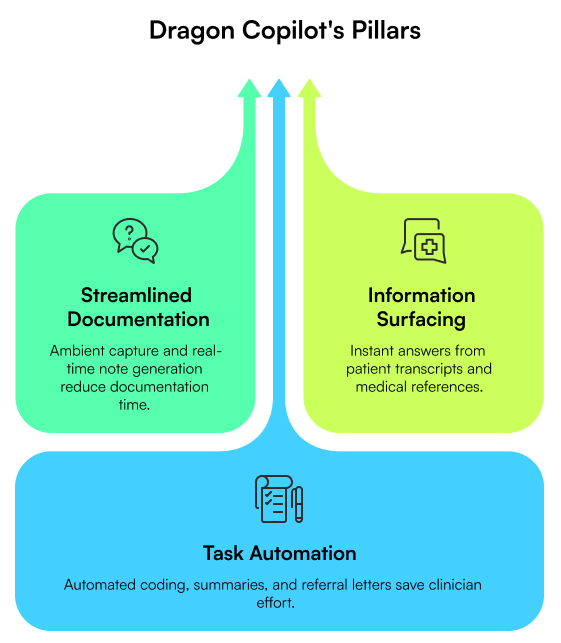
1. Streamline Documentation
Dragon Copilot ambiently captures conversations between clinicians and patients even across multiple people speaking multiple languages simultaneously. These conversations are automatically converted into specialty-specific, customizable clinical notes in real time. For physicians, the result is dramatically reduced documentation burden. For nurses, observations can be captured ambiently and transferred directly into EHR flowsheets after review and approval, cutting after-shift charting to a minimum.
Key benefit: Clinicians can talk naturally with patients while the system instantly drafts a structured clinical note saving both time and mental energy.
2. Surface Information
Dragon Copilot brings information directly into the clinician's workflow. Users can ask questions and receive responses drawn from patient transcripts, clinical notes, and trusted third-party medical references all with clear citations. There is no need to toggle between systems or manually search for patient history.
Key benefit: Fast, reliable answers surface precisely when needed, eliminating the cognitive overhead of hunting through disparate systems.
3. Automate Tasks
Dragon Copilot goes far beyond simple note-taking. It intelligently generates accurate coding suggestions, clinical evidence summaries, referral letters, and after-visit summaries all without requiring extra manual effort from the clinician. For nurses, it converts conversations into actionable outputs such as nurse notes and shift summaries, reducing overtime and mental fatigue.
Key benefit: Clinicians can focus entirely on delivering care while Dragon Copilot handles the administrative output in the background.
Role-Based Experiences for Every Clinician
One of Dragon Copilot's distinguishing strengths is its role-specific design. Rather than offering a generic AI assistant, Microsoft has built tailored experiences for different members of the care team:
- Physicians benefit from ambient documentation, specialty-specific note generation, EHR-embedded workflows, clinical evidence surfacing, and automated coding.
- Nurses benefit from ambient observation capture, flowsheet auto-population, automated nurse notes, and shift summary generation.
- Radiologists are also now supported through a newly announced Dragon Copilot experience tailored to radiology workflows.
This specialization ensures that each clinician receives maximum value without needing to adapt generic tools to their specific needs.
Innovation with Integrity: Security, Privacy & Trust
Healthcare organizations handle some of the most sensitive data in existence. Microsoft has built Dragon Copilot on enterprise-grade infrastructure backed by its comprehensive trust framework:
- Security: Integrated with Microsoft Entra ID for identity and access management, backed by the Microsoft Secure Future Initiative.
- Privacy: Grounded in Microsoft's privacy principles with full data control for healthcare organizations.
- Responsible AI: Developed with healthcare-specific safeguards for accurate, trustworthy AI outputs.
- Compliance: Meets modern healthcare regulatory demands with high-performance, compliant infrastructure.
As Orlando Health's Chief Digital and Informational Officer Novlet Mattis observed, the Microsoft platform's significant investment in security makes Dragon Copilot a more trusted choice for healthcare organizations.
Real-World Impact: What Healthcare Organizations Are Saying
Dragon Copilot is already delivering measurable results across leading healthcare systems. Here are some highlights from early adopters:
Mercy Health: Dragon Copilot saved one nurse approximately 2 hours of charting during a 12-hour shift, with nurses reporting significant improvements in time spent at the bedside.
- Stephanie Whitaker, MSN, RN,
Chief Nursing Officer, Mercy
Cooper University Health Care: Clinicians can talk naturally with patients, and the system drafts a structured note instantly saving time and mental energy.
- Snehal Gandhi, MD, VP & Chief Medical Information Officer,
Cooper University Health Care
Northwestern Medicine: An outcomes study found that using DAX Copilot for Epic (whose capabilities are now included in Dragon Copilot) resulted in a 112% ROI and a 3.4% service-level increase.
- Northwestern Medicine Outcomes Study
Seamless EHR Integration & Extensibility
Dragon Copilot is designed to fit into existing clinical ecosystems, not replace them. It integrates directly with leading EHR platforms including Epic, athenahealth, and MEDITECH, and is available embedded within Epic's web and mobile workflows (such as Epic Rover for nurses). This means clinicians can access AI-powered assistance without ever leaving their familiar EHR environment.
Beyond EHR integration, Dragon Copilot supports an extensible platform through a growing ecosystem of partner solutions from CDW Logistics and Accenture to specialized partners like Canary Speech, Kyndryl, and Chipsoft enabling organizations to build customized AI workflows on top of the Dragon Copilot foundation.
Availability & Deployment
Dragon Copilot is available across multiple geographies and care roles:
- For physicians: Available in the United States, Canada, United Kingdom, Ireland, France, Germany, and Austria.
- For nurses: Available in the United States, with general availability from December 2025.
The platform is accessible via web browser, mobile app, desktop application, and embedded within supported EHR platforms providing maximum flexibility for diverse healthcare environments.
SharePoint Designs' Perspective: Why Dragon Copilot Matters
After thoroughly evaluating Microsoft Dragon Copilot, our team at SharePoint Designs is convinced that this platform represents a generational shift in how healthcare organizations leverage technology. Here is what stands out most:
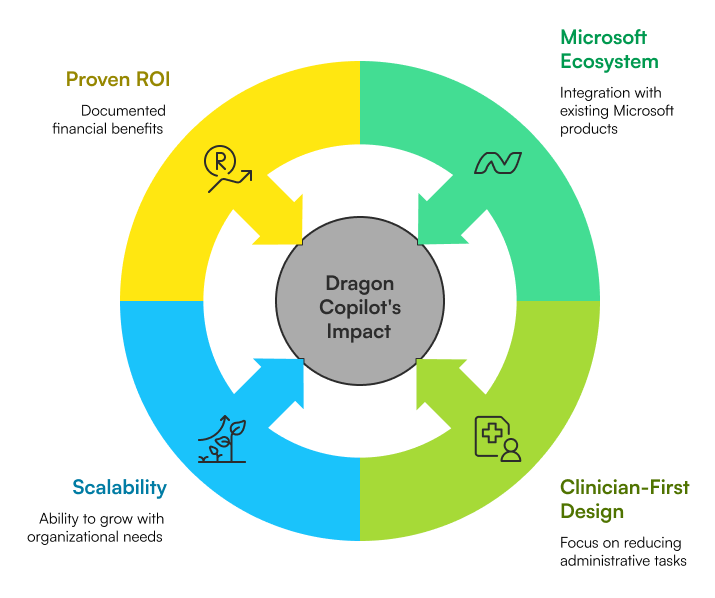
- Built on Microsoft's trusted ecosystem: Organizations already invested in Microsoft 365, Azure, and Teams gain immediate synergy with Dragon Copilot.
- Clinician-first design: Every feature is engineered around reducing administrative burden, not adding it.
- Scalable and extensible: Dragon Copilot grows with your organization, supporting custom AI apps and agents on top of the core platform.
- Proven ROI: The documented outcomes from leading health systems make the business case compelling and clear.
For healthcare organizations already operating in the Microsoft ecosystem, Dragon Copilot is not just a productivity tool it is a strategic foundation for AI-driven clinical transformation.
Conclusion
Microsoft Dragon Copilot represents a bold and well-executed vision for the future of clinical AI. By addressing the three most pressing needs of care teams documentation, information access, and task automation it delivers tangible, measurable impact at every level of the healthcare organization.
Whether you are a hospital system looking to reduce clinician burnout, a practice seeking faster documentation workflows, or an IT leader evaluating AI clinical solutions, Dragon Copilot deserves to be at the top of your shortlist. Our team at SharePoint Designs is ready to help you explore, evaluate, and implement Dragon Copilot within your Microsoft environment.
Microsoft Dragon Copilot: Transforming Healthcare with AI-Powered Clinical Workflows
The healthcare industry stands at a pivotal crossroads. Clinicians today spend a staggering amount of time on administrative documentation
Most SharePoint homepages don’t fail because of missing features.
They fail because employees land on the page and quietly think:
“What am I supposed to do here?”
If your homepage feels busy, ignored, or confusing, it’s usually not a SharePoint issue. It’s a design and intent issue.
Let’s break down how teams design SharePoint homepages that actually feel like modern websites and get used daily.
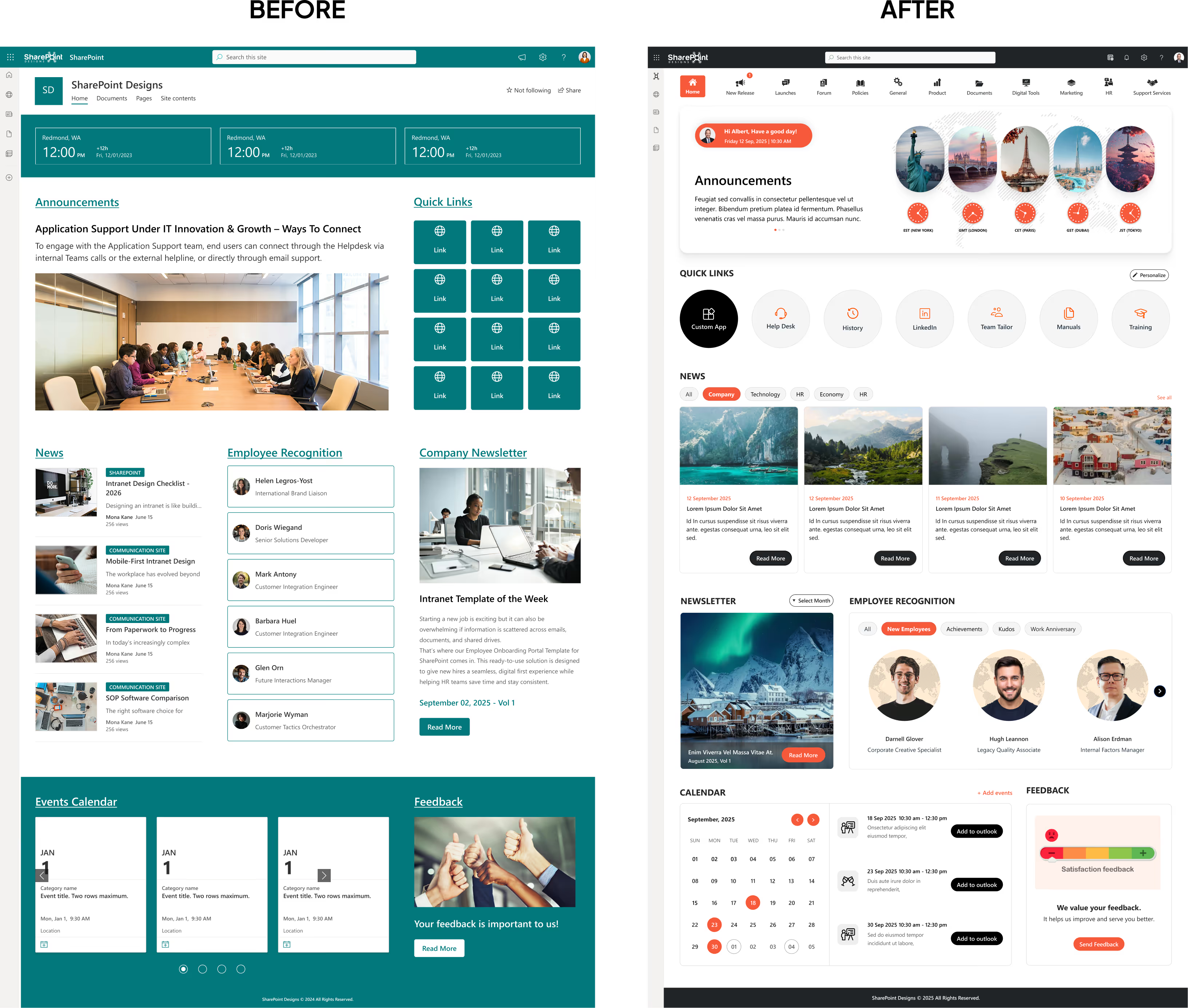
Before vs After: Why Most SharePoint Homepages Fail
Before redesign, many SharePoint homepages look like this:
- Every department asked for a link
- Announcements stacked endlessly
- Navigation labels only IT understands
- No clear starting point
After redesign, the same homepage becomes:
- One clear purpose at the top
- A few actions people use daily
- Clean sections instead of clutter
- Content that feels intentional
Nothing dramatic changed.
The thinking did.
That shift alone often improves engagement within weeks.
How to Design a SharePoint Homepage Like a Modern Website?
Most SharePoint homepages don’t fail because of missing features. They fail because employees land on the page and quietly think:
In today’s fast-paced workplace, a well-designed intranet isn’t just a “nice to have”; it’s a productivity booster, a culture-shaper, and a vital communication tool. As more organizations adopt Microsoft SharePoint for internal communication, collaboration, and knowledge sharing, the way you design your SharePoint intranet can make or break its effectiveness.
See these principles applied in real intranets Browse the LookBook
Below are transformative SharePoint intranet design tips that can elevate your intranet from “just another portal” to a powerful, intuitive, and user-friendly hub.
1. Use Hero Web Parts to Surface High-Priority News
Explore more Modern Webparts
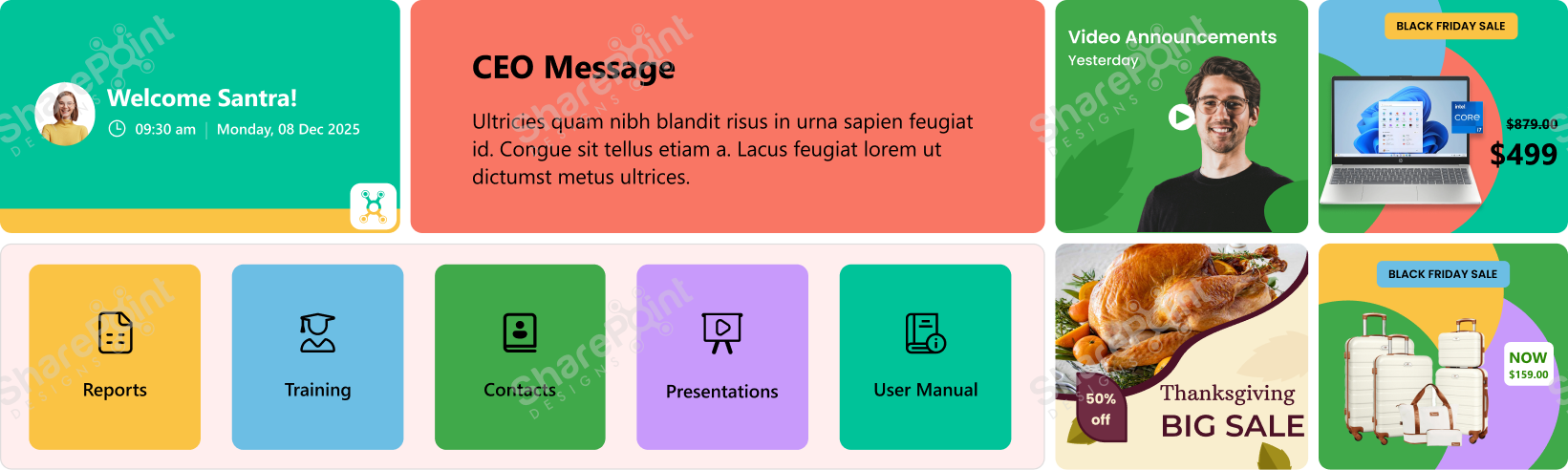
The first thing users see when they open the intranet matters; that’s why Hero Web Parts deserve more respect than mere “decorative” images. Instead of treating them as flashy banners, think of them as your intranet’s front page: a place for real, high-impact communication.
- Announcements: company-wide updates, deadlines, new initiatives
- CEO or leadership messages: set tone and direction
- Alerts or urgent notices: e.g., department-specific emergency info
- Company vision/mission/values: especially useful for new hires
- Polls, feedback requests, idea submission links: when you need quick employee input
- Useful content during seasonal changes, e.g., weather advisories, especially in the rainy season or extreme heat
- Reminders: celebrations, compliance deadlines, events
- Background videos: brief clips about company culture, onboarding, brand story
By leveraging Hero Web Parts for purposeful and timely content, you make the home page of your intranet an important communication hub, not just a placeholder image.
2. Keep Navigation Simple and Clear
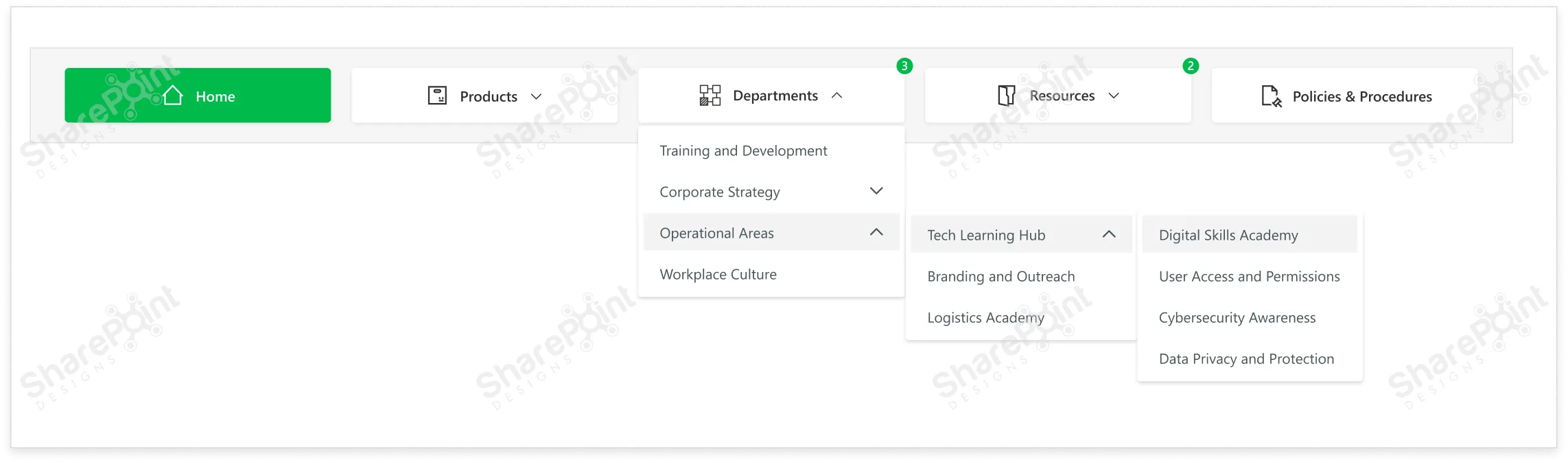
Your intranet may house tons of information documents, policies, apps, team pages, updates, and training materials, but users shouldn’t need a map to find anything.
- Use a mega-menu when you have many categories or sub links. It keeps navigation neat and avoids long dropdowns that break UX.
- Use user-friendly, consistent naming conventions for links. Avoid jargon or overly generic names like “Documents123” or “Misc.”
- Position navigation in a standard location, typically at the top. This aligns with common web and app UI/UX patterns, so users don’t have to hunt for the menu.
- Provide visual cues for states: default, hover, active/pressed. This helps users understand where they are in the site and what’s clickable.
- Double-check that each menu link points to the correct and relevant content. Dead or misdirected links are a sure way to frustrate users and lose trust.
Clear navigation in SharePoint is like giving every user a roadmap, helping them reach the information they need without confusion or wasted time.
3. Use White Space to Improve Readability.
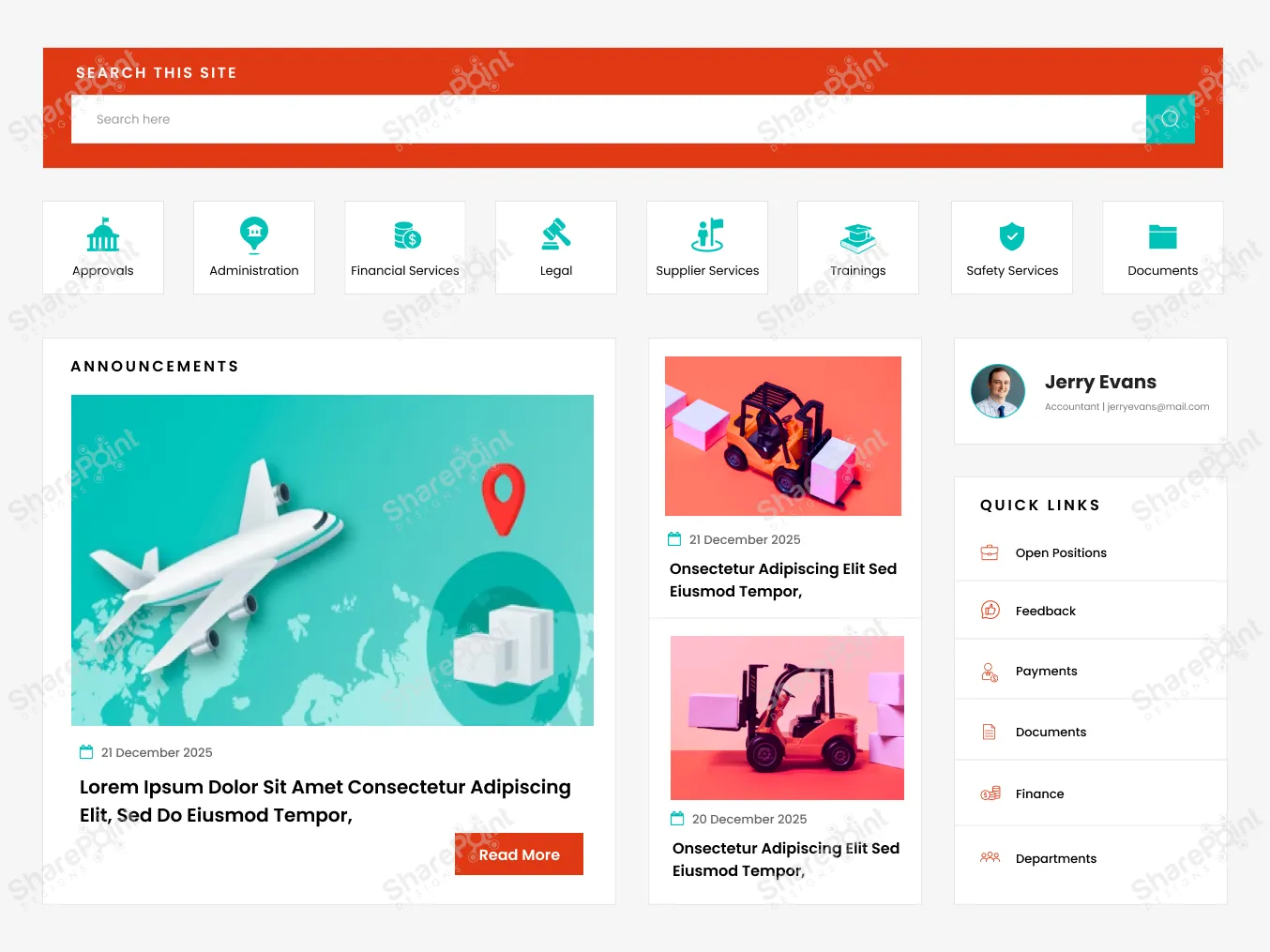
An intranet often contains dense information articles, policies, tables, and links, which can easily overwhelm the user if not laid out thoughtfully. That’s where white space (or blank space) becomes one of your most powerful design tools.
- It prevents visual clutter, making content easier on the eyes and easier to digest.
- It helps structure content logically: grouping related items, separating distinct sections, and defining hierarchy.
- It improves readability and comprehension, reducing cognitive load on users.
- It gives breathing room, preventing users from feeling overwhelmed by too much information at once.
Rule of thumb: Don’t pack too many web parts onto one screen without spacing. Let content breathe. Use margins, padding, and blank space between rows and columns. A clean layout isn’t empty, it’s intentionally
designed to guide the user’s focus.
Explore the best SharePoint design examples
4. Add Personalization Where It Counts
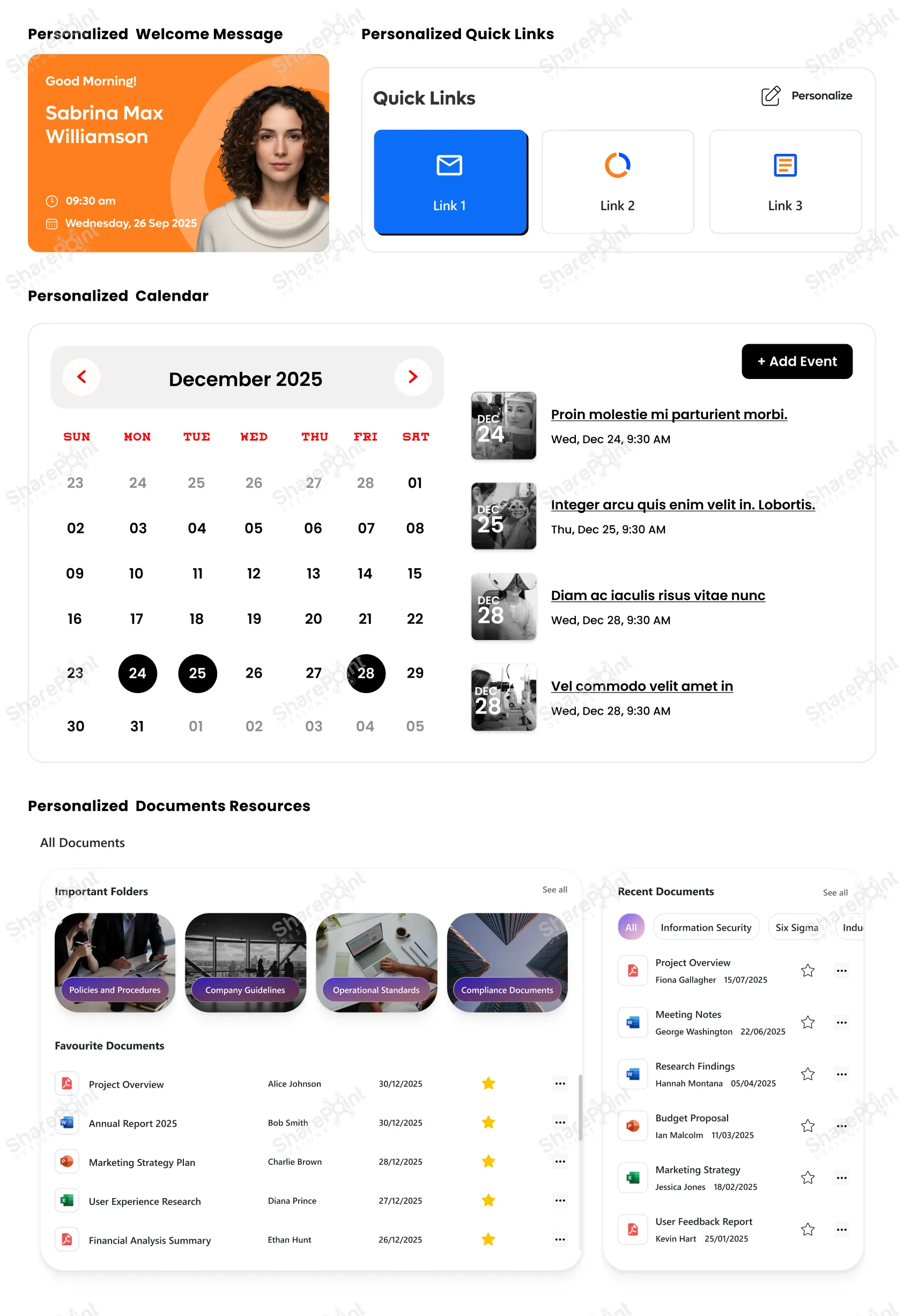
In an age where personalization is the norm, on social media, news feeds, even entertainment, your intranet should follow suit. A one-size-fits-all intranet rarely fits anyone particularly well.
- News and announcements: showing updates relevant to a user’s department, role, or location. · Quick links: Role-aware quick links that provide instant access to essential tools and apps. (e.g. HR forms for employees, project dashboards for team leads)
- Documents and resources: presenting what’s most relevant to the user rather than everything at once
- Welcome messages: personalized greeting or onboarding guidance for new joiners
- Events, training, calendar items: targeted to relevant teams or user groups
By giving users a customized view, you reduce noise, improve efficiency, and make it easier for them to focus on what matters, without sifting through unrelated content. The result? A leaner, clearer, and more impactful intranet experience.
5. Hide Complexity with Collapsible Sections
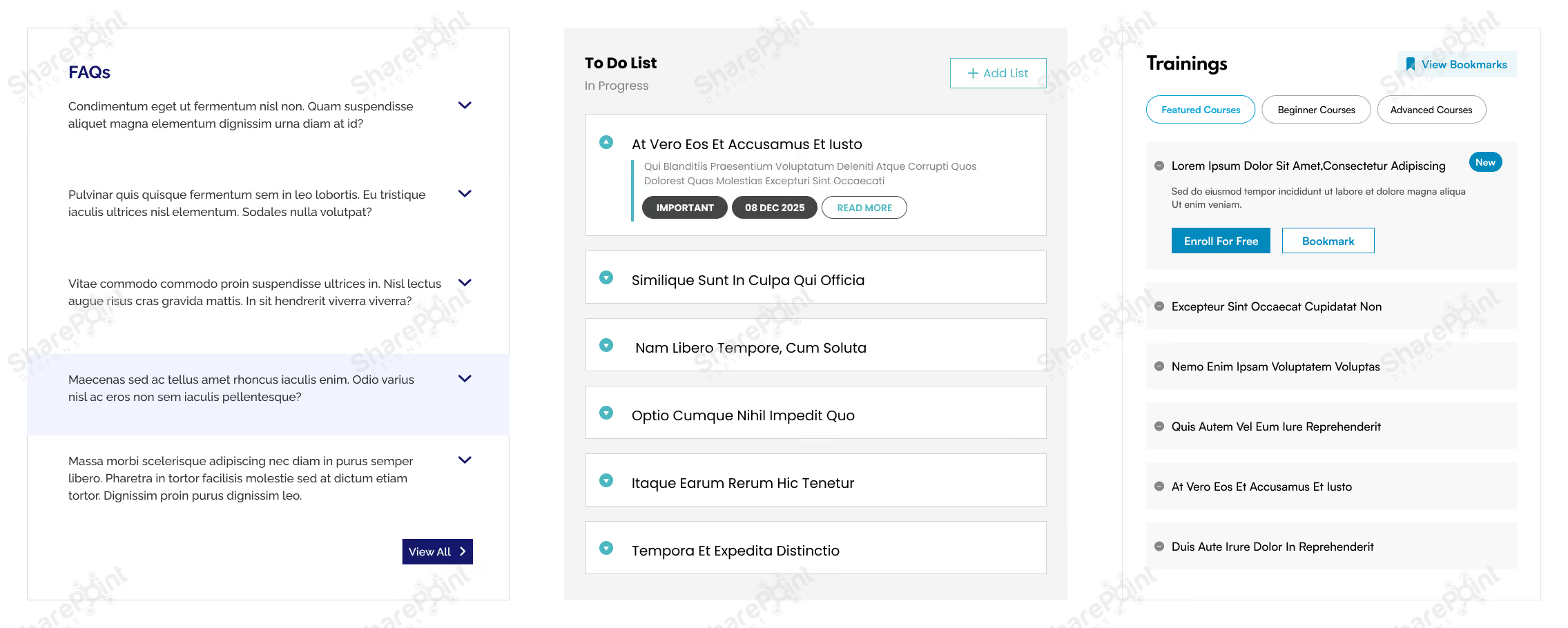
Sometimes you do need to present lots of information tables, detailed FAQs, long articles, or rich text, but that doesn’t mean it all should blast onto the user’s screen at once. Instead, use collapsible sections often implemented via accordions, to make complex information more digestible.
- Use accordions to organize FAQs, long policy documents, or help guides.
- Group dense content tables, multi-section reports, or long lists under collapsible headers.
- Let users expand only what they need, reducing overwhelm and keeping the UI clean.
- Especially useful for SharePoint pages with mixed content types, text, images, links, and embedded content where collapsing extra layers can greatly simplify navigation.
Collapsible sections let you balance having all information available when needed, without burdening the user with complexity by default. You can explore this in more detail in our guide on how to use flexible sections in SharePoint pages to simplify complex page designs and improve usability.
6. Prioritize Responsive Designs
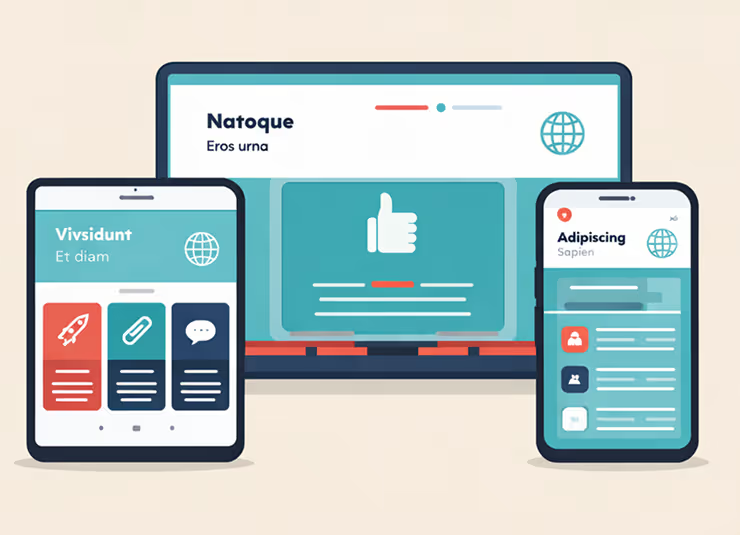
In 2026 the desk bound employee is the exception, not the rule. Whether it is frontline workers checking schedules or executives approving requests between meetings, your intranet must be responsive. Designing for responsive layouts is not just about shrinking the desktop view; it is about
prioritizing touch targets and vertical scrolling to ensure the site works flawlessly on tablets, laptops, and smartphones alike.
- Test page layouts on the SharePoint mobile app: Ensure columns stack correctly and do not break the reading flow.
- Prioritize vertical scrolling over horizontal: Horizontal scrolling is notoriously difficult on touch devices.
- Use larger touch targets: Buttons and links should be easily tapable without zooming in.
- Simplify the home page for smaller screens: Use the "Hide on mobile" feature for non-essential web parts that clutter the small screen.
7. Leverage "Section Backgrounds" for Visual Hierarchy
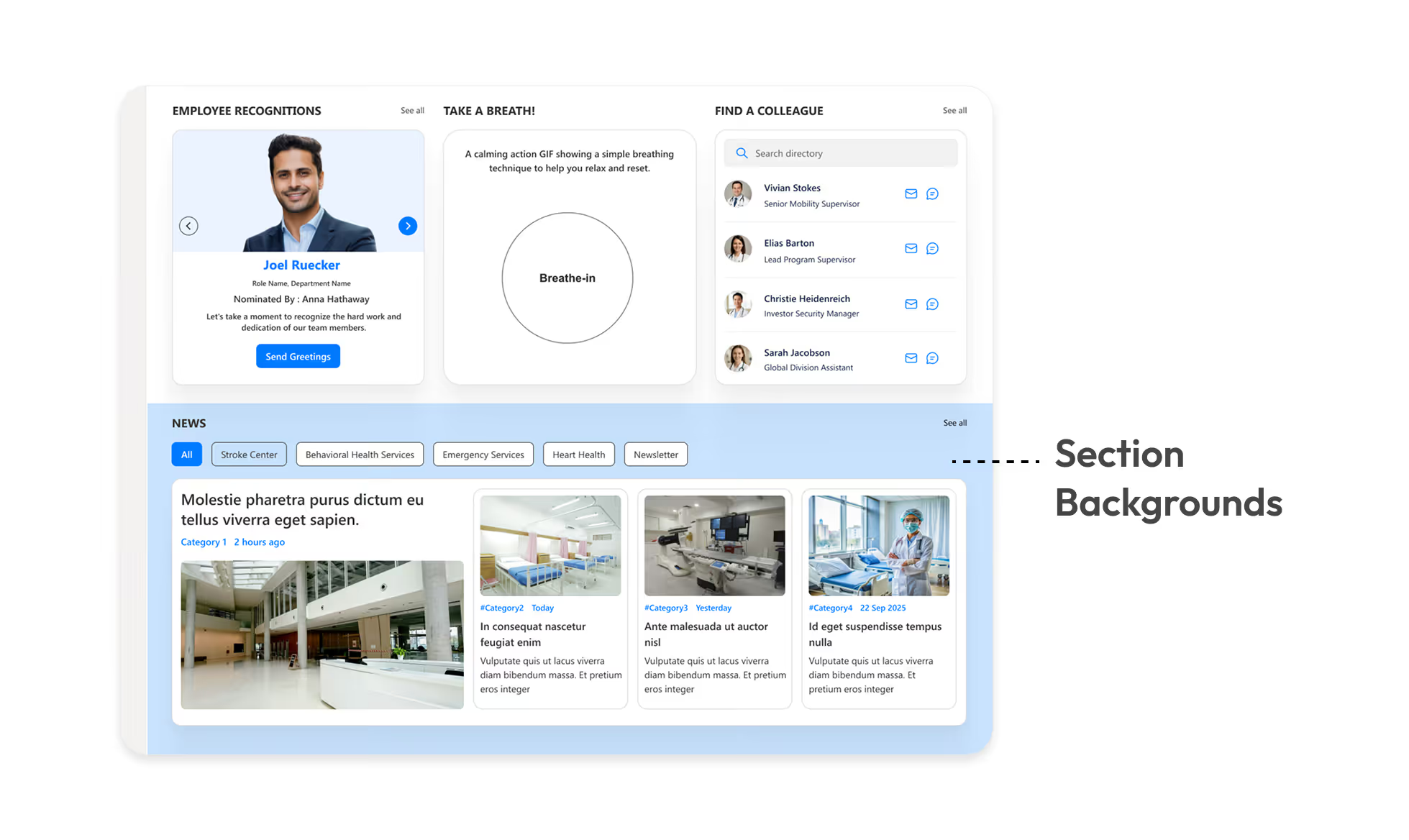
Monochromatic pages are functional but boring. SharePoint’s modern experience allows you to apply different background colors to specific page sections. This is a subtle but powerful way to break up long pages and signal a change in context to the user.
- Highlight key calls to action: Use a contrasting background color for sections containing critical buttons or forms.
- Separate content types: Use soft grey or brand tinted backgrounds to distinguish between "News" sections and "Resource" sections.
- Create visual rhythm: Alternating section colors prevents the "wall of text" fatigue and guides the eye down the page.
- Ensure contrast: Always verify that your text remains readable against the chosen background color (e.g. dark text on light backgrounds).
8. Standardize Your Page Templates
Ready-to-use Templates Explore Templates
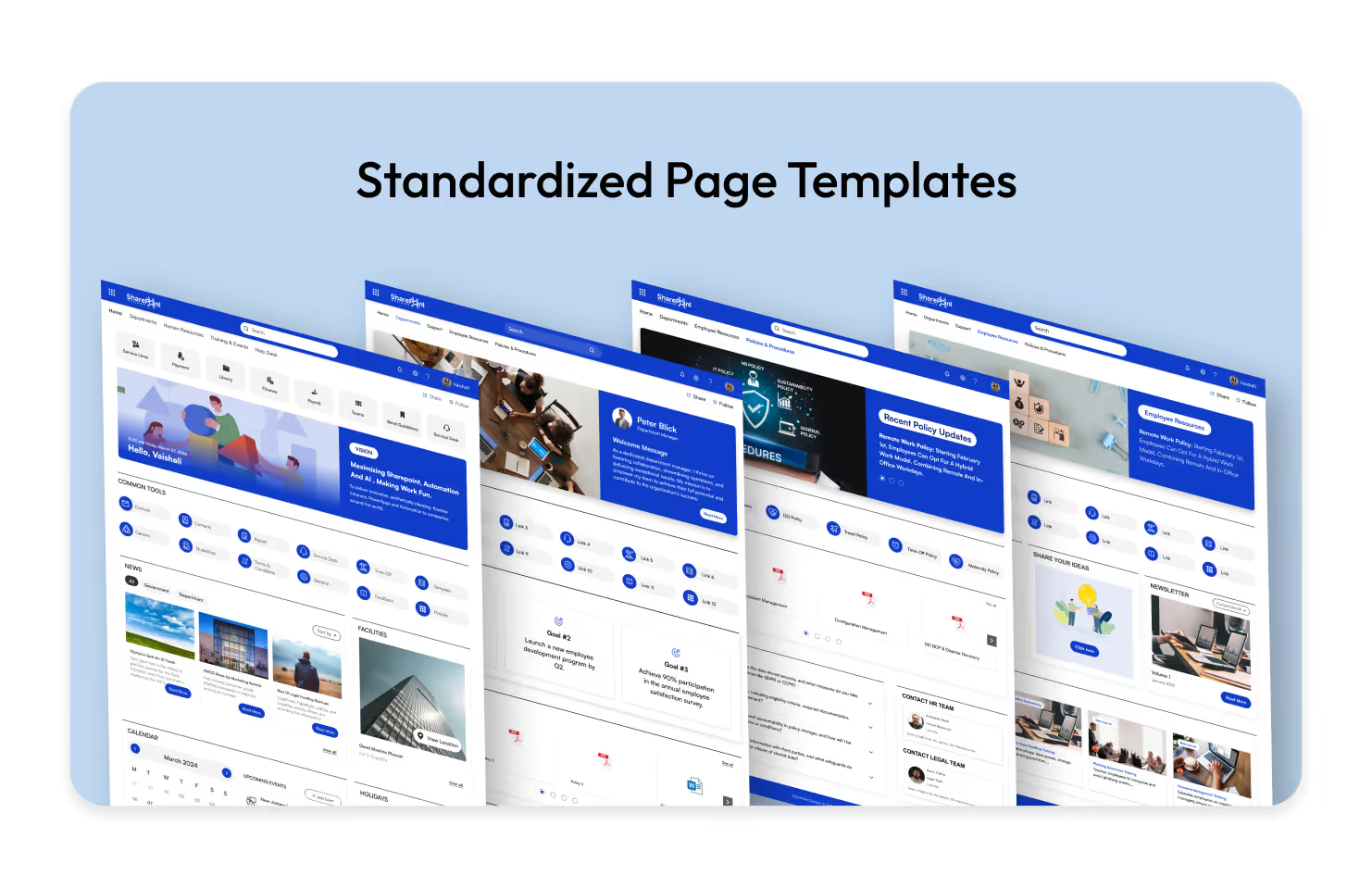
Inconsistency kills user confidence. If the HR page looks completely different from the IT page, users have to re-learn how to find information every time they switch departments. Creating and enforcing standard Page Templates ensures a cohesive experience across the entire intranet.
- Predefine web part placement: Decide where the "Contact Person," "Quick Links," and "News" web parts should always sit (typically the right-hand column).
- Save time for content creators: Authors can simply select a "New Policy Page" or "New Team Event" template rather than building from scratch.
- Maintain brand consistency: Ensure headers, banners, and footer information are uniform across all new pages.
- Reduce training requirements: When pages follow a pattern, users intuitively know where to look for specific data.
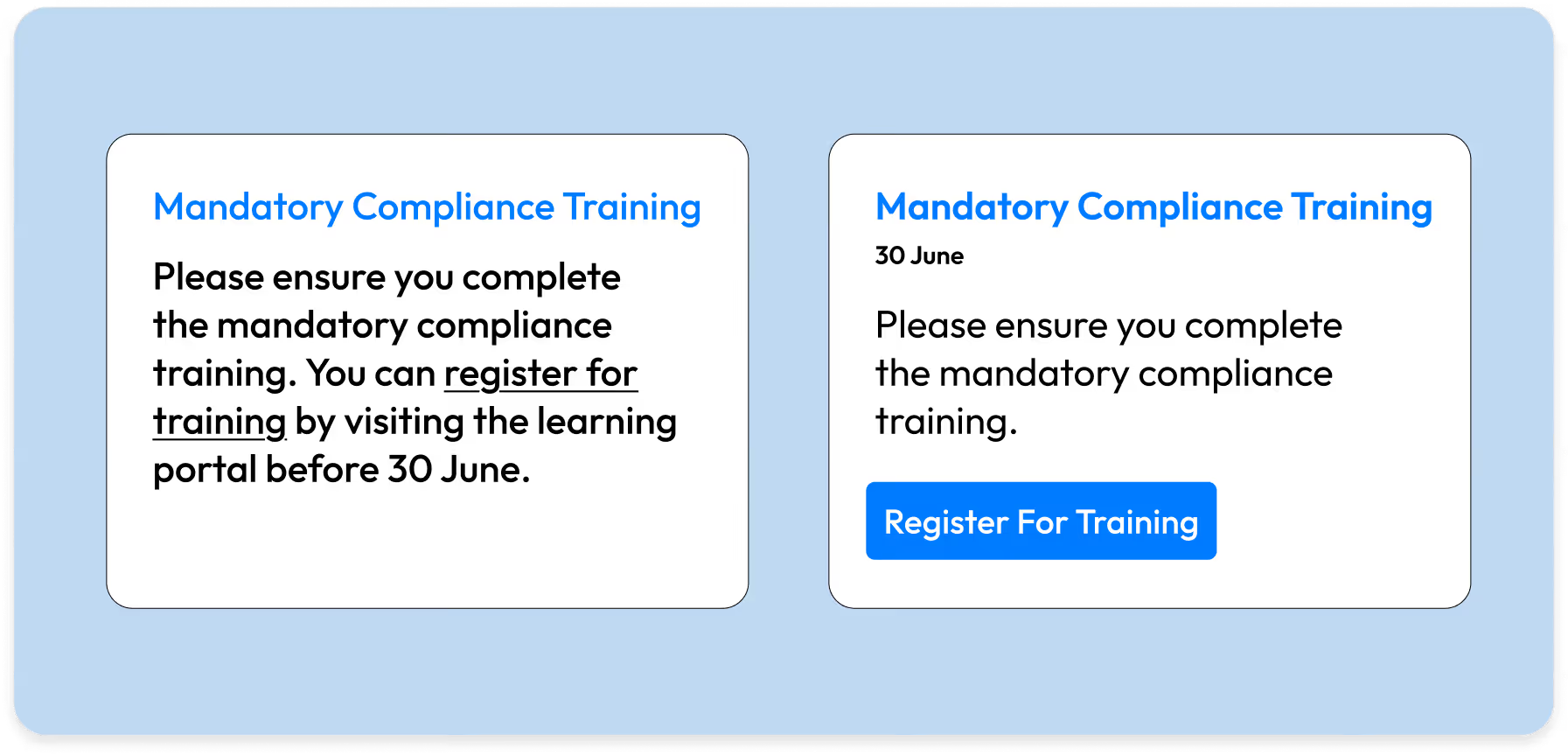
9. Utilizing "Button Web Parts" for Clear Calls to Action (CTA)
Explore more Modern Webparts
Hyperlinked text in the middle of a paragraph often gets missed. When you need a user to do something like "Submit Expense Report" or "Register for Training" use the Button Web Part. It acts as a visual signpost that stands out from the narrative text.
- Use descriptive labels: Instead of "Click Here," use specific action verbs like "Download 2026 Handbook" or "Access IT Helpdesk".
- Center align for impact: A centered button draws the eye immediately and implies a pause in the reading flow to take action.
- Consistent styling: Stick to one primary color for main actions and a secondary outline style for less critical links to avoid a "rainbow" effect.
- Place buttons strategically: distinct from the body text, usually after a brief explanation of why the user should click it.
20 Game-Changing SharePoint Design Tips You Need in 2026
In today’s fast-paced workplace, a well-designed intranet isn’t just a “nice to have”; it’s a productivity booster, a culture-shaper, and a vital communication tool.
Modern intranets have evolved far beyond static portals with simple pages and links. Today’s intranets function as dynamic digital workplaces offering personalized dashboards, intelligent content, integrations with business systems, and responsive user interfaces.
This evolution is powered by the SharePoint Framework (SPFx), which has become the foundation for building modern, scalable intranet solutions on SharePoint.
Let’s explore SPFx in a clear and practical way.
What is SPFx?
The SharePoint Framework (SPFx) is Microsoft’s recommended development model for creating custom solutions in Modern SharePoint. It enables developers to build rich, client-side experiences that run securely in the browser.
With SPFx, you can create:
- Client-side web parts
- Extensions such as:
1. Application Customizers
2. Field Customizers
3. Command Sets
- Reusable UI components
All of this is achieved without deploying code to the server, ensuring better performance, security, and maintainability.
Core Tools Used in SPFx Development
1. Node.js & npm
SPFx is built on Node.js, and npm is used to manage dependencies and packages required for development.
Tip: Always use a Node.js version that is supported by your SPFx version to avoid compatibility issues.
2. Yeoman Generator
The SPFx Yeoman generator helps scaffold new projects quickly and consistently.
It creates:
- Standard project structure
- Build and configuration files
- Web part or extension templates
This ensures best practices are followed from the beginning of the project.
3. Gulp
Gulp is the task runner used in SPFx to automate development tasks such as:
- Building bundles
- Running the local workbench
- Packaging solutions for deployment
Commands you’ll use daily:
- gulp serve
- gulp bundle
- gulp package-solution
4. Code Editor
Most developers use Visual Studio Code for SPFx development due to its strong ecosystem and tooling support:
It provides excellent support for:
- TypeScript
- React
- SPFx debugging
- Extensions for linting and formatting
Developing a Hello World Web Part
In this scenario Let’s create a Hello world webpart with a Node.js version greater than 22.
Step 1: Create the Project
Run the following command:
yo @microsoft/sharepoint
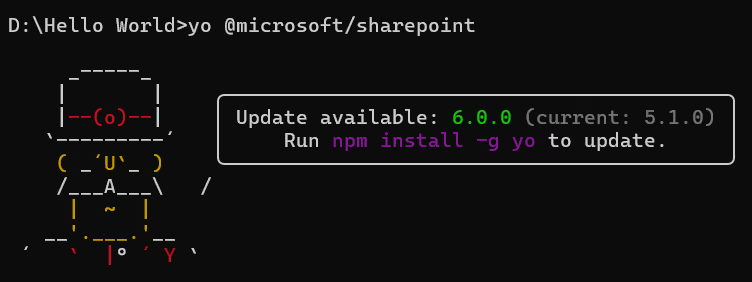
Step 2: Provide Project Details
During setup, provide:
- Solution name
- Type of component (Web Part)
- Web part name
- Framework choice (e.g., React)

Step 3: Open the Project
Once the project is created, open it using Visual Studio Code.
Step 4: Understand the Project Structure
The generated project includes folders for:
- Web part source code
- Configuration files
- Build and packaging setup
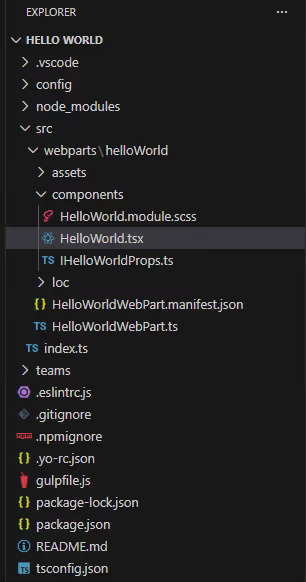
Step 5: UI Entry Point
The .tsx file is the main file where all UI elements are rendered in the browser
Debugging the webpart
1. Run the following command to start debugging:
npm run start
2. This command starts the local server and provides a debug URL.
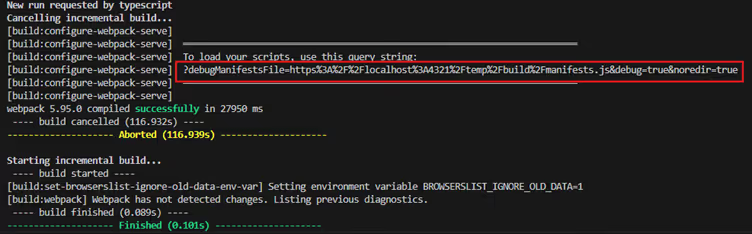
3. Append the debug URL to your SharePoint site URL.

4. You will be prompted to Load debug scripts confirm to proceed.
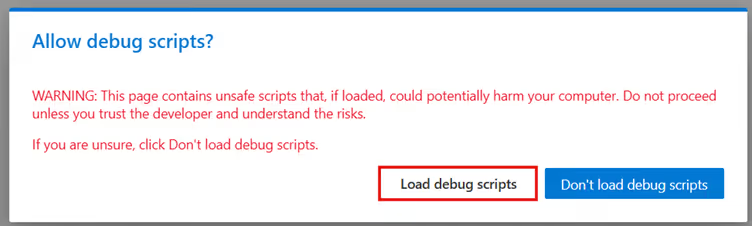
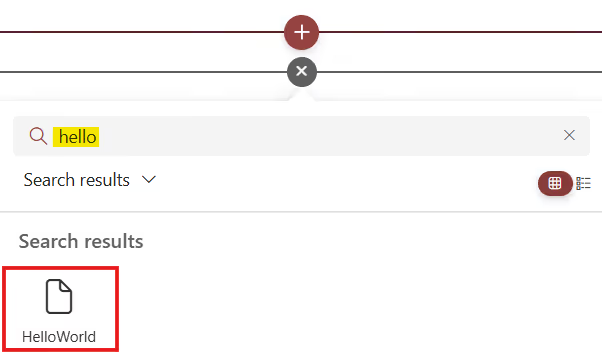
5. Edit the SharePoint page.

6. Add the web part to the page to view and test your changes.
Build and Package the Solution
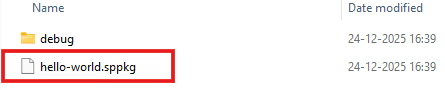
1. Run the following command:
npm run build
2. This process generates a .sppkg file inside the sharepoint/solution folder.
Deploy to the App Catalog
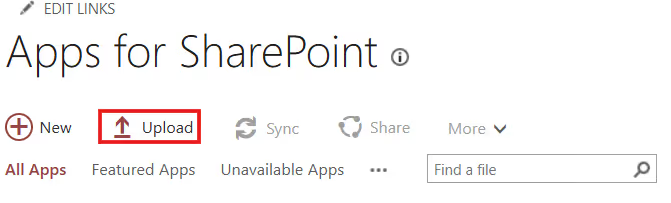
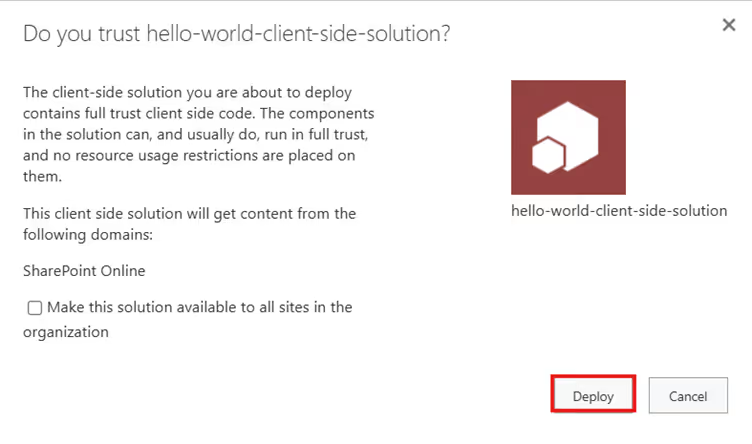
1. Upload the .sppkg file to the SharePoint App Catalog.
2. Click Upload, select the package, and choose Deploy.
Add the App to a Site
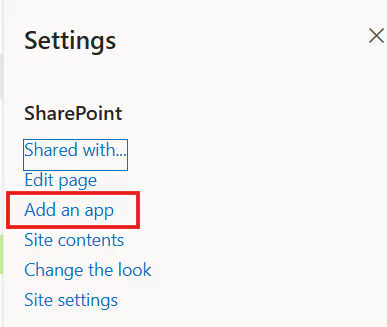
1. Navigate to Settings → Add an app in your SharePoint site.
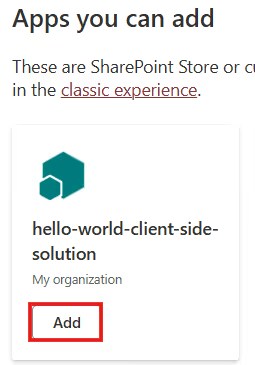
2. Locate the deployed solution.
3. Click Add to make the web part available on the site.
Final Thoughts
SPFx bridges the gap between modern web development and enterprise intranet requirements. By leveraging familiar technologies such as React, TypeScript, and npm, developers can create powerful, secure, and scalable intranet solutions that integrate seamlessly with SharePoint. For organizations building or modernizing their intranet, SPFx is a critical and future-ready development framework.
You may also like
Triggering Out of Box User Invitations for a SharePoint Site Using SPFx and REST API
Introduction to SPFx for Modern Intranet Development Tools, frameworks, deployment basics
Modern intranets have evolved far beyond static portals with simple pages and links.



.svg)





