Most SharePoint intranets don’t fail because SharePoint is bad. They fail because they’re built without looking at real SharePoint intranet designs that employees love to use.
In almost every organization, the story starts the same way: “We already have SharePoint, let’s build an intranet.”
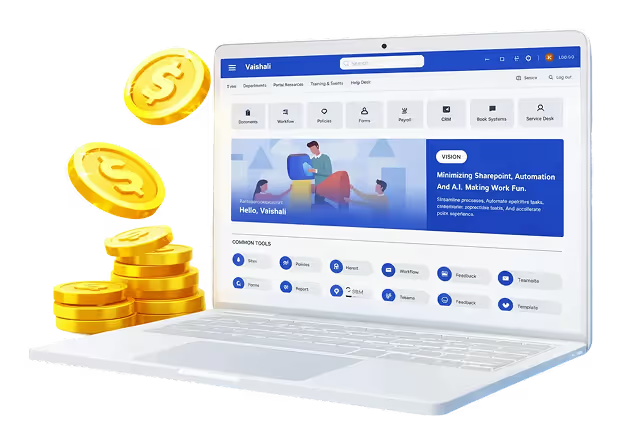
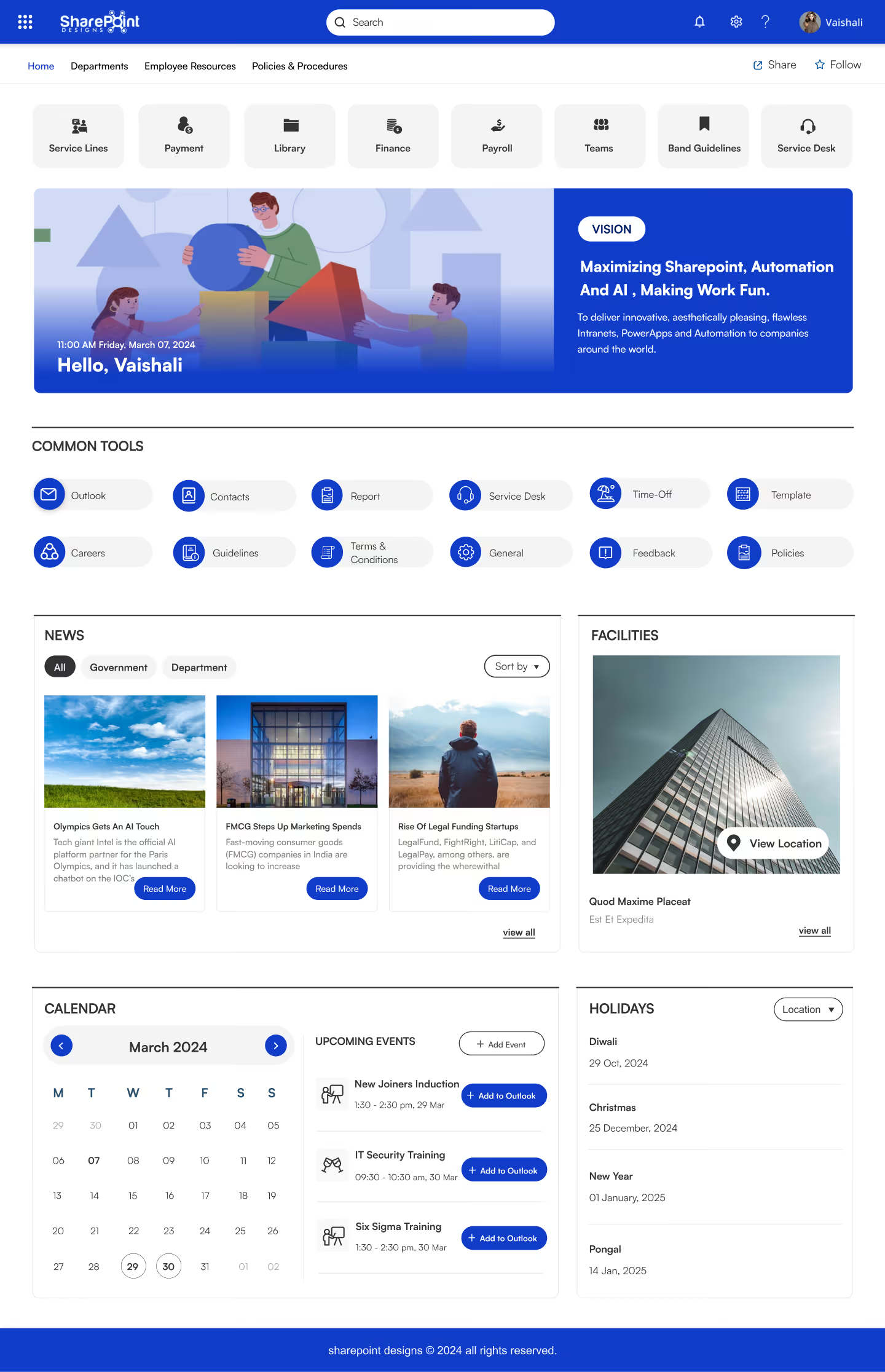
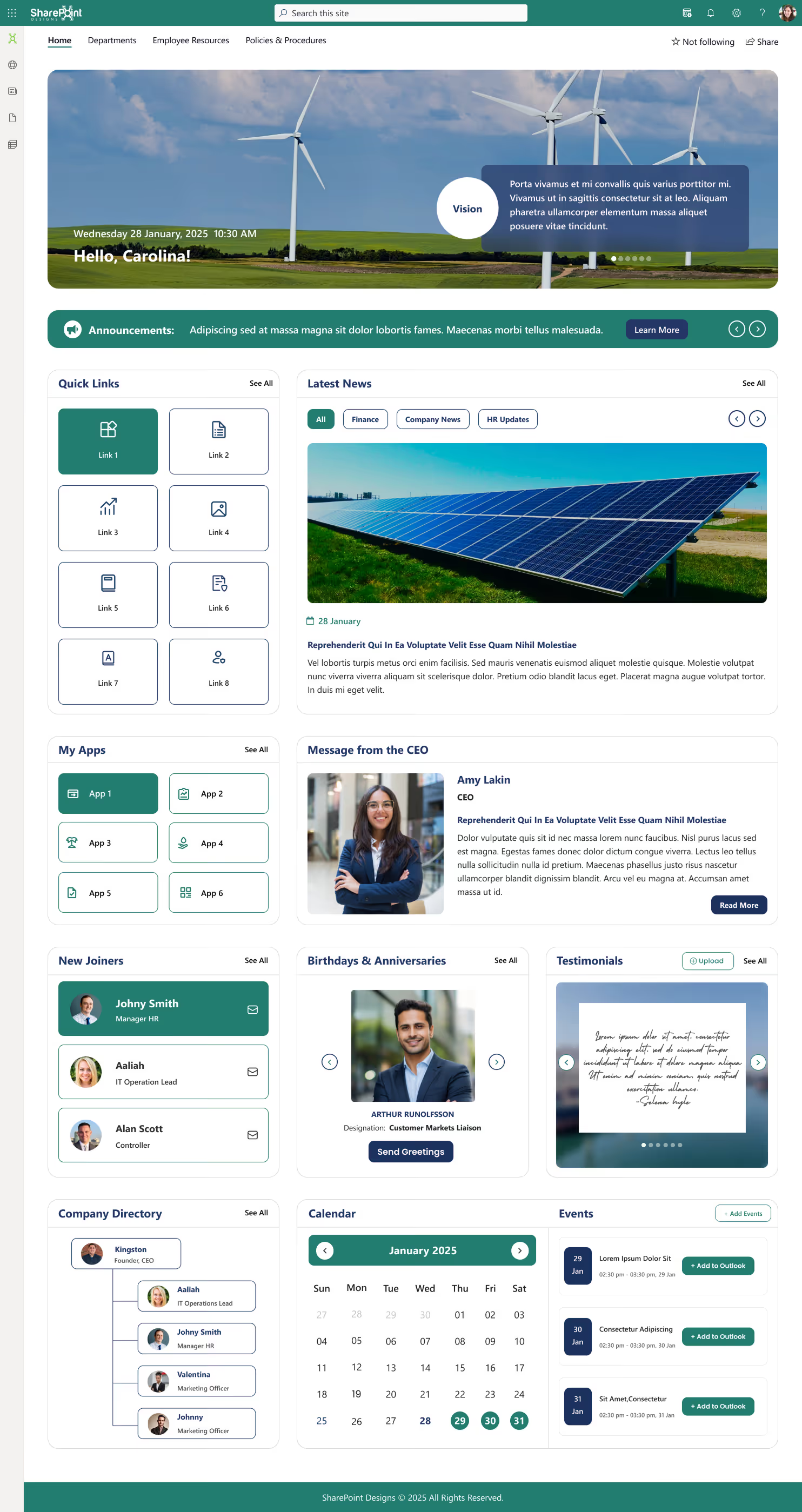
Prebuilt & launch-ready from Day 1 - no development, no coding, deploys instantly on Microsoft 365 / SharePoint Online
Everything on one homepage - news, calendar, tools, holidays, facilities and announcements, all organised and ready
2+ quick-access tools built in - Outlook, Payroll, Service Desk, HR, Policies, Time-Off and more, one click away
Live events & calendar - upcoming trainings and events sync directly to Outlook with zero manual effort
Fully branded & personalised - greets employees by name, reflects your company vision and culture from day one
Built for any industry - used by teams across Healthcare, Finance, Legal, Manufacturing, IT, Retail, Education and Government
Works for every team size - whether you're 50 employees or 50,000, the structure scales without rebuilding
No IT team needed - configured for SharePoint Online out of the box, your HR or Comms team can manage it independently
One thing we’ve noticed across multiple intranet redesigns is that clarity almost always beats visual complexity. In similar cases, teams that narrowed their homepage to just a few key actions saw nearly 2× higher repeat visits within the first two months.
Usage didn’t increase because of design. It increased because the homepage finally answered one question: “What should I do here?”
The industry line is woven naturally into the benefits rather than being a separate list — keeps it punchy and scan-friendly for ads, landing pages, or brochures. Want me to write this as a Google Ad headline + description set or a landing page hero section?
Leave policies and benefits explained in plain language
Onboarding checklists for new hires
People directory with role and contact details
FAQs based on real employee questions
Within weeks, repetitive HR emails dropped. When HR content mirrors real employee language, repeat questions typically decline by 30–45% within the first quarter.
Why This Template Works
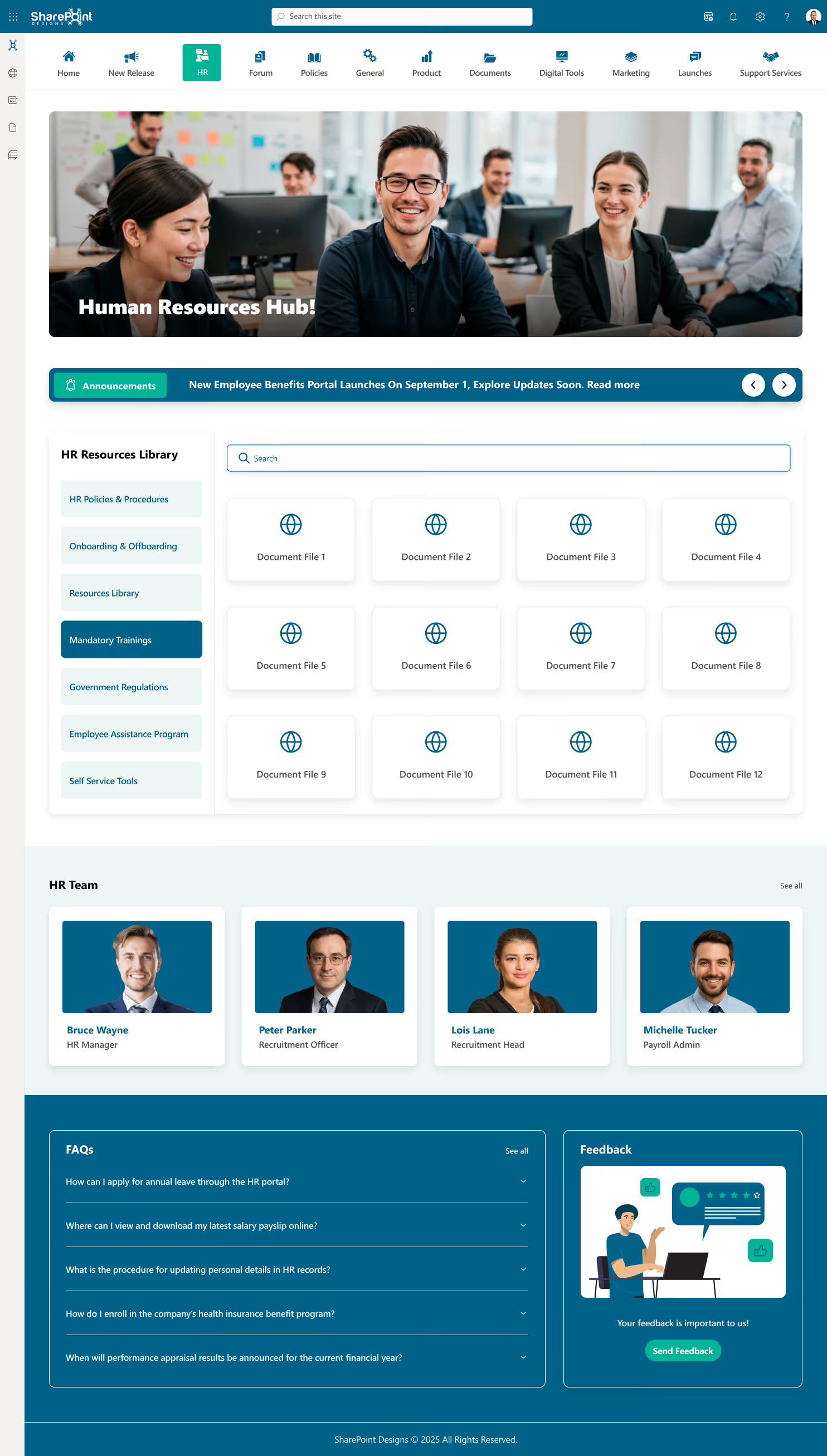
Complete HR resources library - Policies & Procedures, Onboarding & Offboarding, Mandatory Trainings, Government Regulations and Self-Service Tools, all organised and searchable
Live announcements banner - broadcast benefits updates, policy changes and company news instantly to every employee
Searchable document center - employees find HR files, forms and documents in seconds without emailing the HR team
HR team directory - puts a face to HR roles, employees know exactly who to contact for recruitment, payroll or support
Built-in FAQ section - handles the most common HR queries like leave applications, payslips, appraisals and insurance without back-and-forth emails
Employee feedback tool - built-in feedback widget captures sentiment and suggestions directly from the portal
Perfect for any industry - designed for HR teams in Corporate, Healthcare, Banking, IT Services, Legal, Manufacturing and Education
Fully managed by HR, not IT - your HR team owns and updates the entire portal independently from day one
Department Site SharePoint Intranet Design (That Scale)
As companies grow, each department builds its own SharePoint site. That’s when chaos starts.
In one case, IT, Finance, and Operations all had separate layouts and navigation. Employees kept asking, “Which site should I use?”
They fixed this by adopting department-level SharePoint intranet templates under a hub site.
Now:
Every department site follows the same structure
Navigation feels familiar everywhere
New departments can launch sites in hours, not weeks
Why This Template Works
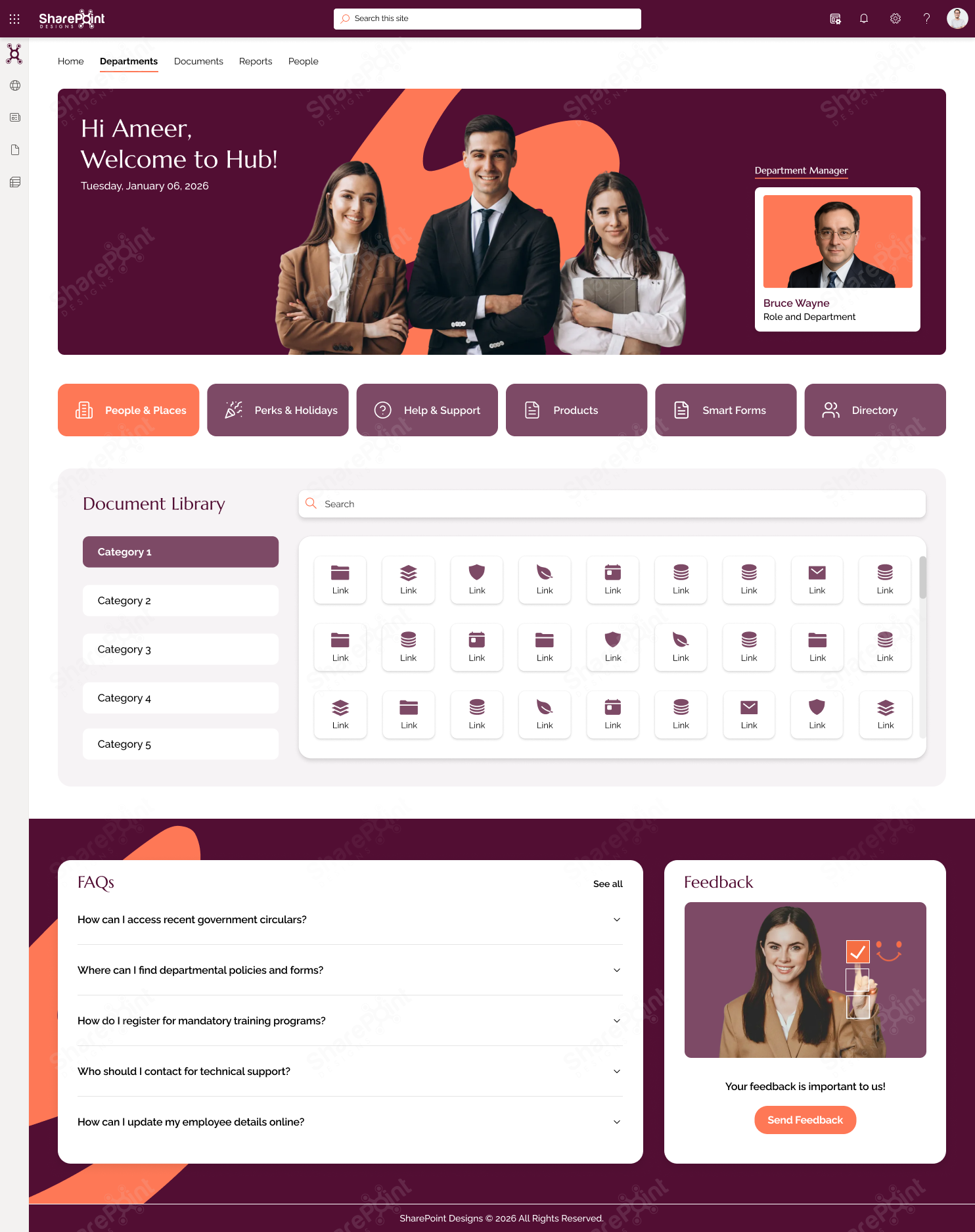
Personalised welcome experience - greets each employee by name with the date, department manager profile and team context front and centre
Categorised document library - up to 5 document categories with a searchable grid view, employees find what they need without asking anyone
Six power shortcuts built in - People & Places, Perks & Holidays, Help & Support, Products, Smart Forms and Directory, all one click away
Department-specific FAQ section - addresses government circulars, policies, training registration, technical support and employee self-service in one place
Feedback widget - captures employee input directly from the department portal, no separate survey tool needed
Department manager spotlight - clearly shows who leads the team, reducing confusion and improving accountability
Fits any department in any industry - adaptable for HR, Finance, Legal, IT, Operations, Marketing and Compliance teams across Corporate, Banking, Healthcare, Manufacturing and Government sectors
Fully customisable - built as a flexible SharePoint framework your team configures, brands and structures to match your exact department needs
Organizations using standardized department templates often reduce new site setup time by 50–70%, making governance easier as teams grow.
SharePoint Hub Site Examples (That Fix Navigation Problems)
In a large organization, documents weren’t hard to find because they didn’t exist, they were hard to find because they were scattered.
By introducing hub sites:
Department sites were grouped logically
Global navigation stayed consistent
News rolled up automatically
Employees stopped bookmarking random pages. Across mid-size and enterprise teams, hub-based navigation reduces confusion and improves repeat usage.
Why hub-based SharePoint intranet design succeeds
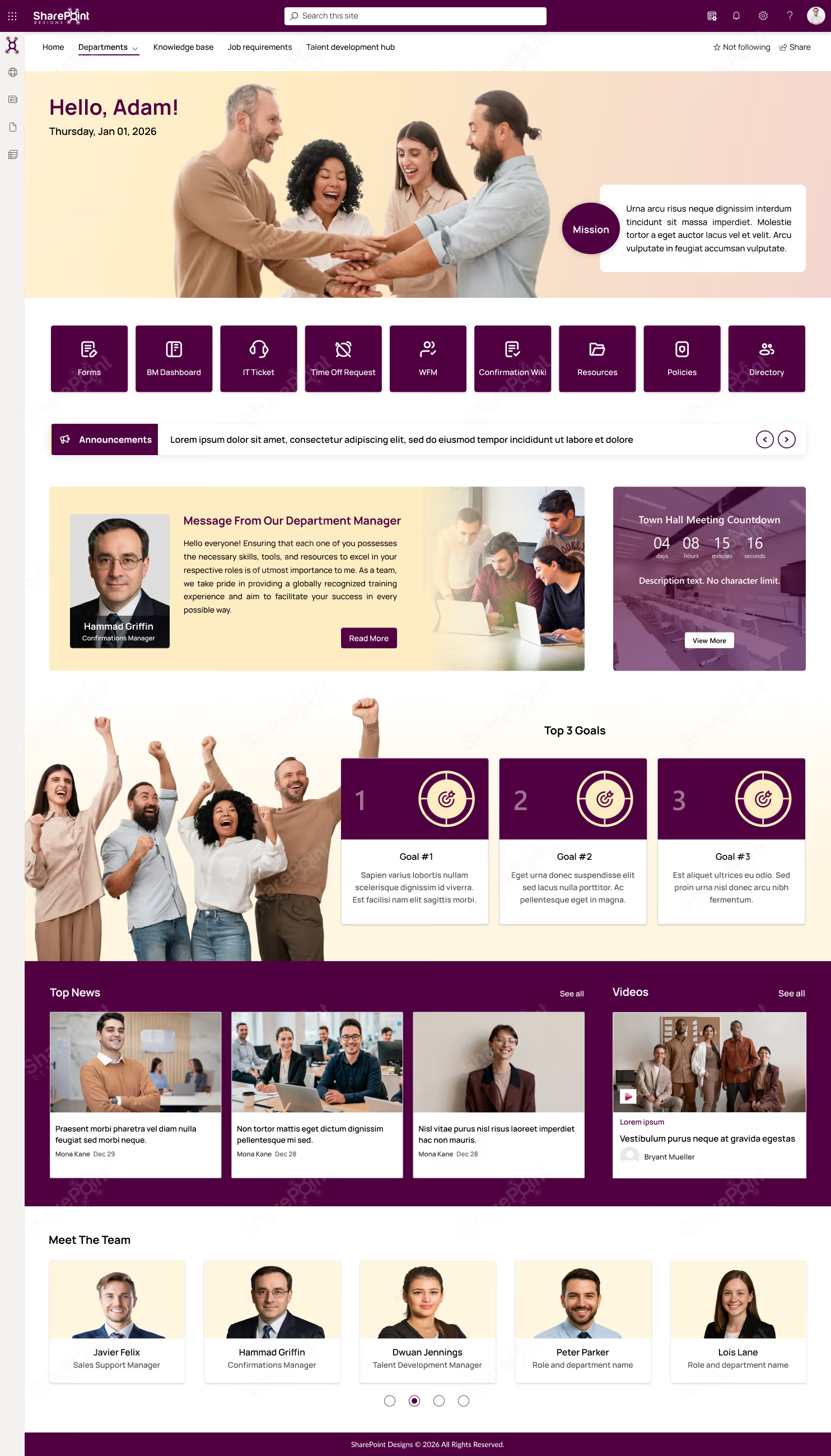
Personalised team welcome - greets each employee by name with the date, mission statement and department context visible from the moment they land
9 quick-access shortcuts - Forms, BM Dashboard, IT Ticket, Time Off Request, WFM, Resources, Policies and Directory, all one click away
Live announcements ticker - broadcast urgent updates and department news instantly across the entire hub without any extra tools
Department manager message - a dedicated space for leadership to communicate directly with the team, building trust and transparency
Town Hall countdown timer - keeps the whole team aligned on upcoming all-hands meetings and key company events in real time
Top 3 goals panel - department priorities are visible to everyone, keeping teams focused and aligned on what matters most
News and video feed - latest updates, stories and video content surface automatically so the team is always informed
Meet the Team directory - roles, names and responsibilities are clearly visible, eliminating the "who do I contact?" problem
Built for enterprise teams - ideal for large departments in Corporate, Banking, IT Services, Healthcare, Retail and Government organisations managing multiple sub-teams
Fully customisable - tailor the mission, goals, shortcuts, manager spotlight and content sections to fit any department or business unit
No items found.
If you’re planning a SharePoint intranet refresh, explore ready-to-use intranet templates
Knowledge Base SharePoint Intranet Template (People Trust)
Many IT knowledge bases fail because they feel outdated the moment they’re published.
One team rebuilt their knowledge base using a knowledge center SharePoint intranet template:
Short, task-focused articles
Clear page owners
Search-first layout
Related content suggestions
Employees started searching the intranet before raising tickets. In practice, search-first knowledge bases with clear ownership show higher trust and reuse over time.
Why This Template Works
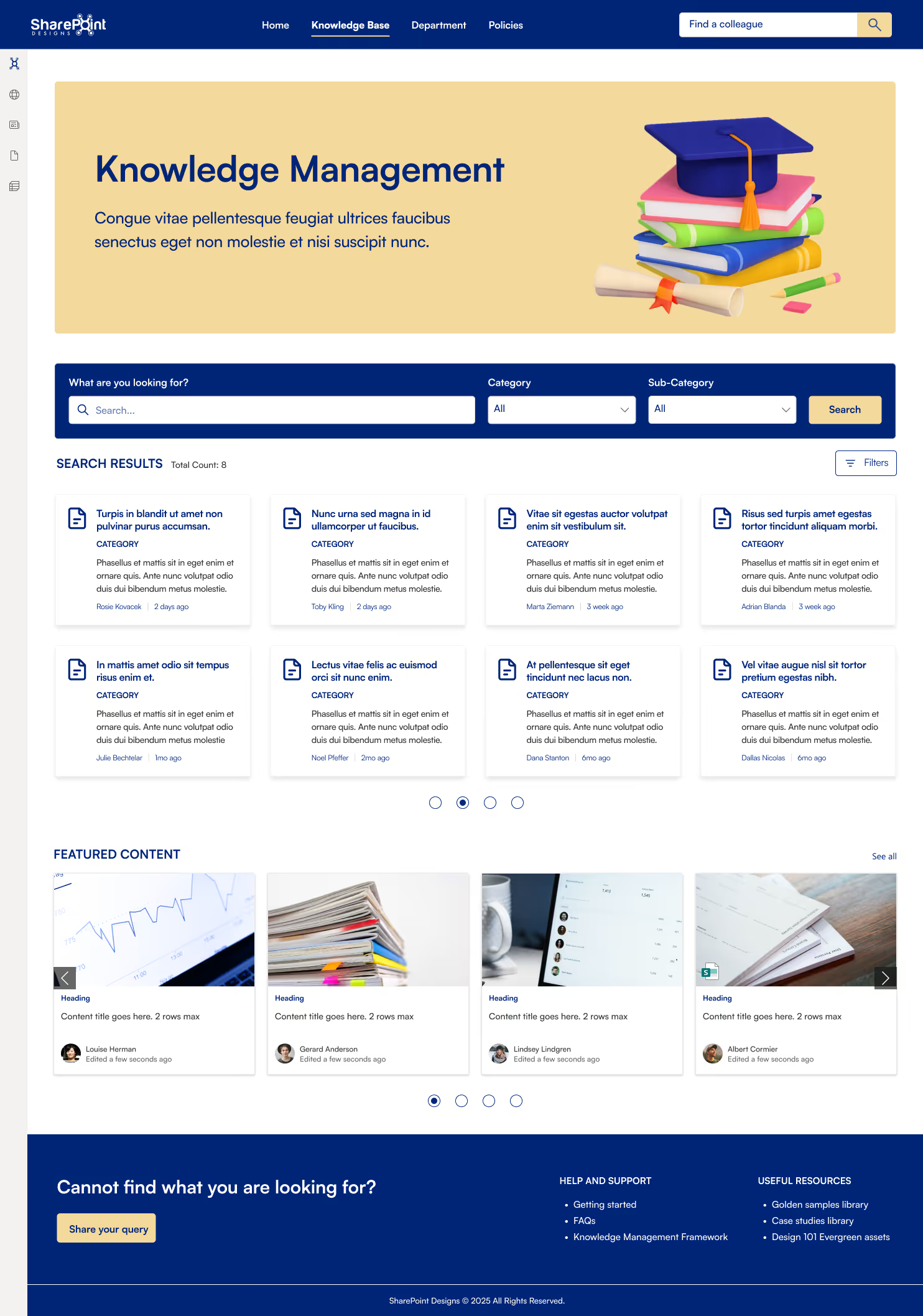
Centralised knowledge hub - every policy, guide, process document and resource lives in one structured, searchable place employees can trust
Powerful search with category & sub-category filters - find the right document in seconds, not minutes
Featured content showcase - surface the most critical and recently updated resources so important knowledge never gets buried
Author & recency visibility - every article shows who wrote it and when, building trust and accountability across teams
"Can't find it?" fallback - a built-in query submission button ensures no employee ever hits a dead end
Help, support & useful resources pre-linked — FAQs, Getting Started, Case Studies and Golden Samples ready from day one
Built for knowledge-heavy industries - ideal for IT, Legal, Consulting, Healthcare, Finance and Education teams
Fully customizable - structure categories, sub-categories and featured content exactly the way your organisation works
Onboarding SharePoint Intranet Design Example for New Employees
New hires often feel lost during their first weeks.
A simple onboarding SharePoint intranet example changed that:
First-week checklist
Tools and access guide
Team introductions
Training links
Instead of asking five people the same questions, new hires followed one clear path. This outcome is common when onboarding content is structured around first-week needs rather than documentation.
Why This Template Works
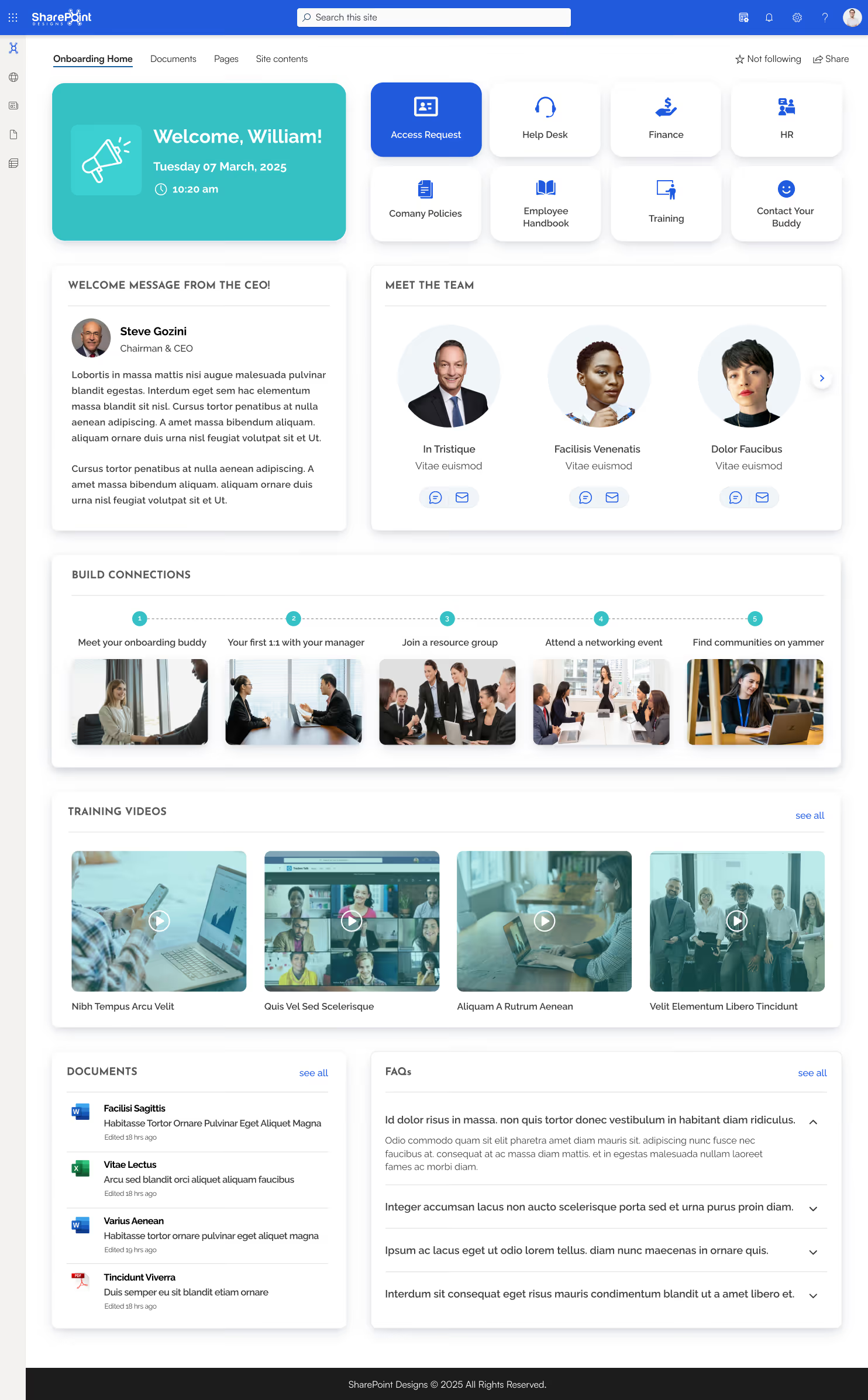
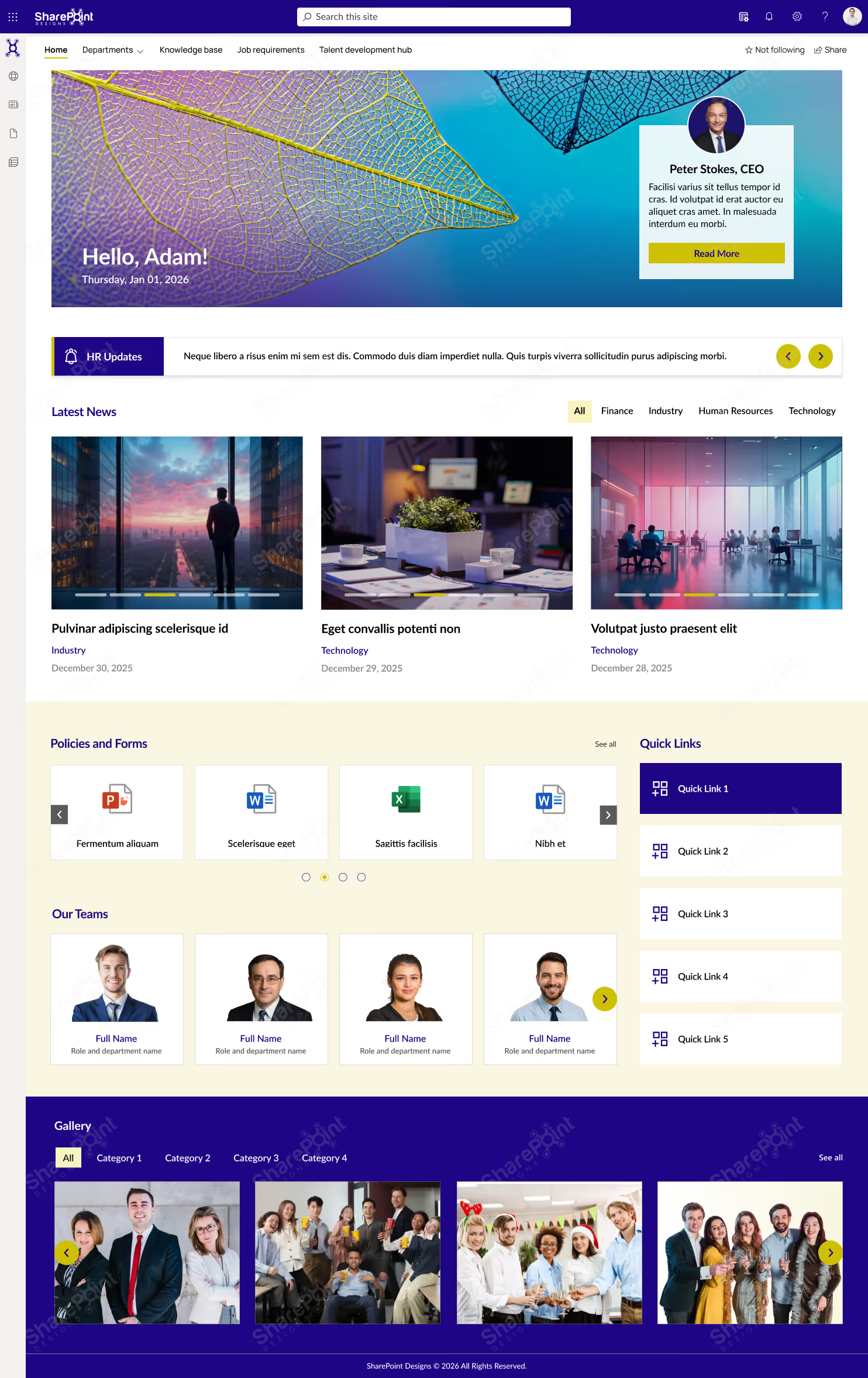
Warm first-day welcome - greets new joiners by name with time, date and a personal CEO message, setting the right tone from day one
8 essential shortcuts upfront - Access Request, Help Desk, Finance, HR, Company Policies, Employee Handbook, Training and Contact Your Buddy, everything a new joiner needs, instantly visible
Structured connection journey - a 5-step visual pathway guides new employees from meeting their buddy to joining communities, making integration effortless
Meet the team panel - new joiners can chat or email colleagues directly from the portal, removing the awkwardness of not knowing who's who
Training video library - onboarding content, process walkthroughs and company videos all in one place, accessible from day one
Documents & FAQs side by side - key forms, handbooks and answers to common new joiner questions are always one click away
Works across all industries - built for any organisation that wants to give new employees a confident, connected and productive start
Fully customisable - personalise the CEO message, shortcuts, connection steps and content to reflect your unique culture and onboarding process
Mobile-Friendly SharePoint Intranet Design Example for Hybrid Teams
When intranet content appeared directly inside Microsoft Teams, engagement increased without changing the design.
SharePoint IT Helpdesk Intranet Examples (That Reduce Tickets)
In many companies, IT teams spend most of their time answering the same questions: “How do I reset my password?” “VPN not working.” “Where do I raise a ticket?”
One organization redesigned its IT intranet using a SharePoint IT helpdesk template.
The site included:
Clear “Report an Issue” entry point
Common fixes explained in simple steps
System status announcements
Contact escalation paths
Over time, employees stopped emailing IT first and started checking the intranet.
Why This Template Works
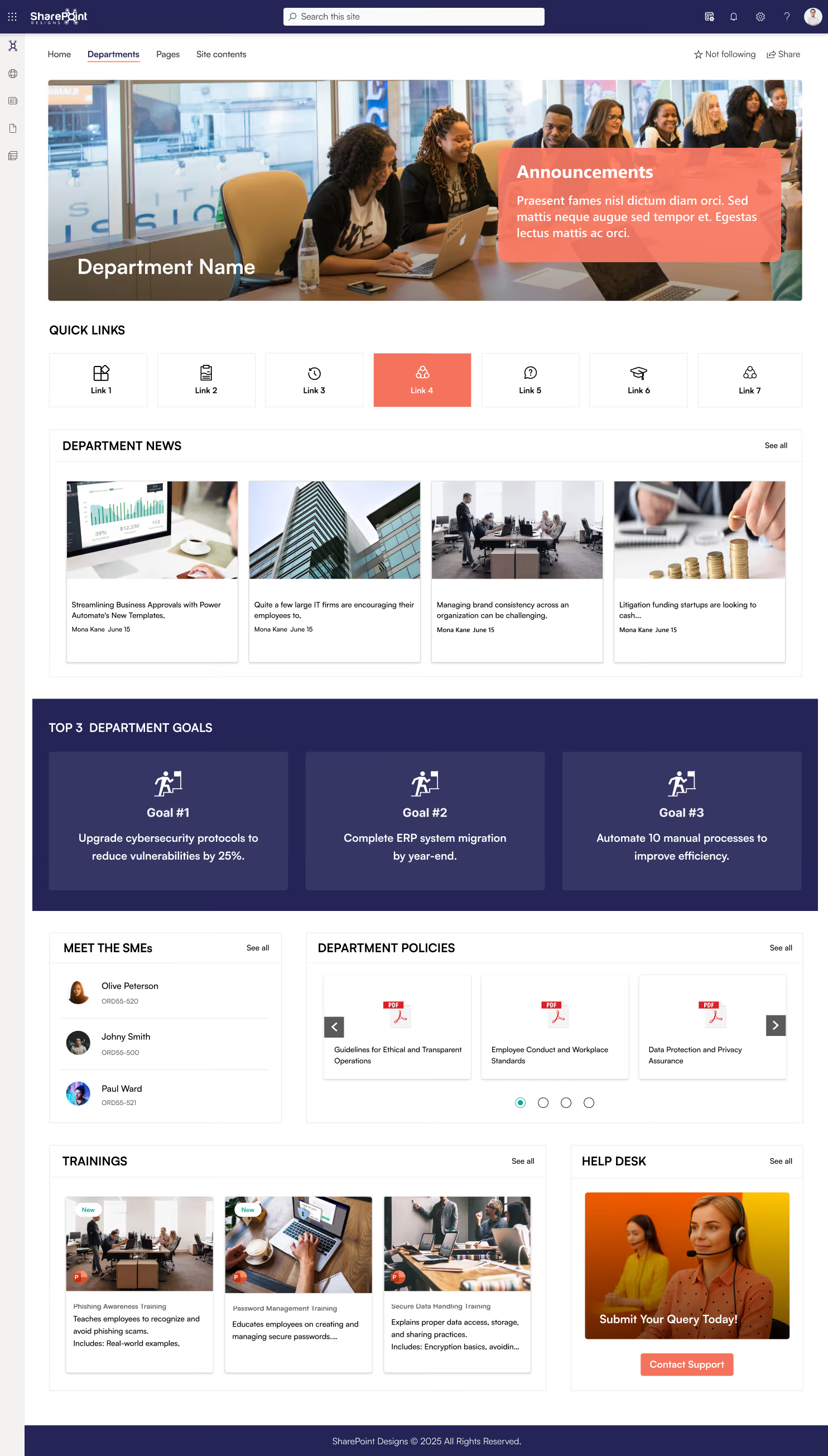
Instant IT announcements - critical alerts, system updates and security notices broadcast on the homepage the moment they're published
Quick links to every IT tool - 7 configurable shortcuts route employees to the right portal instantly, no searching required
Department goals always visible - cybersecurity targets, migrations and automation priorities kept front and centre for the whole team
Built-in training library - Phishing Awareness, Password Management and Secure Data Handling courses embedded and ready to assign
Meet the SMEs - employees know exactly who to contact, reducing misdirected tickets and delays
Policies & help desk in one place - Data Protection, Conduct guidelines and a direct Contact Support button, all without leaving the portal
Ideal for IT, Cybersecurity, Infrastructure and Operations teams - designed to scale across organisations of any size
Leadership Communication SharePoint Intranet Examples
In another case, leadership messages were buried in emails that most employees skimmed or ignored.
They introduced a leadership communication section on the intranet homepage:
CEO messages as short posts, not PDFs
Quarterly updates in plain language
Videos embedded directly on the page
Comments enabled for feedback
Engagement increased because communication felt human, not corporate.
Employee Engagement Intranet Template
A people-first SharePoint intranet that goes beyond information sharing built to connect, recognise and energise your workforce every single day.
Why This Template Works
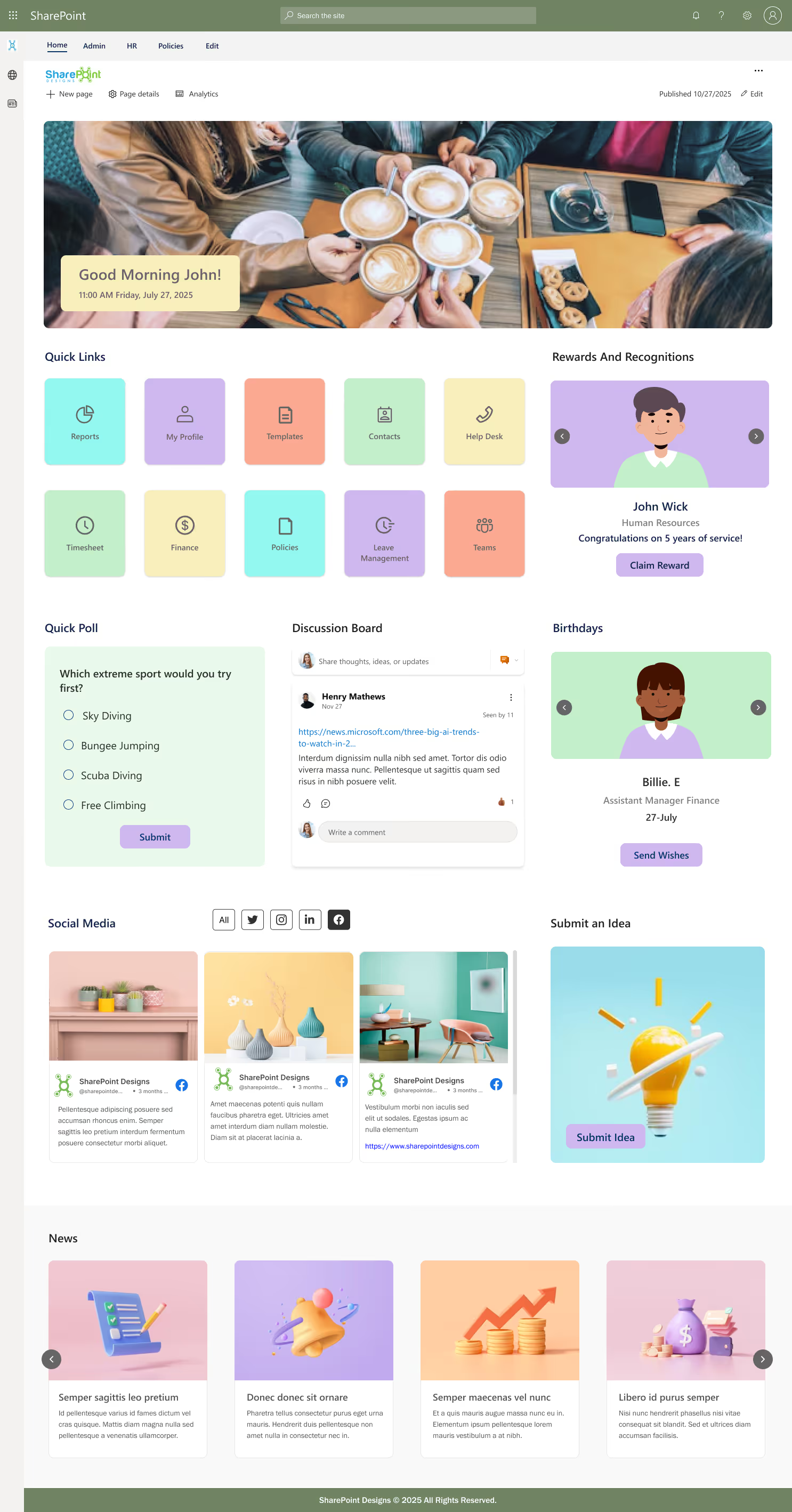
Personalised daily welcome - greets every employee by name, making the intranet feel like their own space, not a corporate notice board
10 quick-access shortcuts - Reports, Timesheet, Finance, Leave Management, Teams and more, all organised and instantly reachable
Rewards & recognition built in - celebrate milestones, acknowledge contributions and let employees claim rewards directly from the portal
Birthday reminders with a human touch - never miss a colleague's birthday, send wishes directly from the intranet
Live discussion board & quick polls - employees share ideas, spark conversations and give instant feedback without leaving the portal
Submit an idea feature - every employee has a direct channel to contribute suggestions, driving a culture of innovation
Social media feed integrated - keep the company's external presence visible internally, bridging the gap between brand and culture
Perfect for HR, People & Culture and Internal Comms teams - built to create a connected, motivated and engaged workforce
Learning & Training SharePoint Intranet Examples Employees Finish
Many training portals exist, but few get used.
One company built a learning and training SharePoint intranet example with:
Short learning paths instead of long courses
Role-based training recommendations
Integration with Viva Learning
Progress visibility
Completion rates increased because learning felt manageable, not overwhelming.
Key takeaway:
People are more likely to learn when training is clearly structured and easy to resume.
Why This Template Works
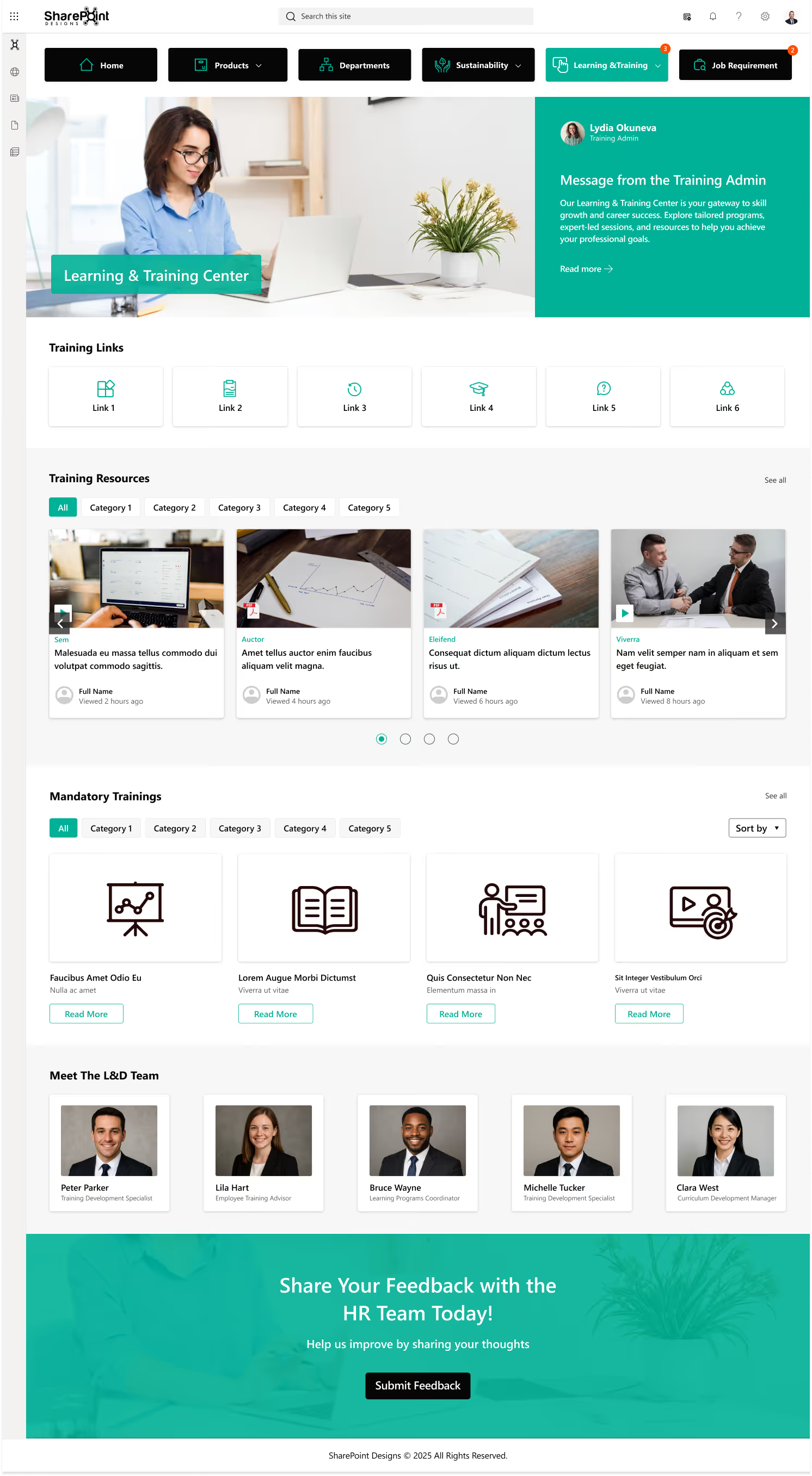
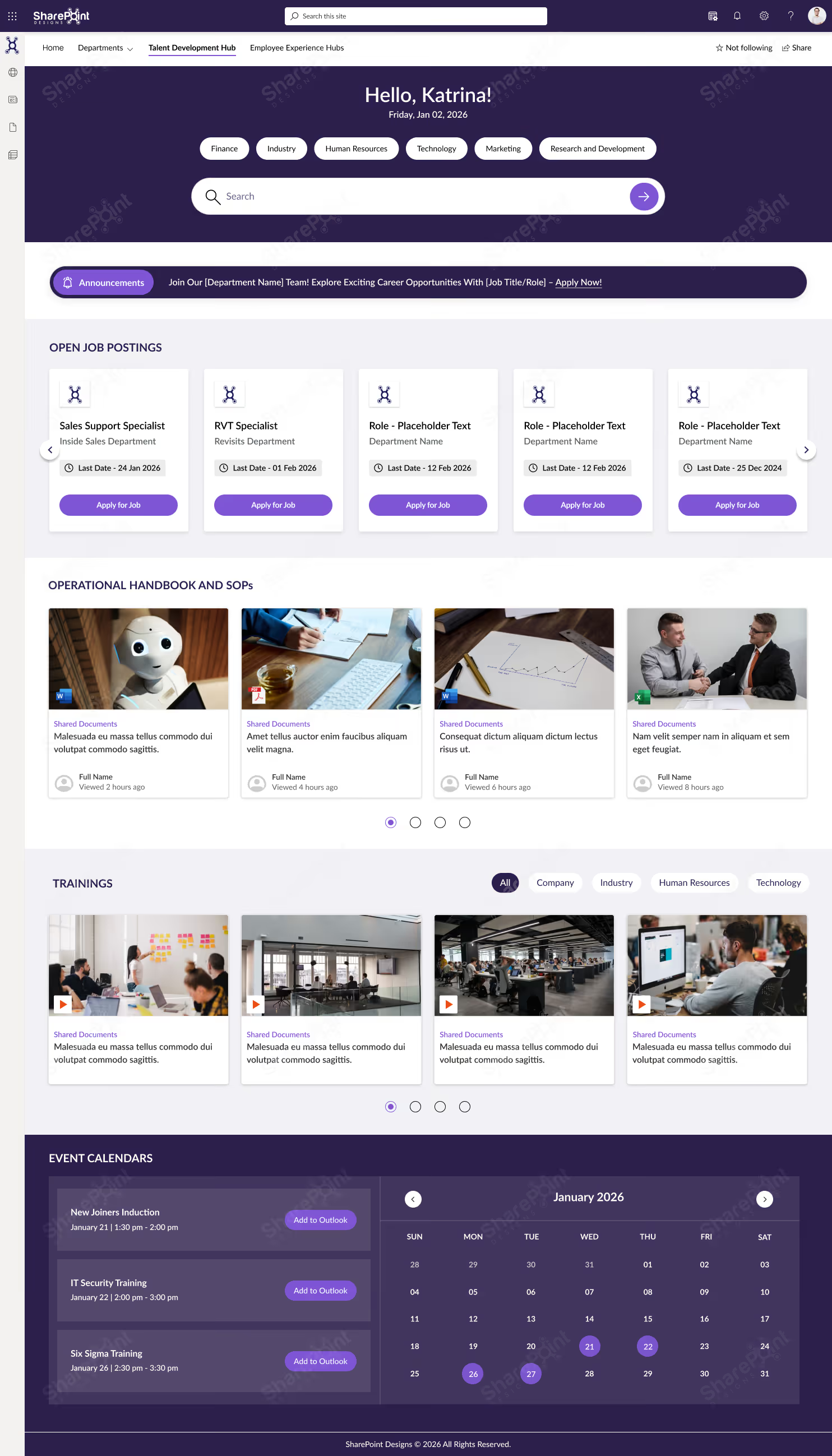
Training admin message front and centre - sets the tone, communicates the L&D vision and gives employees a direct contact from day one
6 configurable training links - route employees to LMS, certifications, course platforms or internal resources in one click
Categorised training resources library - browse by category or search across all content, with author name and last viewed timestamp for easy navigation
Mandatory trainings clearly separated - compliance and required courses are distinct from optional learning, so nothing critical gets missed
Meet the L&D team - employees know exactly who owns their learning journey, from Training Specialists to Curriculum Managers
Feedback section built in - employees share thoughts on training quality directly with HR, enabling continuous improvement
Ideal for HR, L&D, Compliance and People teams - suitable across Corporate, Healthcare, Banking, Manufacturing and any organisation with structured learning requirements
Fully customisable - configure categories, mandatory vs optional courses, team profiles and resource links to match your exact training programme
What All These SharePoint Intranet Examples Have in Common
Across all these scenarios, successful SharePoint intranet examples share a few traits:
Clear purpose for each site
Familiar layouts using templates
Search-first thinking
Strong ownership and governance
Continuous improvement, not one-time launch
Technology didn’t change. Intent and structure did.
These traits appear consistently when intranets are reviewed and improved continuously, not treated as one-time launches. For a practical guide on keeping your intranet effective over time, see our SharePoint intranet maintenance checklist. One real-world SharePoint intranet example shows what happens when these principles are applied together.
How to Improve Intranet Engagement and Adoption: A Real Adoption Story
One mid-sized organization we worked with had a familiar challenge. They were already using SharePoint, but their intranet adoption was consistently low.
Employees relied on email and chat, HR and IT teams answered the same questions daily, and the intranet existed more as a document store than a destination.
Before changes, analytics showed less than 30% weekly usage.
Instead of rebuilding everything, they studied real SharePoint intranet examples and applied proven patterns:
A simplified, action-focused homepage
Clear HR, IT, and department site templates
Standardized navigation using hub sites
Easy access through Microsoft Teams
Within three months:
Weekly intranet adoption grew to over 70%
HR saw a 40% reduction in repetitive queries
IT ticket volume dropped for common requests
No major technical changes were made. The improvement came from structure, clarity, and learning from SharePoint intranet examples that already work.
Looking to improve intranet adoption without a full rebuild?
Mohammed Jamal is a UI/UX Designer with 3+ years of experience dedicated to crafting intuitive, user-centric digital experiences. He specializes in Web, SharePoint Intranet, Mobile, and Graphic Design, prioritizing seamless user journeys and high usability.









.svg)