Published Date -

10 SharePoint Site Templates for HR, Onboarding, Compliance and More (2026)
A SharePoint site template is a prebuilt site layout (pages, navigation, web parts) that you apply when you create a site. Every SharePoint Online tenant includes basic Microsoft templates (Settings → Apply a site template). For branded, department-ready intranet sites, the 10 templates below cover the most common use cases.
Trusted by Organizations Worldwide
800+ clients · 23 countries · 10 apps on Microsoft AppSource · 11+ years.
Executive Summary
Modern SharePoint templates serve as prebuilt, governance-friendly frameworks that ensure:
- A consistent intranet experience across departments and regions
- Faster deployment cycles without reliance on custom development
- Better content structure, navigation, and findability
- Higher employee engagement due to intuitive design and personalization
- Scalability for enterprise-level intranet growth
This article covers:
- Template types: Site templates vs page templates
- Common intranet challenges templates solve
- Strategic considerations for intranet planning
- Detailed templates aligned to real business scenarios
- Governance and brand structure that maintains long-term intranet quality
The goal is to provide a practical guide for organizations aiming to build a SharePoint intranet that is durable, discoverable, and aligned with organizational goals.
Why SharePoint Templates Matter?
Organizations frequently struggle with intranet adoption because the platform lacks clarity, structure, and consistency. Despite SharePoint’s flexibility, many intranets decline in effectiveness over time due to:
- Unstructured content growth
- Inconsistent page creation
- Limited governance
- Overreliance on IT for updates
- Poor navigation models
- Out-of-date design patterns
Modern SharePoint templates directly address these challenges by offering repeatable, governed structures that reduce content fragmentation and improve navigation. When implemented strategically, templates provide a predictable experience for employees and contribute to measurable improvements in communication, productivity, and compliance.
Understanding SharePoint Templates: Site Templates and Page Templates
A key element of intranet governance is understanding how SharePoint templates function at different levels. SharePoint Site templates establish the overall framework for an intranet area. They define navigation, default pages, branding, and structural rules. These templates are typically used for departmental hubs, HR portals, knowledge centers, or corporate communication sites.
SharePoint Page templates, on the other hand, control how individual pages are laid out. They ensure that news articles, knowledge pages, onboarding content, or landing pages follow a consistent design and information hierarchy. When used together, site and page templates prevent the visual and structural fragmentation that commonly affects growing intranets.
This distinction is often overlooked, yet it is foundational to building an intranet that remains usable as content volume increases.
How to apply Microsoft's built-in SharePoint site templates
- Open the site (you need site owner permission).
- Select Settings (gear icon) → Apply a site template.
- Choose a template on the "From Microsoft" tab and select Use template.
- Adjust the theme, navigation and content.
Built-in templates are a quick start for a single site. When you need consistent branding and department-ready layouts across the intranet, the templates below close that gap.
Out-of-the-Box vs Custom vs Strategic Templates
Organizations usually build SharePoint intranets in three ways: using Microsoft’s out-of-the-box templates, creating a fully custom intranet, or adopting strategic SharePoint templates. Out-of-the-box templates enable quick setups but lack branding, governance, and long-term scalability.
Custom intranets offer full flexibility but come with higher costs, longer timelines, and ongoing dependency on developers.
Strategic SharePoint templates bridge this gap by combining speed, structure, and usability. They provide modern UX, built-in governance, and consistent branding while remaining flexible enough to evolve with business needs. SharePoint supports this approach through its template framework, and SharePoint Designs builds on it by offering user-friendly prebuilt intranet templates that are easy to deploy and designed for long-term adoption.
How to Select the Right SharePoint Template
Choosing the right template requires an understanding of organizational needs, not just design preferences. Key evaluation questions include:
- What is the primary purpose of the site?
Communication, self-service, compliance, onboarding, collaboration, or knowledge access.
- Who is the target audience?
Frontline teams, new hires, managers, corporate employees, or a cross-functional group.
- What governance model is needed?
Structured content types, metadata, permissions, lifecycle policies, and approval workflows.
- What business outcomes must the intranet support?
Reducing support tickets, improving time to information, strengthening communication, or standardizing processes.
- Is the intranet expected to scale across multiple departments or regions?
If yes, repeatable templates become essential.
Templates must be selected based on long-term sustainability not only on initial design appeal.
The 10 Best SharePoint Site Templates by Use Case
These templates are aligned with modern intranet design standards and solve specific organizational challenges.
1. Employee Hub Intranet Template
Deliver consistent, centralized communication across the organization.
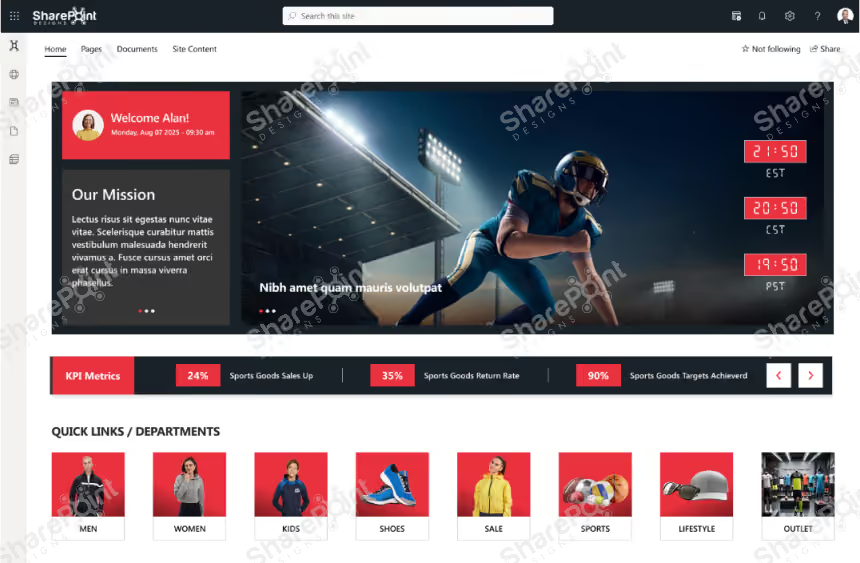
Why This SharePoint Intranet Template Works
- Delivers a personalized welcome experience with a prominent hero section that helps employees quickly orient themselves.
- Provides quick access to key tools, documents, and applications through well-structured Quick Links and department tiles.
- Organizes company updates using a categorized News section, making HR, departmental, and company-wide announcements easy to find.
- Improves governance and findability by grouping policies, important documents, and forms into clearly labeled sections.
- Balances modern visual design with practical usability, making the intranet easy to maintain and scale.
Preview the Employee Hub template →
2. HR Portal Intranet Template
Offer employees a self-service area for HR policies, forms, and benefits.
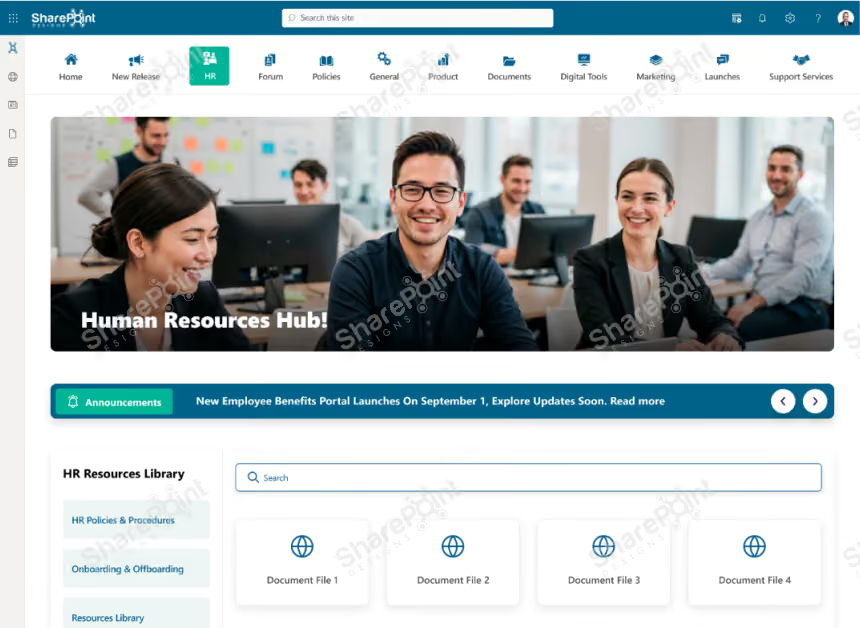
Why This SharePoint HR Hub Template Works
- Centralizes all HR information in one structured, easy-to-navigate hub.
- Highlights key announcements so employees stay informed of important updates.
- Organizes policies, onboarding, training, and HR documents for quick access.
- Enables fast search and self-service, reducing routine HR queries.
- Introduces the HR team clearly, improving visibility and communication.
- Supports engagement through FAQs and feedback, while remaining clean and scalable.
Preview the HR Portal template →
3. Learning & Training Center Intranet Template
A modern intranet template is designed to centralize learning resources, manage employee training programs, and track skill development across the organization.

Why This SharePoint Learning & Training Template works
- Centralizes all learning and training content into a single, easy-to-access hub.
- Highlights key messages from training administrators to guide employee development.
- Organizes training resources by categories, making content easy to discover and consume.
- Supports mandatory training tracking with clear course visibility and progress actions.
- Encourages continuous learning through structured resources, videos, and programs.
- Builds approachability by introducing the L&D team and enabling direct feedback.
Preview the Learning & Training template →
4. Department Site Intranet Template
Customizable sites for each department (IT, Finance, Marketing, Sales, etc.) with team-specific resources, updates, and tools.
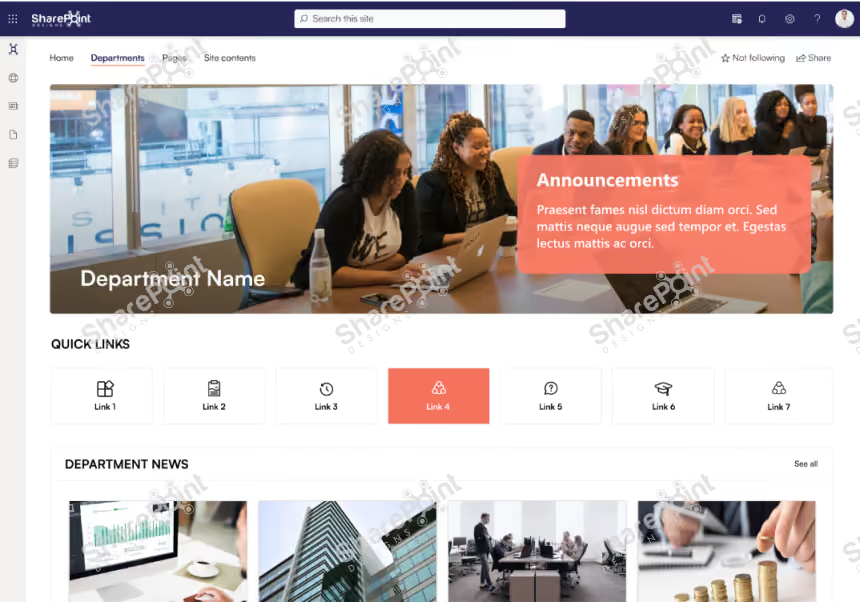
Why this SharePoint Department Template works
- Provides a centralized department hub with clear announcements and updates.
- Offers quick access to key tools, links, and resources used by the team.
- Showcases department news, goals, and priorities for better alignment.
- Highlights subject matter experts and key contacts for easy collaboration.
- Organizes policies, training, and support in a structured, easy-to-find layout.
Preview the Department Site template →
5. Onboarding & Training Intranet Template
Guide new employees through orientation, training, and early tasks.

Why this SharePoint Onboarding Template works
- Personalized onboarding home with date, time, and welcome message
- Quick access to essential tools such as access requests, HR, finance, and help desk
- Leadership welcome message to set context and culture from day one
- Meet-the-team section to build early connections
- Guided onboarding steps for faster integration and networking
- Centralized training videos and learning resources
- Easy access to key documents and FAQs for self-service support
Preview the Onboarding template →
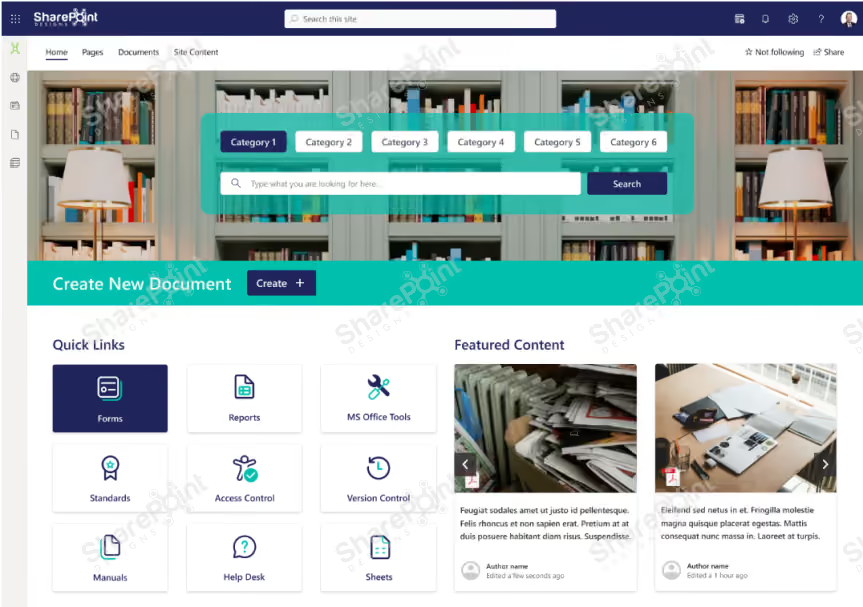
6. ISO Compliance & Document Management Template
A secure, audit-ready library for controlled documents, procedures, and compliance records with version tracking.
Find the AI-Powered SharePoint DMS You Need
Centralize, secure, and manage documents with AI-powered search, workflows, and compliance.
Explore DocVault
Why this SharePoint Template works Well
- Centralized knowledge hub with category-based search and filters
- One-click document creation for faster content contribution
- Quick links to forms, reports, standards, and access control
- Featured content to highlight important or updated documents
- Structured policies and procedures library with version control
- Recently added content section for quick discovery
- Integrated training calendar with upcoming events and reminders
- Assigned trainings panel to track completion status
- Built-in help and support area for user queries and guidance.
Preview the ISO Document Management template →
7. Internal Communication & Social Engagement Intranet Template
Includes blogs, discussion forums, polls, and recognition boards to encourage interaction beyond work tasks.

Why this SharePoint Template works
- Company news and leadership blogs in one feed.
- Discussion forums to ask, answer and share across teams.
- Quick polls to gather opinions.
- A recognition board to celebrate wins and peer kudos.
- Events and celebrations that build culture.
- Familiar social-style layout on desktop and mobile.
Preview the Internal Communication template →
8. Knowledge Base / FAQ Intranet Template
Central hub for SOPs, troubleshooting guides, and common queries, searchable by keyword or category.
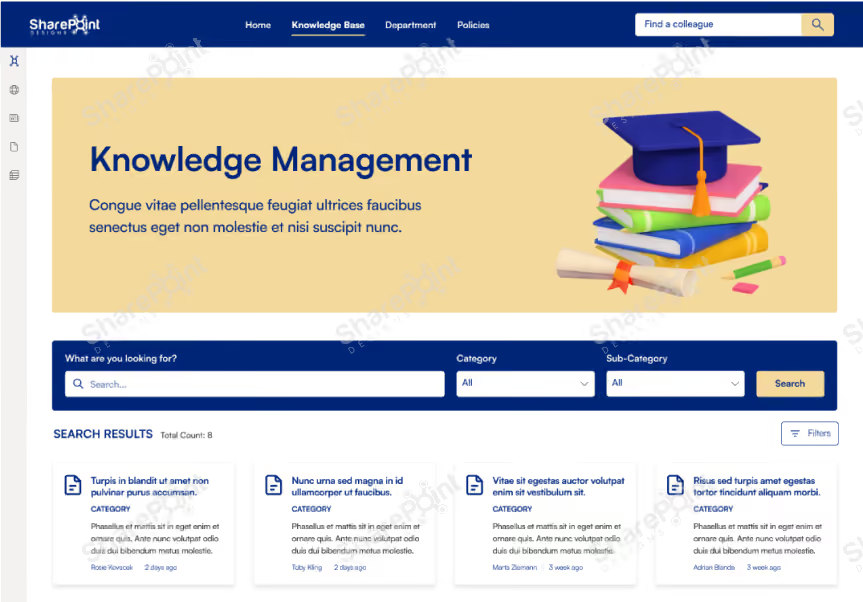
Why this SharePoint Template works well
- Centralized knowledge management hub for easy information discovery
- Powerful search with category and sub-category filtering
- Structured content cards for quick scanning and access
- Featured content to highlight high-value or trending resources
- Author and timestamp visibility to build trust and accountability
- “Ask a question” option to capture unmet knowledge needs
- Dedicated help, FAQs, and reference resources in one place
Preview the Knowledge Base template →
9. CSR and Community Engagement Hub
Highlight corporate social responsibility activities and encourage participation.

Why this CSR Intranet Template works
- Centralized CSR initiative hub showcasing company impact
- Clear giving-back metrics with transparent donation tracking
- Quick links for easy access to CSR programs and resources
- News and announcements highlighting ongoing social initiatives
- Upcoming events with countdowns to boost participation
- Visual gallery to showcase employee volunteering and impact
- Single platform to engage employees in social responsibility efforts
Preview the CSR Hub template →
10. Sustainability and ESG Insights Hub Intranet Template
Showcase environmental programs, ESG metrics, and sustainability initiatives.
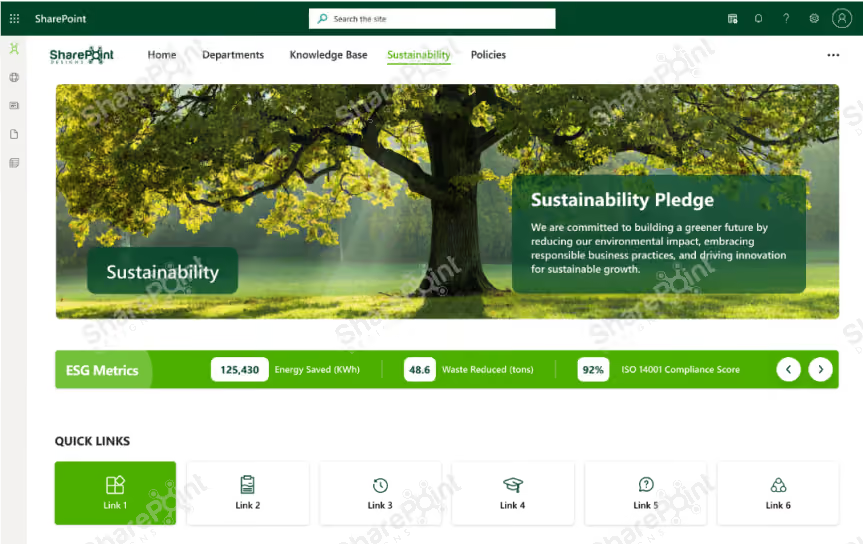
Why this template works well
- Centralized sustainability hub aligned with ESG goals
- Clear sustainability pledge from leadership
- Real-time ESG metrics for energy, waste, and compliance
- Quick access to policies, initiatives, and reports
- ESG blogs and updates to drive awareness
- Training calendar and employee feedback for engagement
- Compliance and certification visibility for transparency
Want the whole intranet set up for you? See Sangha →
Branding, Governance, and Content Structure
A sustainable intranet requires governance that extends beyond templates. Key considerations include:
- Navigation standards
- Content types and metadata
- Lifecycle management
- Branding consistency
- Contributor permissions
- Approval workflows
- Search optimization practices
Strong governance ensures the intranet remains organized and transparent as it scales.
Deployment and IT Efficiency
Modern SharePoint Intranet templates reduce IT dependency by giving business teams the autonomy to maintain pages without compromising standards. This results in:
- Shorter deployment cycles
- Lower support overhead
- Reduced content duplication
- Faster rollout of new departments or functions
- Predictable user experiences across the intranet
Templates provide the foundation; governance ensures long-term maintainability.
Building a Connected Digital Workplace Experience
A modern SharePoint intranet is not only a collection of pages; it is part of a larger digital ecosystem. Effective intranets integrate with Microsoft 365 tools such as:
- Teams
- OneDrive
- Viva Connections
- Power BI
- Planner
- SharePoint Search
The most effective templates support these integrations through structured layouts, clear content hierarchy, and consistent design frameworks.
Organizations that treat their intranet as a holistic employee experience rather than a content repository achieve higher engagement and long-term adoption.
Which SharePoint Template Option Is Right for Your Organization?
Not every organization needs the same approach. Here's how the three most common options compare.
When should you choose each option?
- Microsoft templates are a great starting point for small teams or organizations that need a quick internal site with minimal customization.
- Custom development is suitable for organizations with unique business processes and dedicated SharePoint development resources.
- SharePoint Designs templates are ideal for organizations that want a modern, professionally designed intranet with faster deployment, customization, and expert implementation support.
Conclusion
Modern SharePoint intranet templates offer a dependable, scalable, and cost-effective approach to building a digital workplace that supports communication, collaboration, compliance, and employee experience. When paired with strong governance, clear information architecture, and role-based design principles, these templates form the foundation of an intranet that remains relevant and sustainable as organizations grow.
Templates reduce complexity, improve clarity, streamline content creation, and help build a coherent experience across the entire organization. The result is a modern intranet that supports daily work, reinforces culture, and enables employees to find what they need quickly and efficiently.
faqs
Johnsi Jayasingh

Johnsi Jayasingh is a technology leader and Co-Founder & Chief Innovation Officer with over 20 years of experience in digital solutions. She specializes in Microsoft technologies, including SharePoint and the Power Platform, driving modern digital workplaces. She is known for turning complex technology into simple, high-impact user experiences.





.svg)





