Tech Ideas & Best Practices
Navigating Microsoft Copilot: A Guide to Its Products
Microsoft’s AI offerings, such as Bing Chat and Microsoft 365 Copilot (including GitHub Copilot), are paving the way for a more productive future. These intelligent tools simplify tasks through features like conversational bots and custom searches tailored to your needs. Let’s explore how you can use Microsoft Copilots to optimize your workflow today.
The Pioneers of AI Productivity
Microsoft integrates AI across its products, making them user-friendly and intuitive.
- Bing Chat leverages large language models within Microsoft Edge.
- Integration with Microsoft Graph ensures seamless connection between apps and services.
Available Across:
- Bing
- Edge
- Microsoft 365
- Windows (Windows Copilot)
Microsoft recently launched a Copilot, offering a unified AI productivity experience in Windows 11, allowing users to manage tasks and settings through a centralized assistant.
1. Best for Integrated OS Experience - Microsoft Copilot
Microsoft Copilot in Windows 11 offers:
- AI-powered assistance integrated into Windows 11
- App launching and system setting adjustments (volume, dark mode) via voice command
- Bing Chat Enterprise integration for combining web and work data
IT admins can deploy Copilot with access control, ensuring security and personalization.
2. Best for Conversational AI - Bing Chat
Microsoft Edge + Bing Chat:
- Ideal for remote work and flexible workflows
- Powered by Open AI’s GPT-4 for deep understanding
- DALLE 3 generates activity-specific images
- Free and always available at bing.com/chat
Microsoft continues improving Bing Chat to reduce hallucinations and enhance reliability.
3. Best for Office Productivity - Microsoft 365 Copilot
Microsoft 365 Copilot boosts productivity in Teams, Word, Outlook, Excel, and PowerPoint:
- Generate text and tables in Word
- Summarize and draft emails in Outlook
- Create Python visualizations in Excel
- Access insights in OneDrive without opening files
Enterprise Plan: $30/user/month – offering:
- Intelligent writing assistance
- Advanced data analysis and visualization
- Personalized productivity insights
- Automated email management
- Voice dictation and transcription
Integration ensures a streamlined experience across Microsoft 365 apps for everyday efficiency.
4. Best for Modern Computing - Windows 11
Windows 11 offers:
- Modern UI with upgraded Start menu and Taskbar
- Microsoft Copilot for AI assistance in system settings
- Gaming features: Game Bar, Direct Storage, Auto HDR, Game Mode, Game widget store, Xbox app
Access to Android apps via Windows Subsystem for Android and Amazon Appstore
5. Best for Developers - GitHub Copilot
GitHub Copilot helps developers:
- Get real-time code suggestions
- Work with multiple programming languages
- Reduce errors and accelerate workflows
Supported languages:
- JavaScript, Python, C#, C++, Java, PHP, Ruby, Go
- Pricing: $10/month or $100/year.
Powered by OpenAI Codex, Copilot translates comments or code lines into natural language.
Choosing Your AI Copilot
- Microsoft Copilot: For unified AI in Windows 11
- Bing Chat: For advanced conversational AI
- Microsoft 365 Copilot: For office productivity and automation
Select the copilot that fits your specific workflow needs.
Summary
To sum up, Microsoft’s AI copilots can provide the perfect solution for any need. Ranging from workplace efficiency to coding and regular computing. By understanding how these tools differ, you can decide which works best in accordance with your requirements and take advantage of all the features that this technology has to offer.
Welcome to a new era with an AI-driven productivity upgrade due to its empowering capabilities. Take full control over every aspect of your job thanks to artificial intelligence - don’t miss out on such groundbreaking opportunities!
Ready to harness AI in your workflow?
Contact us for Microsoft Copilot Consulting Services and elevate your productivity. Embrace AI-driven solutions tailored for your needs get in touch now!

Mastering Microsoft Copilot: Your Complete Product Guide
Microsoft’s AI offerings, such as Bing Chat and Microsoft 365 Copilot (also known as GitHub Copilot), are paving the way for a more productive future.

Power BI is a business intelligence (BI) tool that allows you to connect to your data, create visualizations, and share insights with others.
Prerequisites
- Power BI Desktop installed on your computer.
- A dataset that you want to connect to. (Here we will use SharePoint List)
Step 1: Connect to Your Data
The first step in creating a report is to connect to your data. Power BI can connect to a variety of data sources, including Excel spreadsheets, CSV files, SQL databases, and cloud services like OneDrive and many more.
To connect to your data,
- Open Power BI Desktop and click on the Get Data button.
- Click more and select Online Services -> SharePoint Online List.

- Follow the prompts to connect.
Step 2: Create Visualizations
Once you have connected to your data, you can start creating visualizations. Power BI offers a wide variety of visualizations, including charts, graphs, maps, and pie charts.
To create a visualization, Click a visual from the Visualizations pane. Power BI will automatically create a visualization based on the visual that you selected.

To Add Data into to visual:
- Under Data Pane, Expand the Data Source (Timesheet)
- Drag and drop the fields into the visual as per your need.

Step 3: Add Filters and Slicers
Filters and slicers allow you to narrow down your data and see specific results. To add a filter, click on the Add Filter button in the Filters pane. To add a slicer, click on the Add Slicer button in the Visualizations pane.


Now you can also use slicer as a filter to play around with the table.
Similarly, you can also use slicer as a filter for the other columns available in your Data Source.
Step 4: Format Your Report
Once you have added your visualizations, filters, and slicers, you can format your report to make it look its best. You can change the font, colors, and layout of your report.
To format your report, click on the Format tab in the Visualizations pane. You can then make changes to the appearance of your report.

Step 5: Final Output

Step 6: Share Your Report
Once you are satisfied with your report, you can share it with others. Power Business Intelligence offers a variety of ways to share your report, including exporting it to a PDF file, publishing it to a webpage, or sending it via email.
- To share your report, click on the File tab in the top menu bar and select Share. Choose the sharing method that you want to use.
- To Publish your report, click Publish on the Top right and select the destination to publish your report.
Explore our blog, 'Easy 9 Steps Guide to Embed Power BI Report in SharePoint' for a comprehensive step-by-step guide on seamlessly integrating Power BI reports into SharePoint.
Join our weekly newsletters and regular blog updates for the latest insights and tips. Connect with our expert Business Intelligence Consultants for Power BI Services. Elevate your data strategy and make informed decisions. Contact us now to transform your analytics!

The Ultimate Step-by-Step Guide to Power BI Report Creation
Power BI is a business intelligence (BI) tool that allows you to connect to your data, create visualizations, and share insights with others.

In today's rapidly evolving digital landscape, the way we work and collaborate is undergoing a significant transformation. At the forefront of this change is SharePoint Premium, a powerful tool reshaping the dynamics of business operations. As highlighted in the 2023 Work Trend Index, the integration of AI and digital tools in the workplace is not just a trend but a necessity. SharePoint Premium stands out as a pivotal platform in this journey, offering robust solutions for enhanced collaboration, streamlined processes, and informed decision-making.
Enhancing Team Collaboration
The core strength of SharePoint Premium lies in its ability to facilitate seamless collaboration across diverse teams and departments. With advanced document management capabilities and seamless integration with Microsoft Teams, SharePoint Premium breaks down silos and fosters a collaborative environment. This integration is crucial in today's context, as the 2023 Work Trend Index reveals a threefold increase in Microsoft Teams meetings and calls since 2020. SharePoint Premium ensures that collaborative efforts are more efficient and productive, irrespective of geographical boundaries.
Streamlining Business Processes
In an era where 70% of people would prefer to delegate work to AI to lessen their workloads, SharePoint Premium emerges as a key player in automating routine tasks. Its integration with Power Automate allows businesses to create custom workflows, reducing manual effort and increasing efficiency. Additionally, PowerApps enables businesses to develop custom applications tailored to their unique needs, further enhancing operational efficiency and user experience.
Data-Driven Decision Making
Data is the new currency in the business world, and SharePoint Premium provides an effective platform for consolidating, managing, and visualizing data. This capability is crucial for data-driven decision-making, aligning with the AI advancements highlighted in Microsoft Ignite 2023. SharePoint Premium's integration with various AI tools enables businesses to analyze trends, generate actionable insights, and make informed decisions swiftly.
Ensuring Security and Compliance
In the current era of AI and digital transformation, data security and compliance are more critical than ever. SharePoint Premium addresses these concerns with robust security features and compliance tools, ensuring that business data is protected and regulatory requirements are met. This aspect is particularly vital for IT managers and CTOs, who are responsible for safeguarding their organization's data integrity.
SharePoint in the Future of Work
As we look to the future, SharePoint Premium aligns perfectly with the emerging trends in AI and digital transformation. The platform is continuously evolving, integrating new AI capabilities to reshape how work is done, as indicated in Microsoft Ignite 2023. SharePoint Premium is not just a tool for today but a strategic investment for the future, empowering businesses to stay ahead in a rapidly changing digital world.
Conclusion
SharePoint Premium offers a suite of features that are essential for modern businesses, especially in the realms of collaboration, process optimization, and decision-making. For IT managers, directors, CTOs, and COOs, embracing SharePoint Premium is a strategic step towards successful digital transformation. The platform's alignment with current and future AI advancements makes it an indispensable tool for businesses aiming to thrive in the digital era.

Revolutionizing Business Collaboration with SharePoint Premium: Key Use Cases for Decision-Makers
In today's rapidly evolving digital landscape, the way we work and collaborate is undergoing a significant transformation.
Let’s be honest. AI is everywhere right now, but most conversations around it feel unnecessarily complicated.
You hear terms like machine learning, LLMs, or prompt engineering and suddenly it feels like you need a technical background just to keep up. The truth is you don’t.
This article breaks down 11 common AI terms everyone should know, explained in a simple, conversational way, using examples you can actually relate to.
If you’ve ever thought “I know AI is important, but I don’t fully get it”, this is for you.
What is Artificial Intelligence (AI)?
At its core, Artificial Intelligence is about machines doing things that usually require human thinking.
That could be understanding language, recognizing images, making recommendations, or answering questions.
AI already shows up in daily work through search, automation, and digital workplace tools. As AI becomes more embedded in platforms like Microsoft 365 and intranets, understanding the basics helps teams adopt it more confidently.
What is Machine Learning?
Machine Learning is a part of AI where systems learn from data instead of being manually programmed for every scenario.
Instead of defining every rule, the system identifies patterns and improves over time.
Example: Spam filters that get better the more emails you receive.
This is why many AI-powered workplace tools improve gradually rather than being “perfect” on day one.
What is Generative AI?
This is the term everyone’s talking about.
Generative AI doesn’t just analyze data. It creates new content such as text, images, summaries, or even code.
You’ve likely seen it used to:
- Draft emails
- Summarize documents
- Create first versions of content Generative AI is increasingly being explored in digital workplaces and intranets to reduce manual effort and improve productivity.
What is a Large Language Model (LLM)?
A Large Language Model (LLM) is the engine behind most text-based AI tools.
It’s trained on massive amounts of text so it can understand context and generate human-like responses.
Think of it this way:
- The LLM is the brain
- The chatbot or interface is what you interact with
Most users never see the model itself, only the experience it powers.
What is Prompt Engineering?
Prompt engineering sounds technical, but it’s really just learning how to ask AI better questions.
For example:
- “Summarize this document”
- “Summarize this document in 5 bullet points for leadership”
Clear prompts almost always lead to better results.
This is especially important when AI is introduced into shared environments like intranets, where clarity and consistency matter.
What is AI Hallucination?
An AI hallucination occurs when AI generates an answer that sounds confident but is incorrect.
This can include:
- Made-up facts
- Incorrect explanations
- Non-existent sources
This is why human review is still essential, particularly in business, HR, or decision-making scenarios.
What is Natural Language Processing (NLP)?
Natural Language Processing (NLP) allows AI to understand and respond to everyday human language.
It’s what makes it possible to:
- Search using full sentences
- Chat with AI assistants
- Get summaries from documents
NLP is a big reason AI feels more accessible to non-technical users today.
What is Computer Vision?
Computer vision enables AI to interpret images and videos.
It’s used for:
- Document scanning
- Facial recognition
- Quality checks
- Visual pattern detection
This capability is often paired with automation to reduce manual review work.
What is AI Automation?
AI automation focuses on letting AI handle repetitive or rule-based tasks.
Examples include:
- Automatically categorizing content
- Routing support tickets
- Generating routine reports
In many organizations, AI automation works best when it’s embedded into tools people already use rather than introduced as a separate system.
What is Ethical AI?
As AI adoption grows, ethical AI becomes critical.
Ethical AI focuses on:
- Fairness and bias reduction
- Transparency in decisions
- Data privacy and security
Trust is one of the biggest factors influencing whether employees actually use AI-powered tools.
What is AI Adoption?
AI adoption isn’t about deploying tools. It’s about people actually using them.
Many AI initiatives struggle because:
- The tools feel disconnected from daily work
- Users don’t trust the outputs
- The value isn’t clear
Successful AI adoption usually happens when AI is introduced gradually and aligned with real workflows.
Common AI Confusions (Quick Clarity)
- AI vs Machine Learning: AI is the umbrella; ML is how systems learn
- Generative AI vs Traditional AI: Generative AI creates content; traditional AI analyzes data
- LLM vs Chatbot: LLM is the engine; chatbot is the interface
Final Thoughts
AI doesn’t need to feel overwhelming.
Once you understand the language, AI conversations become far more approachable. You don’t need to understand algorithms or training models to use AI effectively.
This guide reflects real questions people ask when they’re trying to understand AI in practical, everyday terms. Clarity matters more than complexity, especially as AI becomes part of modern digital workplaces.
Understanding the basics is always the first step.

11 AI terms everyone should know
You probably know what hallucination is IRL, but do you know what Hallucination is with respect to an AI? If not, continue reading to know more about the top AI Jargons.

Microsoft Power Pages is a low-code/no-code website builder that allows you to create and manage websites without writing any code. It comes with a variety of pre-built themes and templates, but you can also apply your custom styling to create a unique look and feel for your website.
There are two ways to apply custom styling in Power Pages
1. Use the Styling workspace: The Styling workspace in Power Pages allows you to make custom CSS changes to individual elements on your pages. You can change the font, color, size, and other properties of any element on your page.
2. Upload a CSS file: You can create a CSS file in your favourite code editor and then upload it to Power Pages. Once you have uploaded the CSS file, it will be applied to all pages on your website.
Way - 1: To use the Styling Workspace
1. Begin by accessing Power Pages and choosing the specific site where you intend to apply custom CSS.
2. Click on the Edit button to enter the site's editing mode.

3. Within the left-hand panel, locate and select the Styling option.

4. Now pick the element on your page that you wish to style.
5. In the Properties pane, make the desired CSS adjustments. You can customize the element in various aspects, such as.
- Theme: Change the theme by selecting the desired theme and clicking Save.

- Fonts: Modify font-related attributes, including font family, font weight, font size, and font color for different headings.

- Button: Tailor button properties, such as style, button radius, background color, and more.
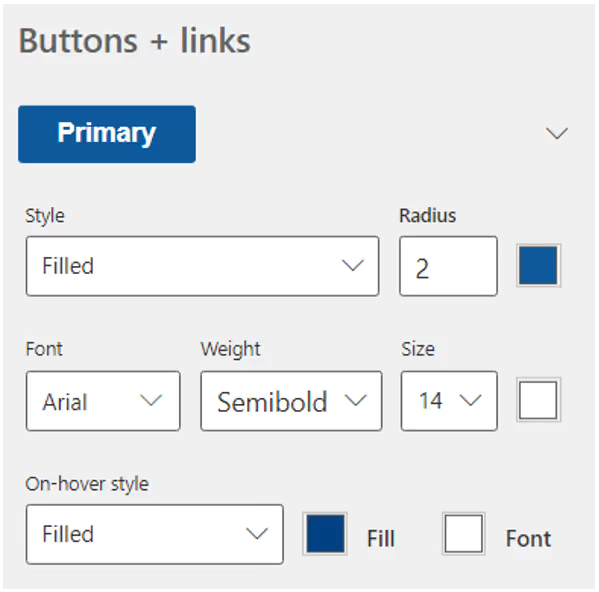
- Hyperlink: Adjust link properties, such as the presence of an underline, font style, link text color, hover color, and more.

6. After achieving the desired styling, save the changes.

7. To apply the updated CSS and view the alterations, select Sync.
Way - 2: To upload a CSS file
1. Start by navigating to Power Pages and selecting the specific site where you wish to apply custom CSS.
2. Click on the Edit button to enter the site's editing mode.
3. In the left-hand panel, locate and choose the Styling option.

4. Within the More options menu, click on Manage CSS.

5. In the Custom CSS section, select Upload, and then proceed to pick the CSS file that you want to upload.
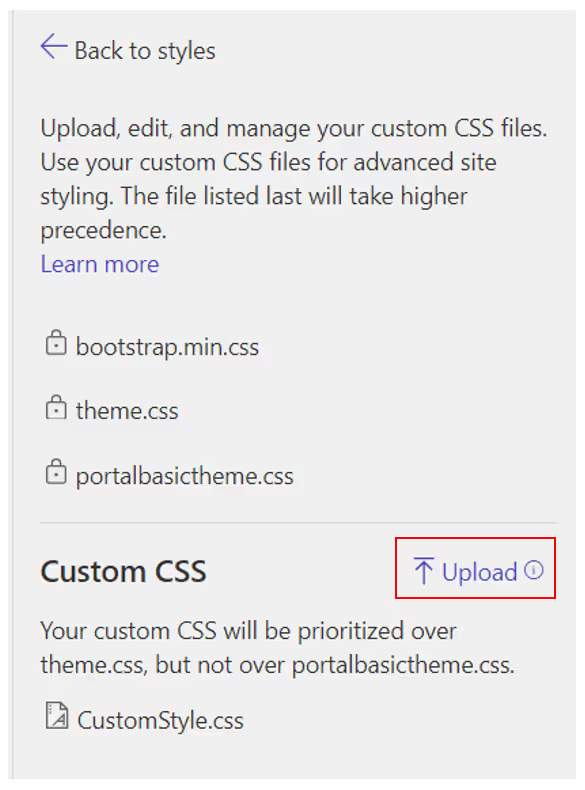
Here is an example of how to apply custom styling to a button in Power Pages
1. Begin by creating a new page and adding the Button component to it.


2. To apply custom styling, go to the page you've created and select Edit. This will open Visual Studio Code for editing.


3. Assign a custom class name, such as 'customstyleBtn', to the button element.

4. Navigate to the 'web-files' section and locate your 'CustomStyle.css' file.

5. Add your custom CSS rules to style the button according to your preferences.

6. Once you've made your CSS modifications, save the file by pressing 'Ctrl+S' (or the equivalent shortcut for your system). Then, return to your Power Pages site and click on Sync.

7. To preview the changes on your site, click Preview and select the Desktop option.

8. You'll see the final result, showcasing the custom styling applied to the button.
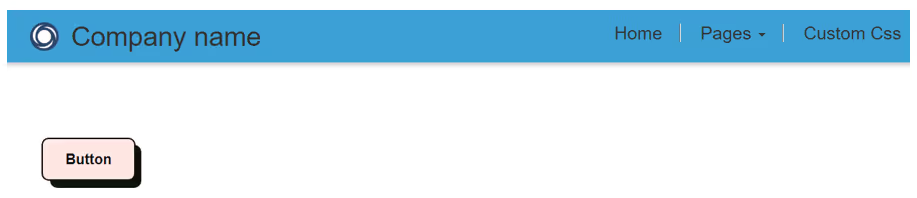
Conclusion
You can use CSS to style any element on your Power Pages page, including buttons, text, images, and layouts. By using custom CSS, you can create a unique and professional look and feel for your website.
Ready to give your Power Pages website a personalized touch? Start applying custom styling today and unlock endless design possibilities. Get creative and make your website stand out! If you have any questions or need assistance, feel free to reach out -> Contact us. Your unique web design journey begins here.

Modernize Microsoft Power Pages with OOTB Styles and Custom Styles: A Step-by-Step Guide
Microsoft Power Pages is a low-code/no-code website builder that allows you to create and manage websites without writing any code.

Why Microsoft Teams is a Budget Game-Changer?
As Microsoft Teams experts, we can confidently say that Teams are not just a tool for seamless collaboration and communication. It's a one-stop solution for companies looking to minimize operational costs. In this detailed guide, we'll explore how Microsoft Teams can be a budget-saver for your organization.
Key Takeaways
- Reduce travel expenses
- Streamline communication and project management
- Enhance cybersecurity at a lower cost
1. Eliminate Travel Costs with Virtual Meetings
- Why Travel Costs Add Up
Business travel isn't cheap. Flights, hotel stays, meals, and even conference rooms can take a big chunk out of your budget.
- Virtual Meetings: A Cost-Effective Alternative
With Microsoft Teams, you can hold HD video conferences, webinars, and virtual meetings, cutting out all those travel expenses.
- Real-World Savings
Company X reported a 30% reduction in annual travel costs.
- Sustainable Benefits of Modern Workplace Collaboration
- Reduces Office Footprint: Remote work capabilities mean less need for physical office space, saving energy and resources.
- Less Commuting: With virtual meetings, there's a significant reduction in travel, cutting down on emissions.
- Digital Collaboration: Sharing documents and ideas electronically cuts down on paper waste.
- Energy Efficiency: Modern team platforms often run on cloud infrastructure, optimized for energy efficiency.
- Extended Tech Lifecycles: With software-focused collaboration, there's less pressure to constantly update hardware, reducing electronic waste.
2. Unify Communication Channels and Save Big
- Traditional Communication Costs
Managing separate bills for emails, SMS, video conferencing, and enterprise chat applications can be daunting and expensive.
- The All-in-One Solution
Microsoft Teams offers an integrated platform where chat, email, and video calls come under a single license. This is where Microsoft Teams consulting can help you make the most of your investment, by customizing your setup to align with your specific needs.
- Cost-Benefit Analysis
A study showed that companies saved up to 20% on communication software after switching to Teams.
3. Streamlined Project Management at No Extra Cost
- The Expense of Project Management Software
Microsoft Teams provides a budget-friendly alternative when compared to tools such as Asana, Trello, and Jira. While these other tools come with additional costs, Microsoft Teams offers similar collaboration and project management capabilities within its platform, making it a cost-effective choice for businesses looking to streamline communication and project coordination.
- Built-In Project Management Features
Microsoft Teams offers built-in task assignments, file storage, and collaboration spaces, making external project management tools redundant.
4. Robust Security Without Breaking the Bank
- The High Cost of Data Breaches
Data breaches can have devastating financial implications.
- How Teams Enhances Security
Two-factor authentication, data encryption, and secure guest access make Teams a secure platform.
5. Boost Collaboration Without Additional Tools
- Additional Collaboration Tools are Expensive
Slack, Zoom, and Dropbox subscriptions can add up.
- The Teams Advantage
With real-time co-authoring, large file storage, and sharing capabilities, Teams eliminates the need for additional tools.
6. Scalability and Flexibility: Pay for What You Use
- The Cost of Scaling Operations
Adding more users usually means buying more licenses and bigger, costlier packages.
- Teams' Flexible Plans
Add or remove users without committing to fixed, inflexible plans.
Don't Miss Out on Substantial Cost Savings
If you haven’t embraced Microsoft Teams yet, you're not just missing out on seamless operations you're missing out on substantial savings. Adopt Microsoft Teams to streamline processes and significantly cut costs across various facets of your organization.

Maximize Savings with Microsoft Teams: Your Comprehensive Guide to Cutting Costs
Microsoft Teams helps companies improve access to information and free up workers to focus on high-value activities.

Power Pages is a remarkable low-code/no-code platform built on Microsoft Dataverse, designed for creating and managing websites with utmost ease. Even without prior coding experience, you can develop a website that's accessible to anonymous users, making it perfect for sharing public information. In this comprehensive guide, we'll walk you through the steps to create a stunning Power Pages site and offer valuable tips to ensure its professional appearance.
1.Step-by-Step Guide to Creating a Power Pages Site
- Access Power Pages: Start by visiting the Power Pages website

- Initiate a Free Trial: Click on the Try it for free button.
- Sign In: Use your Microsoft 365 account to sign in.
- Create a Developer Environment (if needed): If you encounter a message indicating that you can't create a site in the default environment, create a developer environment.

- Begin Site Creation: For initiating site creation, we have two options to choose from. Let's continue by opting to Start with a template.

- Select a Template: Choose a template that aligns with your site's purpose, whether it's for business, e-commerce, or personal use.

- Customize Site Details: Provide a name and web address for your site.
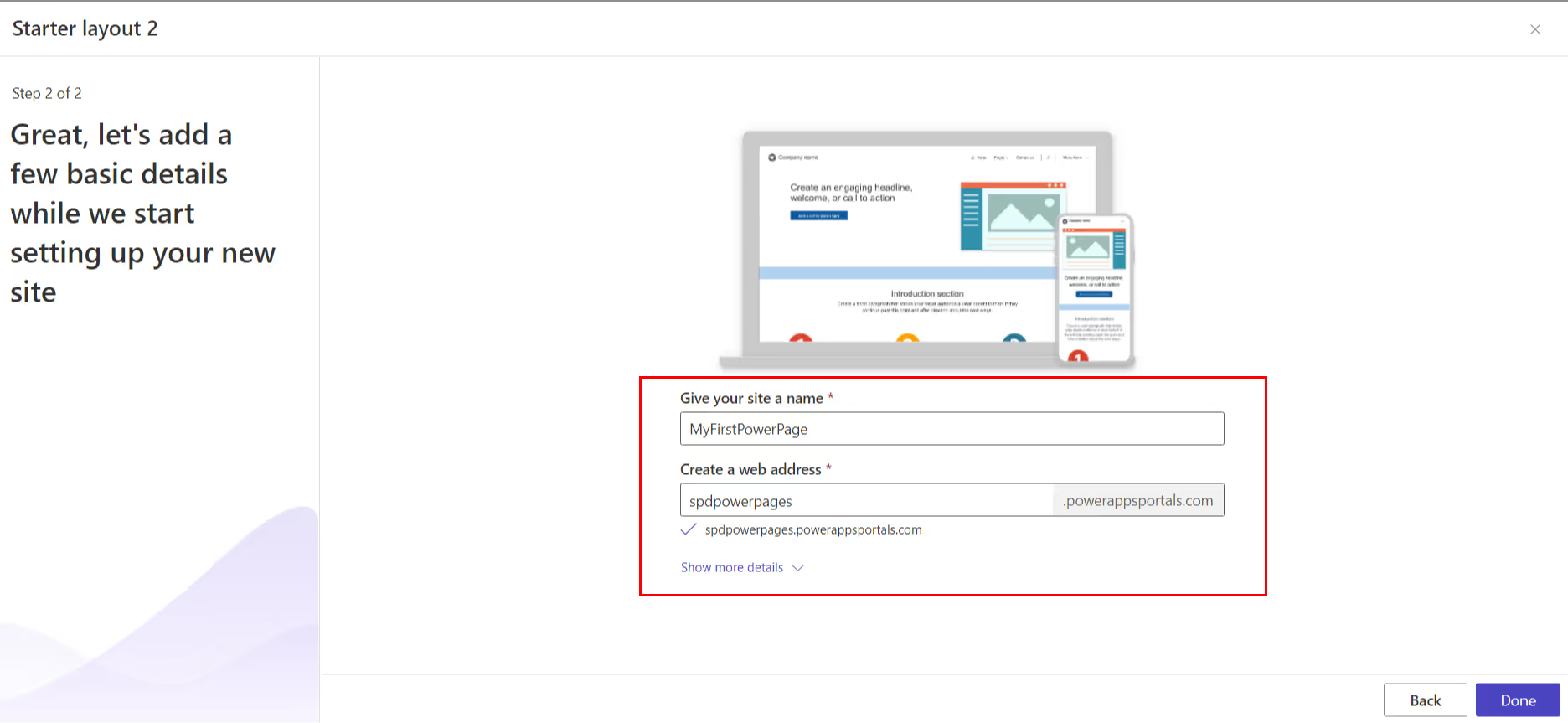
- Confirm and Proceed: Click Done to complete the initial setup.
2. Editing Your Power Pages Site
Once your site is ready, it's time to start editing. The Power Pages editor is user-friendly, featuring a drag-and-drop functionality to effortlessly add web parts from the Web Parts pane to your desired locations on the page.

To configure a web part, click on it, allowing you to adjust properties like alignment, links, and images.

3. Enabling Anonymous User Access
For sites that need to be accessible to anonymous users, follow these steps:
- Click Set up in the left navigation.
- Select Site visibility.
- Under Site visibility, opt for the Public setting.
- Click Set to public.

4. Preview and Go Live
Before going live, it's crucial to preview and ensure your site looks its best. You can do this by clicking the "Preview" button and choosing between the "Desktop" or "Mobile" options to test on various devices.

Sync your website. Once you are happy with your website, you can Sync it so that it is live and accessible to your users.

Tips for Crafting a Professional Power Pages Site
- Choose the Right Template: Select a template that complements your site's purpose and appearance.
- Quality Visuals: Incorporate high-quality images and videos to enhance visual appeal.
- Clear and Concise Content: Craft content that is both clear and easily comprehensible.
- Proofreading: Always proofread your content meticulously before publishing.
- Cross-Device Testing: Ensure your site functions seamlessly across different devices and browsers.
Examples of What You Can Create with Power Pages
- Create a company website to showcase your products or services.
- Establish a blog to share your expertise with your audience.
- Develop a knowledge base to offer support to your customers.
- Design an event website for promoting and registering attendees.
- Build a community website to facilitate user interaction.
While Power Pages works well for public-facing websites, many organizations also use SharePoint for internal portals and employee-facing experiences. Exploring modern intranet and portal structures can help you decide how these platforms complement each other.
Conclusion
Power Pages is an incredibly versatile platform for crafting professional websites, accessible even to non-coders. Its unique feature of allowing anonymous user access is a significant advantage for businesses seeking broader information sharing. To create a cohesive and successful site, remember to maintain consistent branding, implement responsive design, prioritize accessibility, keep content updated, and actively promote your site on various online channels, including social media. With these guidelines, you're well on your way to building a remarkable online presence with Power Pages.
Building a Power Pages site isn’t just about launch it’s about long-term usability. Teams that already manage SharePoint sites often find it easier to extend governance and structure across platforms when they understand how sites are planned and maintained in Microsoft environments.

4 Steps to Building Your Website with Power Pages: The Ultimate Guide
Power Pages is a remarkable low-code/no-code platform built on Microsoft Dataverse, designed for creating and managing websites with utmost ease.
In today's digital age, where connectivity and collaboration are paramount, an organization's intranet serves as the central hub for its employees. This in-house website brings together resources, documents, applications, and communication tools, fostering seamless interaction within the organization.
Crafting an intranet site that reflects the brand and engages employees is vital for a thriving workplace environment. The starting point of this engagement journey lies in homepage design. Here are five essential tips to create a best looking intranet homepage that ignites employee interest and participation.
1.Less is More: Embracing Simplicity
Simplicity is the cornerstone of effective design. An engaging intranet doesn't overwhelm users with cluttered layouts or excessive elements. Instead, it focuses on delivering the necessary information succinctly. A clean and organized design captures users' attention just as a well-presented meal appeals to the senses.
The "less is more" philosophy ensures that concepts are conveyed clearly without confusion. Drawing inspiration from successful brands like Apple and Google, we explore the power of minimalism in design, enhancing accessibility and user satisfaction.

Ignite Employee Love for Your Intranet: 5 Tips to Create an Engaging Homepage
In today's digital age, where connectivity and collaboration are paramount, an organization's intranet serves as the central hub for its employees.

In the ever-evolving world of software development, efficiency and accuracy are key. Microsoft has taken a giant leap in this direction this week with the introduction of Microsoft Copilot, a groundbreaking AI-powered assistant. Generative AI is proving to be a game changer in the technological landscape. As users become more familiar with it, they can expect a substantial increase in performance. This article examines the features, benefits, and potential impact of Microsoft Copilot, a game changer in the software development industry.
What is Microsoft Copilot?
The Microsoft 365 Copilot system is a triad of components: Microsoft 365 apps like Word, Excel, and Teams, where users can access and engage with the AI assistant; Microsoft Graph, encompassing files, documents, and data within the Microsoft 365 framework; and OpenAI models and apps such as ChatGPT-3, ChatGPT-4, DALL-E, Codex, and Embeddings. These models and apps are hosted within Microsoft's Azure cloud infrastructure.
Microsoft's Copilot is a segment of a broader initiative towards generative AI. Future includes specialized Copilots for Microsoft's Dynamics 365 business apps, Power Platform, the company's security suite, and the Windows operating system. With the integration of Copilot into the Power Platform, the ability to automate mundane task, manage more, develop chatbots, and transform a concept into a functioning app in mere minutes becomes accessible to everyone.
At the heart of Copilot, and other generative AI tools, lies the Large Language Model LLMS. These LLMs are akin to machine-learning networks trained via data input/output pairs, utilizing self-supervised or semi-supervised learning techniques. Essentially, the LLM consumes data and generates a response based on the algorithm's prediction of subsequent words. The content within an example LLM can be confined to exclusive corporate data or, as with ChatGPT, can encompass data sourced or scraped from the web.
The Transformative Impact of Microsoft 365 Copilot
Copilot's Objective: Automation and Efficiency
Copilot's objective is to create and to enhance workforce efficiency by automating routine task, for example, such as composing an email to client or assembling a slideshow. These subtitles help developers to organize the content into distinct sections, making it easier for readers and users to navigate and understand the various aspects of Copilot.
A Partner in Creativity
Microsoft 365 Copilot team is designed to be a creative partner, assisting customers in the generation of content, presentations, research and data analysis.
Co-pilot in Word
Imagine drafting a report or an article in Word, and Co-pilot suggests sentence structures, corrects grammar, and even proposes content based on feedback from your initial inputs. It could significantly speed up the writing process and improve the quality of the output.
Co-pilot in Excel
In Excel, Co-pilot could assist in data analysis by suggesting the most suitable formulas or charts based on the data you're working with. It could also automate repetitive tasks like data entry and sorting, allowing you to concentrate on more complex analyses.
Co-pilot in PowerPoint
When creating presentations, Co-pilot could offer design suggestions, recommend layouts, and even generate text for slides based on the topic you're presenting. This would make the process of creating professional-looking presentations much quicker and easier.
Co-pilot in Teams
In Microsoft Teams, Co-pilot could help by automatically summarizing meeting notes, pulling in relevant data from other Microsoft applications, and even suggesting follow-up task based on the meeting discussion.
Co-pilot in Outlook
For Outlook, imagine a Co-pilot app that drafts email responses for you based on the context of the incoming email. It could also prioritize your emails, for example, reminding you to respond to the most urgent ones first.
Co-pilot in Power Platform
In Power Platform, Co-pilot could assist in app development by suggesting the most efficient ways to build apps, automate processes, or analyze data. It could also provide real-time debugging support, making the development process smoother.
How to get Copilot for free?
Subscribers to Microsoft 365 E3, E5, Business Standard, and Business Premium plans can avail themselves of Microsoft 365 Copilot at a monthly fee of $30 per user. This pricing represents a significant increase over the current costs of existing Microsoft 365 subscriptions. You can access Microsoft Copilot for free during its preview phase by downloading the Copilot extension from the Visual Studio Code marketplace.
Unlocking the Potential of Data
One of the most significant technology challenges businesses face today is harnessing the vast reservoir of data. Copilot creates a new enterprise knowledge model:
Business Chat: This feature works across all business data and apps to surface information and insights from a sea of data, allowing knowledge to flow freely across the organization. It is designed to function across Large Language Models LLMS, Microsoft 365 apps, and your personal data and apps, encompassing calendars, emails, chats, documents, meetings, and contacts. This integration opens doors to capabilities that were previously out of reach.
For instance, you might want to inform your team about the progress on a specific project. With a simple natural language command to Business Chat, it can compile and generate a comprehensive update from your recent meetings, emails, and chat threads. Copilot ensures that you have the final say, giving you the flexibility to keep, modify, or discard any part of the generated content. This innovative approach not only enhances your creativity in Word but also boosts your analytical prowess in Excel.
Empowering Through Learning
Copilot is not a static feedback tool; it's designed to make users learn and grow:
Natural Language Prompts
Unlocking functionalities across Microsoft 365 becomes as simple as writing and speaking naturally.
Continuous Learning
Copilot can learn to create, integrate and manage new domains and processes, performing even more sophisticated tasks and queries over time.
A Commitment to Responsibility
Microsoft's approach to Copilot is grounded in responsibility:
Security and Compliance
Through the integration of two-factor authentication, adherence to compliance standards, and robust user privacy safeguards and user first, Copilot establishes itself as a trustworthy solution for customers.
Responsible AI
Microsoft's multidisciplinary team of engineers ensures that potential user harms are mitigated, and tools and technologies are applied to detect and correct data bias.
Benefits of using Microsoft Copilot:
- Increased productivity: Copilot can help you to be more productive by automating repetitive task and providing suggestions for how to improve your work.
- Improved accuracy: Copilot can help you to improve the accuracy of your work by providing suggestions for grammar, spelling, and punctuation.
- Enhanced creativity: Copilot can help you to be more creative by providing suggestions for new ideas and approaches.
- Simplified collaboration: Copilot can help you to collaborate with others more easily by providing a shared workspace where you can work together on documents and code.
Conclusion
Microsoft 365 Co-pilot is not just a feature but a comprehensive AI assistant that aims to revolutionize the way we work across multiple applications. By automating repetitive task and offering intelligent suggestions, it allows users to focus on more meaningful and productive work, thereby increasing overall productivity.
Microsoft Dynamic 365 co-pilot
In the fast-paced world of business technology, Microsoft has once again raised the bar with the introduction of Dynamics 365 Copilot. This AI-powered assistant is designed to streamline various business functions, from sales and customer service to supply chain management. Let's delve into what Dynamics 365 Copilot offers and how it's revolutionizing the way we work.
The Dynamics 365 Copilot: What Is It?
Dynamics 365 Copilot is an AI-driven assistant that aims to automate repetitive tasks across different business roles. It integrates seamlessly with CRM and ERP systems, automating manual data entry, content generation, and note-taking. This allows employees to focus on more creative and impactful aspects of their work.
In a recent exploration of business trends, our survey revealed that almost 90% of employees are eager to utilize AI to minimize repetitive aspects of their work. Microsoft Dynamics 365 Copilot offers organizations the opportunity to equip their workforce with AI-driven tools specifically designed for roles in sales, service, marketing, operations, and supply chain management. By leveraging these AI functionalities, professionals can focus more on the engaging and rewarding parts of their jobs, leaving mundane tasks behind.
Dynamics 365 Copilot, capitalizing on the latest breakthroughs in generative AI, automates these monotonous tasks, thereby unleashing the workforce's full creative potential. By putting CRM and ERP systems to more efficient use, Microsoft Dynamics 365 Copilot not only enhances the rate of innovation but also contributes to better results across all sectors.
Copilot in Sales and Customer Relations
The Copilot feature in Dynamics 365 Sales and Viva Sales helps sales representatives cut down on clerical work. For instance, it can draft email responses to customers and their requests and even summarize Teams meetings in Outlook, pulling in relevant CRM data like product and pricing information.
Copilot in Customer Service
In the realm of customer service, Dynamics 365 Copilot offers contextual answers to customer queries via chat and email. It also provides an interactive chat experience over knowledge bases and case history, ensuring that AI-powered expertise is always at hand.
Copilot in Marketing and Customer Insights
Marketers can benefit from Copilot in Dynamics 365 Customer Insights and Dynamics 365 Marketing. The AI assistant can help in data exploration, audience segmentation, and content creation. It can even suggest additional customer segments that may have been overlooked.
Copilot in Business Central and Online Commerce
Copilot in Supply Chain Management
In the supply chain sector, Copilot in Microsoft Supply Chain Center proactively identifies external issues like weather or financial fluctuations that could impact supply chain processes. It can review and then edit draft emails to alert partners and mitigate potential disruptions.
Power Platform Copilot
The Power Platform Copilot harnesses the capabilities of Dynamics 365 Copilot to offer additional functionalities. It makes it easier for customer service departments to build virtual agents in minutes, leveraging Azure OpenAI Service and Bing to provide answers from selected company websites and internal knowledge bases.
Conclusion
Dynamics 365 Copilot is not just another AI tool; it's a comprehensive solution designed to improve customer experience, employee satisfaction, and operational efficiency. Its integration across various functions makes it a game-changer in the world of business applications.
By adopting Dynamics Copilot, you're not just leveraging AI; you're embracing a future where AI works alongside humans to achieve work excellence.
Bing Chat Enterprise: Enhanced Search and Retrieval
Bing Chat Enterprise, is an AI-powered chat platform designed to facilitate work within organizations. It comes with robust commercial data protection features, ensuring that user and business data remain secure within the company. Bing Chat is available via bing.com/chat and the Microsoft Edge for Business sidebar. It is offered at no additional cost for customers who are licensed for Microsoft 365 E3, E5, Business Standard, Business Premium, or A3 or A5 for faculty.
Microsoft 365 Copilot leverages the intelligent ChatGPT engine, the same technology that powers Bing Chat, to enable users to search and retrieve both internal and external information effortlessly. But it goes a step further by integrating Bing Chat Enterprise with Microsoft 365 Graph and various Microsoft 365 apps. This integration empowers users to utilize AI assistance for projects within Office, enhancing efficiency and creativity. Both the individual user and the company's administrators retain full control, leading to substantial gains in productivity without compromising security or customization.
Benefits of Bing Enterprise
Data Security: One of the standout features is its commitment to commercial data protection. The platform ensures that chat data is not saved, and Microsoft does not have access to it. This ensures that your business data remains confidential.
Efficiency and Creativity: Bing Chat Enterprise is AI-powered, providing your workforce with better answers and greater efficiency. It also opens new avenues for creativity within the organization.
Managed Access: The platform allows for seamless, managed access control using Microsoft Entra ID (Azure Active Directory), making it easier for employees to log in and use the service.
How to Enable Bing Enterprise in Your Microsoft 365 Tenant?
Enabling Bing Chat Enterprise for your organization involves using Microsoft Entra ID (Azure Active Directory) for managed access control. While the blog did not provide step-by-step instructions, it is likely that further technical documentation is available for setting up Bing Chat Enterprise within your Microsoft 365 Tenant.
Key Takeaways
- Bing Enterprise is an AI-powered chat platform with robust data protection features.
- It aims to empower your workforce by providing better answers and fostering creativity.
- Managed access is provided through Microsoft Entra ID (Azure Active Directory).
- By integrating Bing Enterprise into your workflow, you can take your organization's communication and data protection to the next level.
GitHub Copilot: Unlocking Productivity
What is GitHub Copilot?
GitHub Copilot is an AI-powered pair programming tool that works directly within your code editor. It is designed to assist developers by providing code suggestions based on natural language prompts. Trained on billions of lines of code, GitHub Copilot is capable of offering coding suggestions across a multitude of programming languages.
Data from GitHub reveals that Copilot is poised to boost efficiency across the board. Among the developers utilizing GitHub Copilot, 88% report an increase in productivity, 74% find they can concentrate on more fulfilling tasks, and 77% acknowledge that it aids in spending less time on searching for information or examples. However, Copilot's impact goes beyond enhancing individual efficiency. It establishes create a novel knowledge framework for every company, transforming the way they operate.
Benefits of GitHub Copilot
1. Speed and Efficiency: GitHub Copilot speeds up the coding process by offering multi-line function suggestions, thereby allowing developers to concentrate more on business logic rather than boilerplate code.
2. Enhanced Security: The tool filters out common vulnerable coding patterns, adding an extra layer of security to your code.
3. Customization: GitHub Copilot offers recommendations based on the project's context and style conventions, allowing for a more personalized coding experience.
4. Learning and Adaptability: Whether you're working with a new language or framework, GitHub Copilot can assist you in navigating through the code, reducing the valuable time spent on documentation and web searches.
How to Get GitHub Copilot?
GitHub Copilot offers two main plans:
Copilot for Individuals: Priced at $10 per month or $100 per year.
Copilot for Business: Priced at $19 per user per month, with additional features like organization-wide policy management and corporate proxy support.
You can start a free trial or purchase a plan directly from GitHub's website.
Key Take aways
- GitHub Copilot is an AI-powered tool that enhances coding efficiency and security.
- It offers personalized suggestions based on the project's context.
- It is available in different plans to suit individual and business needs.
By integrating GitHub Copilot into your development workflow, you can significantly enhance your project' coding efficiency, security, and adaptability.
Conclusion: The Future of Work is Here
Microsoft 365 Copilot is more than a technological advancement; it's a philosophical shift in how we approach work. The Copilot System Next generation AI in Power Platform is changing how you write and develop low-code solutions, Microsoft Business Chat, Copilot in Excel, Copilot in Outlook. Copilot in Word, Copilot in Teams Meetings, Copilot in Meeting Recap, Copilot in PowerPoint. More visuals Copilot in Word writes, edits, summarizes, and creates. It recognizes the human need for creativity, purpose, and connection and leverages AI to enhance, not replace, those aspects.
By lightening the load of busy work, using less time, enhancing the user and ability to focus and connect through creativity, unlocking the potential of data, empowering through learning, and committing to responsibility, Copilot represents a holistic approach to the future of work.
It's not just about doing things faster or more efficiently; it's about reconnecting with the essence of our work, the life and soul of our team and company, our creativity and energy, and the heart of our purpose.
Microsoft 365 Copilot is not just a tool: it's a companion, a partner, and a catalyst for a new era of work. It's an invitation to explore, innovate, and transform. It's time to embrace it with Microsoft 365 Copilot. You can read more about

Microsoft's Generative AI: The Game Changer in Modern Collaboration
In the ever-evolving world of software development, efficiency and accuracy are key. Microsoft has taken a giant leap in this direction this week

Companies in various sectors depend on SharePoint Document Libraries as a robust solution for file storage, organization, and management. While these libraries already offer high levels of flexibility and power, their capabilities are dramatically expanded when combined with Microsoft Syntex. Together, these technologies form an intelligent ecosystem that redefines document management and accessibility. In today's world, where data is an invaluable asset, optimizing its management is crucial for any business. As a component of the Microsoft 365 suite, Microsoft Syntex is designed to transform the way organizations engage with their content. In this article, we'll explore the groundbreaking potential of integrating a SharePoint library and Syntex, and how it can be a game-changer for your enterprise.
What is Microsoft Syntex?
Microsoft Syntex is a cloud-based AI-powered content services platform that is part of the Microsoft 365 ecosystem. It leverages machine learning to automatically classify, extract, and process content, thereby transforming the way organizations deal with data. It's not just about storing documents; it's about making them smarter.
The Need for Content AI in Modern Business
The volume of data that businesses generate and consume is staggering. Manual data management is not just time-consuming but also prone to errors. This is where Content AI, a form processing model like the one provided by SharePoint Syntex, comes into play, automating repetitive tasks and offering insights that were previously impossible or very time-consuming to obtain.
The Power of No-Code AI
How Syntex's No-Code AI Enhances Content
Syntex uses no-code AI models that can be trained by any user, regardless of their technical expertise, to classify documents and process content. This democratizes the power of Artificial intelligence AI within the organization.
Real-world Examples of Workflow Simplification
For instance, a human resources department can train Syntex to automatically sort incoming resumes into different categories, thereby saving hours of manual work.
What is SharePoint Syntex?
SharePoint Syntex is designed to enhance SharePoint's capabilities by integrating AI-powered content management features. It automates the categorization of documents, extracts valuable insights, and even applies your organization's security and compliance policies automatically.
How much does SharePoint Syntex cost?
Initially, Microsoft set the price for the Syntex license at an extra $5 monthly per user. Therefore, it's prudent to first test the system's capabilities with a limited number of licenses before making a broader investment.
The system's automated sorting and labeling of content and file types within documents gain substantial value when integrated with other Microsoft 365 offerings like Power Automate or Power BI. However, fully realizing this potential requires discussions across various departments to pinpoint the most beneficial use cases.
How it Integrates with Microsoft 365?
Being a part of the Microsoft 365 suite, Syntex offers seamless integration with other Microsoft products like Microsoft Teams, Power BI, and Power Automate, thereby providing a unified experience across various business functions.
How to use SharePoint Syntex: Document understanding models
Unlike traditional form processing techniques, these models are adept at extracting information from the unstructured content of text documents, such as legal agreements or correspondence. Users need to upload text-rich files so that the model can understand which elements need classification and extraction. Built on Azure Cognitive Services language learning capabilities, these models are housed in SharePoint sites within a Content Center, which serves as the foundational template for your site's document libraries. To initiate the process, begin by adding five sample files and a single counter-example to the Content Center. The model then gets applied to your SharePoint site and document libraries to start classifying and extracting relevant information.
What are the benefits of Microsoft SharePoint Syntex?
Efficiency
One of the most significant advantages of Microsoft SharePoint Syntex is the automation of repetitive tasks. By leveraging AI, Syntex can automatically tag and categorize documents, saving countless hours of manual labor.
Accuracy
Traditional document management systems often rely on human input for content processing, image tagging, and categorizing, which can lead to errors. Syntex minimizes these errors by using machine learning algorithms trained on your specific content.
Security
With Syntex, you can set up advanced security protocols based on the content of the document itself. For example, if a document contains sensitive information, Syntex can automatically restrict access to sample documents to authorized personnel only.
Integration
Being part of the Microsoft 365 suite, Syntex offers seamless integration with other Microsoft products like Power BI, Power Automate, and Teams, providing a unified and streamlined user experience.
9 Key Features of Microsoft SharePoint Syntex
The cornerstone of SharePoint Syntex is its Content Center. To fully leverage Syntex capabilities, setting up a dedicated Content Center site template is indispensable. These specialized site types serve as the control hub for managing Syntex models, facilitating the incorporation of metadata and automated workflows to ensure compliance. Through machine learning tools, a Syntex model can be trained to interpret document content similarly to a human reader. The system then automatically identifies key content elements, extracts valuable information, and attaches metadata tags for easier search and organization.
1. Document Processing with Syntex
Tagging and Securing Information
In various sectors, SharePoint Document Libraries stand as a cornerstone for intelligent document processing, enabling organizations to store, organize, and manage a vast array of files. These libraries are inherently robust and flexible, but when augmented with Microsoft Syntex's document and content understanding models, they evolve into an advanced system for managing and retrieving documents. In a landscape where data has become a critical asset, leveraging advanced metadata search is essential for any business. As an integral part of the Microsoft 365 ecosystem, Microsoft Syntex aims to revolutionize the way companies interact with their digital content.
Syntex can automatically tag documents based on their content and apply security measures such as restricted access or encryption. One of the standout features of Microsoft Syntex is its automatic content tagging. Instead of manually sifting through documents and assigning tags, Syntex utilizes machine learning algorithms to analyze your document's content. It understands handwritten text in the context of existing documents, identifies key phrases, and relevant data, and then tags them appropriately. This leads to more accurate and faster search results, streamlining the way your team accesses information.
For instance, if you upload a legal document type of contract, Syntex can identify clauses, dates, parties involved, and other key elements. These are then tagged automatically, making it simpler to locate specific contracts based on any of these elements later on.
Advanced Security Measures
While it's crucial to make information accessible, it's equally important to protect sensitive data. Microsoft Syntex integrates seamlessly with Microsoft Information Protection to apply advanced security measures automatically. This includes:
Restricted Access
If a document contains sensitive data like customer details or proprietary algorithms, Syntex can automatically restrict its access to a predefined group of users.
Encryption
For highly confidential documents, Syntex can enforce encryption policies, ensuring that even if the document gets into the wrong hands, the content remains secure.
Compliance and Audit Trails
Automatically tagging and securing documents has another significant advantage: compliance. Syntex allows you to define specific compliance policies for different types of documents. It can even generate audit trails for user interactions with sensitive or regulated information, helping your organization meet legal and policy requirements.
2. Integration with Microsoft Azure and AI Builder
SharePoint Syntex also integrates with Azure's cognitive services and AI Builder, allowing for more advanced data processing capabilities like sentiment analysis or image recognition.
3. Translation and Summarization
Language Translation Features
Syntex supports multiple languages and can automatically translate documents, making it easier for global teams to collaborate.
4. AI-powered Content Summarization
It can also summarize long documents into shorter, more manageable versions without losing the essence of the content.
5. Content Assembly and Digital Media Processing
Auto-generating Documents with Templates
Syntex can auto-generate documents using predefined templates, which is particularly useful for creating contracts or reports.
6. Processing Images, Audio, and Video
It can also process and tag digital media like images, audio, and video, making them searchable and easier to manage.
7. Syntex and Business Workflows
eSignature and AI-powered Search
Syntex integrates with eSignature solutions and offers AI-powered search capabilities, making it easier to find, sign, and manage contracts and invoices.
8. Security and Content Management
Syntex Protector for Advanced Document Library Security
Syntex Protector ensures that sensitive documents are automatically identified and secured according to predefined policies.
9. Backup and Restore Functionalities
It also offers robust backup and restore functionalities, ensuring that your data is safe and easily recoverable.
Conclusion
Summary of Key Benefits
SharePoint Syntex is not just another document management system; it's a powerful tool that can transform how your organization manages and interacts with content.
How Syntex Can Transform Your Business Operations
By automating mundane tasks, a compliance service enhancing security, and offering unprecedented insights into your data, Syntex can significantly improve efficiency and decision-making processes.
How to Get Started with Microsoft Syntex
Ready to revolutionize your content management? Contact us today to get started with Microsoft Syntex.

Microsoft Syntex Pricing and SharePoint Syntex Features in 2023
Companies in various sectors depend on SharePoint Document Libraries as a robust solution for file storage, organization, and management.
In the digital age, the way businesses operate is constantly evolving. Two key players in this evolution are Power Apps and Artificial Intelligence (AI). Together, they're reshaping the future of business applications.
Power Apps: A Game-Changer in App Development
Power Apps, part of Microsoft's Power Platform, is a low-code development platform. It empowers everyone, from professional developers to tech-savvy business users, to create custom business applications. For instance, a retail company can use Power Apps to create a custom inventory management app, streamlining their stock control process. With Power Apps, the tedious, time-consuming coding process is replaced by a user-friendly, drag-and-drop interface. This democratization of app development accelerates digital transformation, making it accessible to all.
The Rise of AI in Business Applications
AI has been a buzzword for some time now. But it's more than just a trend; it's a revolution. AI's ability to learn, reason, and understand makes it a powerful tool in various business applications. For example, a healthcare provider can use AI to analyze patient data and predict health risks. From predictive analytics to customer service, AI is making its mark.
Power Apps and AI: A Powerful Combination
When Power Apps and AI come together, the possibilities are endless. But what exactly is Power Apps AI and how does it work? PowerApps AI refers to the integration of AI capabilities within the Power Apps platform. This integration allows users to leverage AI's capabilities without needing extensive coding knowledge.
Understanding Power Apps AI Builder
So, what is PowerApps AI Builder? AI Builder is a feature integrated with Power Apps that allows users to leverage AI's capabilities without needing extensive coding knowledge. It provides pre-built AI models in Power Apps that can be used directly in your apps, or you can build and train your custom models based on your data.
The Use of AI in Power Apps
What is the use of AI in Power Apps? AI in Power Apps is used to enhance the functionality and efficiency of business applications. For instance, a logistics company can use AI Builder in Power Apps to create a Power App that predicts delivery times based on traffic data. This not only improves the efficiency of delivery processes but also enhances customer satisfaction by providing accurate delivery estimates. This integration brings AI's power to the masses, making it a key player in the future of business applications.
Transforming Business Processes with Power Apps and AI
Power Apps and AI can streamline and automate business processes. For instance, a manufacturing company can use AI to predict equipment failures based on historical data. Power Apps can then use these insights to automate maintenance scheduling. This combination not only boosts efficiency but also enables data-driven decision-making.
Enhancing Customer Experience with Power Apps and AI
In today's customer-centric world, providing a personalized experience is crucial. Power Apps and AI can help businesses achieve this. A telecom company, for instance, can use AI to analyze customer data to gain insights into behavior and preferences. Power Apps can then use these insights to tailor the customer experience, such as recommending personalized data plans, boosting satisfaction and loyalty.
The Future of Power Apps and AI
The future of business applications lies in the convergence of Power Apps and AI. As AI technology advances and Power Apps continues to democratize app development, businesses can expect more sophisticated, personalized, and efficient applications. This fusion of Power Apps and AI is not just the future of business applications; it's the future of business itself.
Conclusion
The integration of Power Apps and AI is revolutionizing the way businesses operate. By democratizing app development and leveraging AI's capabilities, businesses can transform their processes, enhance customer experience, and make data-driven decisions. As we look to the future, the synergy of Power Apps and AI will continue to redefine the landscape of business applications. The future is here, and it's powered by Power Apps and AI.

The Future of Business Applications: Power Apps & AI
In the digital age, the way businesses operate is constantly evolving. Two key players in this evolution are Power Apps and Artificial Intelligence (AI).
Elon Musk once said, "Prototyping is easy but Production is hard." What if there is a magic wand that magically transforms your design from a prototype to a production user interface? Well, the app genies have heard your wish and created a magical Figma plugin - "Create Apps from Figma UI Kit (Preview)". Note: This is still a preview feature.
We at SharePoint Designs, will save you a significant amount of time and effort by creating flawless, trendy, modern & aesthetically pleasing power app solutions. We have been experimenting the Figma plugin and re-designed some of the sample apps from PowerApps and have also created some of our own apps.
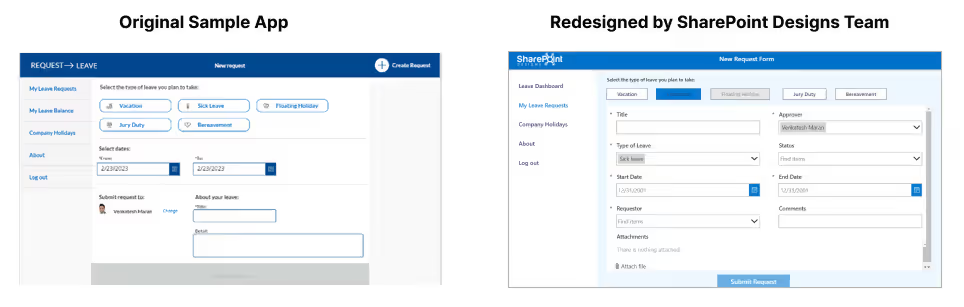
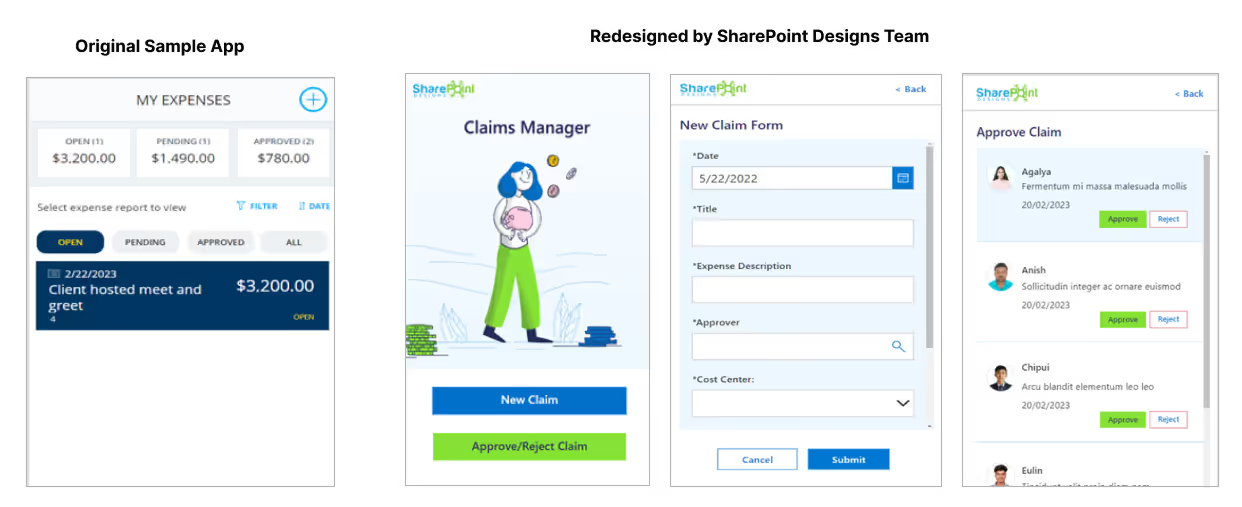
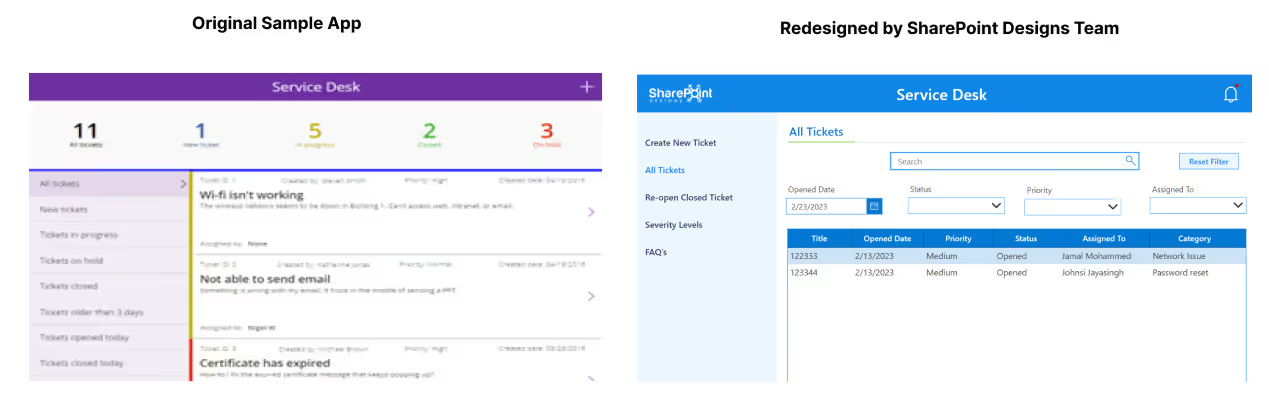
In this blog, we showcase the before and after versions of these apps using the Figma UI kit. By taking a look at the transformation for yourself, you'll be able to see the significant difference we can make in improving the design and user experience of your power apps.
1. Leave Request App
A leave request app can be used by employees across various industries and organizations, including small businesses, non-profits, and large corporations. By using a leave request app, employees can easily request time off and receive timely updates on the status of their request, while managers and HR personnel can more efficiently manage leave requests and ensure compliance with company policies and regulations. This can lead to improved employee satisfaction, better scheduling and resource allocation, and reduced administrative burden for HR personnel.
Some common features of a leave request app include the ability to submit and approve leave requests, the ability to view and manage leave balances, view holidays to plan the leaves, the ability to view and setup rules and policies around leave requests, and the ability to generate reports and analytics related to employee leave.
2. Claims Manager App
A Claims Manager App can be used by claims adjusters, insurance agents, healthcare providers, and other professionals involved in the claims process. By using a Claims Manager App, these professionals can streamline their workflows, reduce errors, and improve the overall efficiency and accuracy of claims processing. This can lead to improved customer satisfaction, reduced costs, and better compliance with regulatory requirements.
Common features of a Claims Manager App include the ability to submit and track claims, the ability to manage documents and other supporting evidence, the ability to communicate with customers and other stakeholders, and the ability to generate reports and analytics related to claims processing.
This version of the app is designed to be used in Mobile but it can be extended to Desktop / Tab as well.
3. Service Desk App
A Service Desk App is a software application designed to help organizations manage and track customer service requests and support inquiries. It provides a centralized platform for employees to handle customer queries, monitor service levels, and manage the resolution of customer issues.
Common features of a Service Desk App include the ability to submit and track service requests, the ability to assign and escalate tickets, reopen a closed ticket, the ability to communicate with customers and the ability to generate reports and analytics to monitor the service desk performance.
4. Quality Check App
This App was designed and developed by our Design Ninjas team of SharePoint Designs which includes Agalya, Jamal & Johnsi.
A quality check app can be used by individuals or teams responsible for ensuring quality control, such as quality assurance or quality control professionals, production managers, or field inspectors. By using a quality check app, these professionals can streamline their workflows, reduce errors, and improve the overall quality of their products or services.
This app can be used in various industries, such as manufacturing, healthcare, retail, and hospitality. It provides users with tools and features that allow them to track and monitor defects, identify potential issues, and implement corrective actions.

We at SharePoint Designs would be happy to help bring your ideas to reality in as early as 12 days. Please go through this infographic below to understand the detailed design and development process we follow to help you achieve your goals.
So what are you waiting for? Go ahead and submit the Contact us form to the right or shoot an email to sales@sharepointdesigns.com

Related Links

From Idea to Prototype: Using PowerApps to Build Interactive Apps
Elon Musk once said, "Prototyping is easy but Production is hard." What if there is a magic wand that magically transforms ...



.svg)





