Tech Ideas & Best Practices
Introducing Microsoft Copilot Studio
Microsoft Copilot Studio is an innovative platform enabling businesses to easily create and deploy intelligent AI assistants integrated seamlessly into familiar Microsoft 365 applications. With custom-built conversational agents, your organization can significantly enhance productivity, collaboration, and employee engagement.
The February 2025 release introduces exciting new capabilities, ranging from seamless integration within Microsoft Teams to advanced analytics, enhanced security, and expanded multilingual support.
Yet, leveraging such powerful technology can feel daunting, especially for organizations without dedicated internal resources.
That's why SharePoint Designs is offering a Free 1-Hour Consultation to help you understand exactly how Copilot Studio can be integrated effectively into your business workflows.
What's New in Copilot Studio – Simplified
1. Publish Custom AI Agents Directly in Microsoft 365
Easily publish AI agents into Microsoft 365(Teams), allowing natural interactions within familiar apps.
2. Powerful Enterprise Data Integration
Connect your AI assistants seamlessly with enterprise platforms like Salesforce, GitHub, and Stack Overflow using built-in Microsoft Graph connectors.
3. Reusable AI Components
Accelerate AI development by reusing conversational flows, knowledge bases, and automation triggers across different agents.
4. Enhanced Analytics & Robust Security
Gain clear performance insights through advanced analytics and protect your organization with improved built-in security features.
5. Multilingual & Developer - Friendly
Build agents quickly in new languages and leverage JavaScript support, making development accessible to more teams globally.
How SharePoint Designs Becomes Your Extended AI Team?
At SharePoint Designs, we recognize many businesses don't have the luxury of an in-house AI development team. That's exactly why our consultative approach is designed to seamlessly fit your needs. We’re not just external consultants—we function as your dedicated in-house AI developers, fully invested in your success.
We support you by providing:
1. Tailored Consultation & AI Strategy
Our specialists provide in-depth guidance, aligning Copilot Studio’s capabilities directly with your business objectives.
2. Custom Agent Development & Deployment
Our developers build, configure, and deploy custom AI solutions specifically tailored to your unique workflows and brand identity.
3. Effortless Enterprise Data Integration
We expertly handle connecting your AI agents with the relevant enterprise data sources, ensuring your AI delivers meaningful and precise answers.
4. Continuous Analytics & Optimization
We proactively monitor your AI agents, using detailed analytics to refine their effectiveness continuously.
5. Security & Compliance Management
We provide proactive security management, ensuring your AI solutions meet compliance standards and remain protected from evolving threats.
Get Started Today with a Free 1-Hour Consultation
Not sure how to start, or simply want a clearer vision of what Copilot Studio can do specifically for your business? We invite you to take advantage of our Free 1-Hour Consultation.
In this session, our SharePoint Designs experts will help you:
- Understand how Microsoft Copilot Studio fits within your unique business context.
- Identify immediate opportunities for automation and productivity gains.
- Develop an actionable roadmap for implementing custom AI solutions quickly.
This complimentary consultation is your first step towards leveraging Microsoft Copilot Studio’s powerful capabilities effectively—with SharePoint Designs acting seamlessly as your extended development team.
Ready to explore AI’s potential for your business?
Claim your Free 1-Hour Consultation now and let SharePoint Designs guide you toward smarter, more productive ways of working.
Maximize Your AI Potential In-House with Copilot Studio & SharePoint Designs - No Hiring Overhead!
Microsoft Copilot Studio is an innovative platform enabling businesses to easily create and deploy intelligent AI assistants integrated seamlessly into familiar Microsoft 365 applications.

In today’s digital-first world, businesses are constantly seeking ways to improve collaboration, streamline workflows, and enhance productivity. Microsoft SharePoint has emerged as a leading platform for achieving these goals, offering robust tools for document management, intranet development, and workflow automation. However, implementing and optimizing SharePoint requires specialized expertise, which is where SharePoint consulting services come into play.
This comprehensive guide dives deep into SharePoint consulting services, exploring their benefits, processes, and best practices. Whether you’re considering a SharePoint migration, custom development, or governance strategy, this blog will equip you with the knowledge to make informed decisions and maximize your SharePoint investment.
1. Introduction to SharePoint Consulting Services
What is SharePoint Consulting?
SharePoint consulting involves partnering with experienced professionals who specialize in designing, implementing, and optimizing SharePoint solutions tailored to your business needs. These consultants bring technical expertise, industry knowledge, and best practices to ensure your SharePoint environment is efficient, secure, and aligned with your organizational goals.
SharePoint consultants help businesses navigate the platform’s complexities, from initial setup to ongoing management. Whether you’re migrating from an older version, customizing workflows, or ensuring compliance, SharePoint consulting services provide the guidance and support you need to succeed.
Why Businesses Need SharePoint Expertise
While SharePoint is a powerful platform, its implementation can be challenging without the right expertise. Common pain points include:
- Difficulty in customizing SharePoint to meet specific business needs.
- Challenges in integrating SharePoint with existing systems and tools.
- Ensuring data security and compliance with industry regulations.
- Managing the platform efficiently without overburdening internal IT teams.
SharePoint consultants address these challenges by providing tailored solutions, ensuring smooth implementation, and helping businesses unlock the platform’s full potential.
Comprehensive Guide to SharePoint Consulting Services – Benefits, Process, and Best Practices
In today’s digital-first world, businesses are constantly seeking ways to improve collaboration, streamline workflows, and enhance productivity.
As organizations adapt to the demands of modern workplaces, selecting the best intranet software has become crucial for streamlining workflows, enhancing collaboration, and fostering employee engagement. Among the top contenders in the industry, Microsoft SharePoint continues to shine as a versatile, feature-rich solution. Let’s compare SharePoint with its key competitors and explore why it remains the preferred choice for businesses in 2025.
1. Microsoft SharePoint
Overview:
SharePoint is a highly customizable and scalable intranet solution that integrates seamlessly with the Microsoft 365 ecosystem. Trusted by organizations of all sizes, it offers a range of advanced features for collaboration, document management, automation, and security.
Key Features:
- Deep integration with Microsoft 365 tools like Teams, Power Automate, and Outlook.
- Advanced document management with metadata tagging, AI-powered search, and version control.
- Customizable intranet layouts and workflows tailored to business needs.
- Enterprise-grade security features, including role-based access and compliance tools.
- Scalable solutions for both SMBs and global enterprises.
Why Choose SharePoint?
SharePoint stands out as the most comprehensive and best intranet solution, offering a secure and scalable digital workplace. SharePoint’s versatility makes it a strong foundation for businesses seeking to build a modern and secure workplace. With the support of expert SharePoint consulting services, businesses can unlock the full potential of this powerful intranet platform.
2. Google Workspace Intranet
Overview:
Google Workspace offers basic intranet functionality through tools like Google Sites and Drive. It is a lightweight solution designed for simplicity and ease of use, making it a popular choice for startups and small teams.
Key Features:
- Ease of Use: Intuitive interface for quick setup and collaboration.
- Cloud-Based: Fully cloud-native, ensuring accessibility from anywhere.
- Integration: Works seamlessly with other Google tools like Gmail, Calendar, and Docs.
- Limitations: Lacks advanced document management, metadata tagging, and workflow automation.
- Best For: Small teams prioritizing simplicity over complexity.
While Google Workspace excels in user-friendliness and basic collaboration, businesses requiring more robust features like automation, compliance tools, and advanced security often look to SharePoint for a more comprehensive solution. Google Workspace lacks advanced document management. It’s suitable for basic needs but falls short for businesses requiring enterprise-grade features.
3. Atlassian Confluence
Overview:
Confluence is a knowledge management and collaboration platform widely used by agile teams in technology and software development. It provides tools for creating wikis, sharing knowledge, and managing projects.
Key Features:
- Knowledge Management: Great for creating and sharing internal documentation.
- Project Collaboration: Works well with Jira for agile project management.
- Search: Basic search capabilities for finding pages and content.
- Limitations: Limited automation, customization, and advanced document management.
- Best For: Tech-savvy teams managing documentation-heavy workflows.
Confluence serves as a strong option for knowledge sharing but lacks the comprehensive capabilities of a platform like SharePoint for managing complex workflows, compliance, and enterprise-grade document management.
4. Slack with Intranet Add-Ons
Overview:
Primarily a communication platform, Slack can function as a lightweight intranet when integrated with third-party tools. It’s ideal for teams prioritizing real-time collaboration.
Key Features:
- Real-Time Messaging: Exceptional for instant communication.
- Integration-Friendly: Connects with numerous third-party apps.
- Collaboration: Supports file sharing and team channels.
- Limitations: No native document management or automation capabilities.
- Best For: Small to medium teams looking for enhanced communication.
Slack’s real-time communication is its strength, but its reliance on third-party integrations to mimic intranet functionalities can lead to fragmented workflows compared to SharePoint’s all-in-one platform.
5. Workplace by Meta
Overview:
Workplace by Meta is a social collaboration platform designed to engage employees through a social media-like experience. It emphasizes communication and engagement over technical features like document management.
Key Features:
- Social Collaboration: Feeds, chat, and live video features.
- User-Friendly: Familiar social media-style interface.
- Limitations: Minimal document management, no automation, and weak integration options.
- Best For: Companies focusing on improving employee engagement.
Workplace by Meta is a good choice for organizations prioritizing social engagement. However, it lacks the depth and flexibility of SharePoint, especially for enterprises managing large-scale workflows and documents.
6. Staffbase
Overview:
Staffbase is a leading employee experience platform, focused on improving communication and engagement through user-friendly tools. It’s an excellent choice for companies prioritizing employee interaction and alignment.
Key Features:
- Intuitive employee communication tools, including branded mobile apps.
- Pre-designed templates for quick intranet deployment.
- Easy integration with HR systems and analytics tools.
- Strong focus on employee engagement and communication.
Limitations:
Staffbase excels in engagement but lacks advanced document management, workflow automation, and AI-powered features. For businesses looking for a balance between communication and comprehensive collaboration tools, SharePoint is often the better choice.
7. Unily
Overview:
Unily is a modern intranet platform designed to offer seamless user experience with a heavy focus on user engagement, collaboration, and analytics.
Key Features:
- Highly polished and visually engaging user interface.
- Strong integration with tools like Microsoft 365 and Google Workspace.
- Built-in analytics to track employee engagement and content effectiveness.
- Personalization capabilities for tailored employee experiences.
Limitations:
Unily focuses more on aesthetics and engagement but lacks the deep integration and customization capabilities of SharePoint. For organizations needing extensive workflow automation and enterprise-level security, SharePoint remains the go-to choice.
Why SharePoint is the Best Intranet Software for 2025
While competitors like Google Workspace, Confluence, Slack, and Workplace by Meta each offer unique strengths, SharePoint stands out as the most well-rounded intranet solution.
Here’s why:
- Comprehensive Features: SharePoint combines collaboration, document management, automation, and compliance into one platform.
- Seamless Integration: Deep connectivity with Microsoft 365tools ensures a unified digital workplace.
- Customizable Solutions: SharePoint can be tailored to fit any organization’s unique workflows and branding.
- Enterprise-Grade Security: With advanced encryption, role-based access control, and compliance tools, SharePoint ensures your data remains protected.
It combines the best features of its rivals like robust collaboration, advanced document management, and enterprise-grade security into one comprehensive platform. SharePoint’s ability to integrate with Microsoft 365 tools, automate workflows with Power Automate, and provide AI-powered features like Syntex makes it the ultimate choice for businesses seeking a future-proof intranet.
How SharePoint Consulting Services Enhance Your Intranet
Implementing and customizing SharePoint requires expertise to unlock its full potential. Utilizing expert SharePoint consulting services, businesses can:
- Build fully customized intranets tailored to their specific needs.
- Streamline workflows and automate repetitive tasks with Power Automate.
- Ensure a seamless migration to SharePoint Online with minimal downtime.
- Enhance user adoption through training and support.
At SharePoint Designs, we have successfully delivered over 100 customized intranet solutions and automated 200+ processes, making us a trusted partner for businesses aiming to optimize their digital workplace.
Conclusion: SharePoint for the Modern Workplace
The intranet software landscape in 2025 is diverse, with many options catering to specific business needs. However, SharePoint remains the best intranet software for organizations looking for a scalable, secure, and feature-rich platform. Partnering with SharePoint Designs ensures your business leverages expert SharePoint consulting services to create a high-performance digital workplace and also specialize in tailoring SharePoint solutions that meets today’s demands and prepares for the future.

Best Intranet Software Platforms & Solutions for 2025
As organizations adapt to the demands of modern workplaces, selecting the best intranet software has become crucial for streamlining workflows

Managing permissions and user access in SharePoint is a critical aspect of site administration, especially when onboarding new users. SharePoint's REST API offers so many functionalities, including the ability to share files and send invitations. Here, in this blog, we will focus on how to use this API to add users to a SharePoint site and send them customized body invitations.
By using SharePoint Framework (SPFx) and the SharePoint REST API, you can automate this process, ensuring users are added to groups and send invitations link to the site. In this blog, we’ll walkthrough how to build a function in SPFx that adds users to a site group by their email, Azure Active Directory (AAD) ID, and SharePoint group ID, and sends a personalized email invitation automatically.
Step-by-Step Solution to Add Users and Send Invitations
We’ll break down the steps in implementing this functionality below,
1. Writing the Function to Send Email Invitations
Below is the code for the function that adds users to a SharePoint site's group and sends them an email invitation. It accepts parameters to specify the user’s email, Azure AD ID (aadId), and SharePoint group ID. The email content is predefined within the function.
2. Key Function Parameters Explained
This function accepts the following key parameters:
- context: WebPartContext: Provides the context of the current SharePoint site or page. It’s used to obtain the site URL and to make HTTP requests using spHttpClient.
- userEmail: string: The email address of the user you want to invite.
- groupId: string: The SharePoint group ID to which the user will be added.
- aadId: string: The unique Azure Active Directory (AAD) ID of the user, which ensures that the correct user is resolved in SharePoint, especially when email addresses or display names may not be unique.
3. How the Function Works
3.1 Constructing the API Request
The core part of this function is sending a POST request to SharePoint’s REST API endpoint /SP.Web.ShareObject, which handles sharing and adding users. The peoplePickerInput is where the user’s email and Azure AD ID are included, which helps SharePoint resolve the correct user.
3.2 Customizing the Invitation
The emailProperties object allows you to configure the content and behavior of the invitation. For instance, the roleValue field specifies the SharePoint group to which the user will be added by using groupId, and the emailBody is predefined to send a welcoming message to new users.
3.3 Sending the API Request
Once everything is configured, the function uses spHttpClient.post() to send the request to SharePoint. It handles both adding the user to the group and sending the email invitation.
The response is checked for success, and any errors encountered during the process are logged.
4. Additional Improvements and Best Practices
Here are a few suggestions to further enhance the solution:
- Dynamic Group Assignment: Modify the groupId parameter to dynamically select different SharePoint groups based on the user's role or other conditions.
- Bulk Invitations: Extend the functionality to handle bulk user invitations by passing an array of emails and looping through them.
- Automation with Power Automate: Further automate this API using Power Automate, enabling seamless integration with SharePoint workflows.
Conclusion
The process of adding users to SharePoint groups and sending personalized invitations using SPFx and the SharePoint RESTAPI can significantly streamline your SharePoint site management tasks. It saves time, improves the user onboarding experience, and ensures consistency.
Moreover, by integrating this solution with Power Automate, you can trigger these invitations automatically based on specific events or workflows, making the process even more efficient.
Stay tuned for future blogs where we'll explore more ways to automate and enhance SharePoint site management!

Triggering Out of Box User Invitations for a SharePoint Site Using SPFx and REST API
Managing permissions and user access in SharePoint is a critical aspect of site administration,

Welcome to 2025, where trends are shinier, smarter, and packed with all the good stuff! When it comes to intranet designs, predicting trends is kind of like weather forecasting, sometimes you nail it, and other times you’re caught in the rain without an umbrella. So, grab your coffee, and let’s explore what the future holds! Whether you’re in logistics, pharmaceuticals, or even organic food, we’ve got the best intranet design examples for 2025 tailored to your needs.
What is an intranet?
An intranet is like a private website or network that only people working in your company, can use.
Think of it like a club with a secret password. Once you're inside, you can share files, send messages, and access important tools and information, but only the people who are part of the group can join. It keeps everything safe, organized, ad easy to find without letting strangers see what’s inside.
Why Intranet?
Here's a short video explaining why you need an intranet for your company:
Here we present our Top 10 Trending Intranet Examples for 2025
From SharePoint services to industry-specific solutions, here are the top SharePoint intranet ideas designed to meet unique business requirements:
1. Logistics Industry SharePoint Design
Designed to streamline operations, track shipments, and centralize warehouse data.

2. Pharmaceutical Industry SharePoint Design
Built for compliance tracking, secure document management, and research collaboration.

3. Interior Decors Company SharePoint Design
Perfect for managing design projects, sharing portfolios, and enhancing team collaboration.


Intranet Trends of 2025!
Welcome to 2025, where trends are shinier, smarter, and packed with all the good stuff! When it comes to intranet designs,

Is it not amazing that 2025 has arrived? If you're still processing 2020, like me, it must be a major shock!
We are always excited and full of expectations regarding what the new year will bring while we prepare to greet it! At least for the initial days, until that rush wears off and vanishes forever. Alright, so what are the upcoming design trends for 2025? Here is what I anticipate and expect will be the trend, although I neither own the crystal ball nor am able to accurately forecast it.
1. Color of the year - 2025
The 2025 Pantone Color of the Year, PANTONE 17-1230 Mocha Mousse, has been revealed. This rich, chocolatey brown is a flexible option for a range of design applications since it radiates warmth and sophistication. According to Leatrice Eiseman, executive director of the Pantone Color Institute, Mocha Mousse is a multimodal experience that mimics common joys by appealing to taste, smell, and sight.

2. Sustainable Design
Sustainability would remain a key focus, influencing everything from physical products to UI/UX design. In digital spaces, designers are embracing eco-conscious practices by optimizing designs for energy efficiency, like using dark modes and lightweight assets to reduce power consumption. Similarly, brands are emphasizing their green credentials more than ever, showcasing eco-friendly practices in both their physical and digital experiences.
3. Inclusive Design
Inclusive design in UI/UX focuses on creating digital experiences that are accessible and usable by people of all abilities, ages, and backgrounds. It ensures designs cater to diverse needs, incorporating features like scalable text, high-contrast visuals, and keyboard navigation. Following WCAG (Web Content Accessibility Guidelines), inclusive design emphasizes principles such as perceivable content (e.g., alt text for images), operable interfaces (e.g., no time-sensitive tasks), understandable layouts (e.g., consistent navigation), and robust compatibility (e.g., assistive technologies). Inclusive design not only promotes accessibility but also enhances usability for everyone, creating equitable and enjoyable experiences.
4. Biophilic Design
Biophilic design in UI/UX brings elements of nature into digital experiences to promote a sense of calm and connection. This can include using nature-inspired color palettes like greens and earthy tones, organic shapes, and visual textures resembling wood or stone. Incorporating dynamic elements like flowing water animations or ambient sounds can further enhance this connection. By mimicking natural patterns and rhythms, biophilic design aims to reduce digital fatigue and create interfaces that feel more soothing and harmonious, fostering better user engagement and well-being.
5. Minimalism
Less is still more, with minimalism evolving into a blend of simplicity and functionality. Clean lines, white space, uncluttered elements, and intentional design choices will remain in focus. The new wave of minimalism incorporates warmth through earthy and neutral color palette, making it feel more inviting and less clinical.
6. AI as a Mainstream Design Tool
AI is transforming design by automating repetitive tasks and offering personalized solutions. From generating ready-to-go websites to customizing user experiences in real time, AI is now a staple tool for creatives. Expect smarter interfaces, adaptive branding, and hyper-personalized marketing to dominate the scene.
7. Organic Shapes
Goodbye rigid lines and hello flowing curves! Organic shapes inspired by nature—like waves, clouds, and pebbles might shape designs in 2025. These forms create a sense of movement and softness, giving a more human touch to digital and physical products alike. They’ll show up in everything from furniture to web designs.
8. Virtual Reality
VR is moving beyond gaming into mainstream applications like virtual showrooms, immersive training, and 3D design previews. Designers will focus on creating seamless, interactive, and hyper-realistic virtual environments. With accessibility improving, VR is set to transform how we engage with brands and products.
9. Voice and Conversational Interfaces
Voice-first interfaces are becoming more intuitive and widespread, thanks to advancements in AI. Think smart assistants that understand context and emotions better. These interfaces will be integrated across devices, focusing on creating smooth, natural conversations that feel less robotic and more human-like.
10. Ethical Design
Designing with ethics in mind means prioritizing transparency, inclusivity, and sustainability. It’s about creating solutions that are good for people and the planet, avoiding manipulative practices. In 2025, brands will embrace ethical storytelling, fair data usage, and socially responsible strategies to win consumer trust.
Conclusion
Design trends are undoubtedly moving in the direction of a future that prioritizes sustainability, diversity, and creativity as we are moving into 2025. Design is changing to meet the demands of a diverse and dynamic society, from biophilic components and eco-friendly materials to AI-driven personalization and immersive technologies like virtual reality. These themes represent a broader movement toward producing experiences that are ethical, meaningful, and user-focused rather than only being aesthetically pleasing. 2025 is looking to be a year where purpose and creativity come together in novel and fascinating ways, whether you're a designer or just an interested bystander.

Top Design Trends of 2025!
We are always excited and full of expectations regarding what the new year will bring while we prepare to greet it! At least for the initial days,
As digital products expand worldwide, we must create culturally sensitive UI/UX designs. They are vital for engaging and satisfying diverse users. Gone are the days when translation alone was sufficient for localization. To design products that resonate worldwide, we must understand cultures. We need to know their values, norms, and aesthetics.
In 2025, designers must be aware of users' diverse regional sensitivities. This guide covers essential aspects of culturally sensitive design in India, the U.S., the U.K., Germany, Australia, the Middle East, China, and Japan.
1. India: Celebrating Diversity and Localization
In a diverse country like India, it's crucial to recognize regional and cultural nuances for product adoption. Here’s how to design for Indian users:
- Language Diversity: India has over 20 official languages. Supporting regional languages such as Hindi, Tamil, and Bengali enhances inclusivity. Designers should account for text expansion and ensure UI flexibility.
- Color Sensitivity: Colors hold deep cultural significance. For example, red represents celebration, while white may signify mourning. Mindful color choices foster connection and avoid cultural missteps.
- Religious and Cultural Imagery: Religion is central to daily life. So, using respectful, relevant symbols helps maintain harmony. Avoid icons or colors tied to specific beliefs.
- Localized Payment Methods: Integrating popular methods, like UPI, boosts local usability.
2. United States: Inclusivity and Accessibility
In the U.S., inclusivity and accessibility are top priorities. They shape key UI/UX design principles.
- Color and Symbols: Use neutral colors to avoid unwanted associations. Avoid politically charged colors, like red and blue.
- Privacy and Transparency: We need explicit consent, with a focus on data privacy. Transparent data use policies are essential. Interfaces typically offer options for users to control their personal data, fostering trust.
- Accessibility Standards: Accessibility features are standard. They include screen readers, high-contrast themes, and keyboard navigation. Adhering to WCAG 2.1 requirements ensures inclusivity for users of all abilities.
3. United Kingdom: Tradition Meets Modernity
UK design combines tradition with contemporary aesthetics, favoring refined, polished interfaces.
- Subtle Design Language: British users often prefer muted color schemes with minimalistic layouts. Elegance and simplicity resonate well.
- Tone of Voice: A polite, formal tone aligns with British norms, contrasting with the more casual tone common in the U.S.
- Local Formats: Designs adopt the British date format (DD/MM/YYYY) and British English spellings, creating a sense of familiarity.
4. Germany: Structure, Directness, and Privacy
German design reflects values of clarity, structure, and privacy.
- Formal Layouts: Germans favor clear, direct interfaces with structured hierarchy. Functional designs with minimal embellishments suit German preferences.
- Privacy Consciousness: Germany’s strict data laws require detailed consent forms and privacy options. They ensure transparency.
- Direct Language: Germans appreciate straightforward, precise language, enhancing clarity and trust.
5. Australia: Relatable and Accessible Design
Australia’s laid-back culture favors approachable, nature-inspired designs.
- Friendly Tone: Australians prefer a friendly, conversational tone. It creates a relaxed, user-friendly experience.
- Nature-Inspired Imagery: Australians love the outdoors and value sustainability. So, eco-friendly themes and nature imagery align with their values.
- Accessibility Focus: High-contrast color schemes and clear fonts make apps inclusive. They help elderly users.
6. Middle Eastern Countries: Cultural Sensitivity and RTL Support
In Middle Eastern cultures, design must respect cultural values and language preferences.
- RTL Language Support: Arabic-speaking countries read right-to-left, requiring mirrored design layouts. Proper text alignment, icon placement, and navigation enhance usability.
- Symbolic Colors and Patterns: Green has religious significance, and ornamental patterns are popular. Gold, symbolizing luxury, is also prevalent in UI elements.
- Content Moderation: Imagery should respect cultural norms, especially regarding modesty and symbolism. Avoiding certain animals or icons prevents cultural missteps.
7. China: Dense Information and Super App Experience
China’s unique digital ecosystem favors multifunctional apps with information-rich layouts.
- Dense Information Display: Chinese users prefer data-dense layouts. They like compact, accessible icons, banners, and notifications.
- Red and Gold Colors: Red signifies prosperity, and gold is associated with wealth. These colors, especially popular around festivals, add a culturally resonant touch.
- Super Apps and Mini-Programs: Multi-functional apps like WeChat combine many services in one interface. This meets users' demands for convenience and a single, powerful app.
8. Japan: Simplicity, Balance, and “Kawaii” Aesthetics
Japan’s design philosophy emphasizes balance, simplicity, and a touch of playfulness.
- Minimalism and Harmony: Japanese design favors minimalism. It prefers clean layouts with ample whitespace. This reflects Zen-inspired aesthetics.
- Politeness in UX Writing: UX writing in Japan is often polite and formal, aligning with cultural norms around respect.
- “Kawaii” Elements: Cute, whimsical design elements are popular, adding charm to interfaces even in formal applications.
General Tips for Culturally Sensitive UI/UX Design in 2025
- Flexible Design Options: Let users customize themes or colors to match their cultural preferences. This creates a personalized experience.
- Date, Time, and Currency Localization: Adapting these to local formats boosts usability and familiarity.
- Inclusive Imagery: Use diverse representation in imagery to make users feel seen. Icons and avatars can reflect a range of skin tones, attire, and cultural elements.
- User Research and Feedback: Testing designs with local users uncovers their preferences. It ensures the design resonates with them.
- Respect for Privacy: Privacy standards vary by country. Transparent design with data control options builds trust, especially in privacy-conscious cultures.
Conclusion: Moving Beyond Translation to Cultural Resonance
Cultural sensitivity in UI/UX design is not a luxury but a necessity. Understanding and honoring each region's cultural nuances fosters trust and deepens engagement. By designing with respect for unique cultural values and aesthetics, we create digital spaces that welcome and serve users worldwide.
Cultural Sensitivity in UI/UX Design: A Global Perspective for 2025
As digital products expand worldwide, we must create culturally sensitive UI/UX designs. They are vital for engaging and satisfying diverse users.

Launching or re-launching an intranet is a crucial milestone for organizations aiming to enhance collaboration, communication, and productivity. A poorly planned rollout can lead to low adoption rates, while a well-executed launch sets the stage for a thriving digital workplace. To help you get it right, here’s a top 10 intranet checklist to ensure your launch is seamless and impactful.
Define Clear Goals and Objectives
Before diving into the technical details, define what you want to achieve with your intranet.
- Is it better communication across teams?
- Improved access to resources?
- Enhanced employee engagement?
- Setting measurable goals will help guide the design and functionality of your intranet.
Engage Stakeholders Early
Involve key stakeholders like HR, IT, department heads, and end-users from the beginning. Their input ensures the intranet addresses diverse needs and gets buy-in across the organization. Conduct surveys or focus groups to gather feedback on what employees expect.
Design an Intuitive User Experience (UX)
Your intranet should be easy to navigate and visually appealing. A cluttered interface leads to frustration and low usage.
- Use consistent navigation menus.
- Group content logically by department or function.
- Prioritize mobile responsiveness for on-the-go access.
Focus on Content Quality
Ensure the content is relevant, engaging, and up-to-date.
- Create content guidelines for contributors.
- Assign ownership for key pages to ensure accuracy.
- Highlight essential resources like policies, forms, and FAQs.
Customize for Your Organization’s Needs
A one-size-fits-all approach doesn’t work for intranets. Leverage customization to make the platform reflect your brand and culture.
- Add custom branding and themes.
- Create departmental hubs for team-specific tools.
- Integrate third-party apps like Microsoft Teams or Slack.
Test, Test, Test
Testing ensures a smooth user experience at launch.
- Conduct usability tests with a sample of employees.
- Test across devices and browsers.
- Check search functionality, permissions, and integrations.
Develop a Training and Onboarding Plan
An intuitive design helps, but employees still need training to fully leverage the intranet.
- Offer live demos or video tutorials.
- Create a guide for new hires to get familiar with the platform.
- Provide ongoing support for technical issues.
Plan an Exciting Launch Campaign
Build excitement around the launch to encourage adoption.
- Send teasers or sneak peeks to employees.
- Host a launch event, either in-person or virtual.
- Use gamification like contests or rewards for early adopters.
Monitor Adoption and Collect Feedback
After the launch, track how employees are using the intranet.
- Use analytics to monitor logins, time spent, and popular pages.
- Send periodic surveys to gather user feedback.
- Be prepared to make adjustments based on what you learn.
Establish a Governance Plan
Ensure your intranet remains relevant and valuable over time.
- Assign a team or committee to oversee updates and maintenance.
- Schedule regular reviews of content and features.
- Define roles for administrators, editors, and content creators.
Conclusion
Launching a successful intranet requires meticulous planning, collaboration, and follow-through. By using this checklist, you can create a platform that employees will love, ensuring it becomes an integral part of your digital workplace.
Let me know if you’d like to customize this further for your audience!

Top 10 Intranet Launch Checklist Items You Can’t Afford to Miss
Launching or re-launching an intranet is a crucial milestone for organizations aiming to enhance collaboration, communication, and productivity.
What is Microsoft Loop?
Microsoft Loop is an innovative collaborative workspace tool designed to help teams work together seamlessly in real time. Here's some of the features facilitates by Microsoft Loop,
Collaborative Workspace Tool
- Facilitates team collaboration by providing shared spaces where members can co-create, brainstorm and manage projects collectively.
- Provide Workspaces to consolidate ideas, discussions and project plannings.
- Integrates with Microsoft Planner and To-Do to assign and track tasks
Component based collaboration
- Enables sharing and embedding portable content blocks, known as Loop components, across various apps for streamlined teamwork.
- Shared the same content in Teams chat, emails
Real time syncing
- Ensures updates are instantly reflected everywhere a component is used, keeping everyone on the same page.
- Multiple team members can edit simultaneously.
Flexible Canvases
- Offers adaptable workspaces and pages that can accommodate a wide range of project needs, providing creative freedom and enhanced organization.
Core Elements of Microsoft Loop
Every tool has been built with different components or elements. Likewise, Microsoft Loop consists of three main elements to enable the collaboration between the teams. Those are,
Loop Workspaces
- Collaborative Hubs for Teams: Broader environments designed for managing related Loop pages and components in one place
- Centralized Organization: Consolidates all project information in one location for easy access and management.
- Contextual Progress Tracking: Offers visibility into team activities and highlights areas that need attention
Loop Pages
- Flexible Digital Canvas: A customizable space to structure and present various content types.
- Supports Various Content Types: Easily integrate text, images, videos and more.
- Customizable Layouts: Even though it offers multiple out-of-the-box (OOTB) layouts, this tool also allows us to customize designs, ensuring they align with a variety of project requirements.
Loop Components
- Portable Real-Time Content Blocks: Easily share and enable content across different platforms (MS Teams, MS Outlook 365, SharePoint).
- Dynamic Updates: Synchronize changes instantly for seamless collaboration across multiple platforms, wherever it added.
- Collaboration Ready: Designed for teamwork, ensuring everyone stays connected and informed.
When to use Microsoft Loop?
Microsoft Loop is tool from Microsoft 365, that can be adapted and utilized in various scenarios to enhance productivity, collaboration, and organization. Here’s how it fits different use cases:
Cross-functional project collaboration
Ideal for projects involving multiple teams or departments, Microsoft Loop provides a centralized workspace to manage tasks, share updates, and ensure seamless coordination. Teams can track progress in real time, bridging the gap between different functional units.
Brainstorming sessions
Perfect for the ideation process, Microsoft Loop offers flexible canvases to organize thoughts, generate ideas, and assign actionable tasks. Its dynamic components allow everyone to contribute in real time, fostering creativity and collaboration.
Meeting preparation and follow ups
Streamline meeting workflows by creating shared agendas, capturing meeting notes, and embedding Loop components directly into Microsoft Teams or Outlook. This ensures that everyone is aligned before, during, and after the meeting.
Remote and hybrid work scenarios
Designed to support distributed teams, Microsoft Loop enables a synchronous collaboration, ensuring that all team members—regardless of location or time zone—can stay connected, share updates, and contribute to ongoing projects effectively.
Conclusion
We 'SharePoint Designs' harness the power of Microsoft Loop to help build business smarter, more efficient based on your needs. By integrating loop's collaborative features into your process, we enable continuous team coordination, faster decision making, and enhanced productivity.
With our expertise, we help you:
• Design Custom Solutions: Customize Microsoft Loop to your specific processes, ensuring a perfect fit for your team's requirements.
• Enhance Team Collaboration: Leverage Loop’s real-time syncing, flexible canvases, and component-based collaboration to streamline communication and project management.
• Drive Organizational Efficiency: Simplify workflows and boost productivity by embedding Loop into your existing ecosystem, such as Microsoft Teams, Outlook, and more
By joining us, we can empower your teams to work smarter, collaborate better, and achieve more. Ready to transform your collaboration experience? Let us help you unlock the full potential of Microsoft Loop!

Boost Team Collaboration with Microsoft Loop
Microsoft Loop is an innovative collaborative workspace tool designed to help teams work together seamlessly in real time.

Ever been to an ice cream shop and wondered whether to grab a ready-made sundae or go all out creating your own masterpiece with your favorite flavors, toppings, and syrups? It's that classic choice: quick and convenient versus fully personalized to your taste. Both have their perks, right?
It’s the same story when you’re setting up your intranet! Do you go for a custom-built solution or stick with something out-of-the-box (OOTB)? It all comes down to what you need and how much flexibility you’re after. Let’s break down the pros and cons of both options so you can decide what works best for your organization.
Custom Intranet solution:
You build something tailored to your exact needs, like a made-to-order pizza!
Advantages
- Fits Like a Glove: You get exactly what you want, designed for your specific business processes or preferences.
- Scalable: Easier to add features as your business grows or changes.
- Competitive Edge: A unique solution can help you stand out from competitors who use generic tools.
- Integration-Friendly: Can be built to work seamlessly with your existing systems.
Disadvantages
- Time-Consuming: Building from scratch can take months (or longer).
- Expensive: Requires a bigger budget for development, testing, and maintenance.
- Maintenance Burden: You’ll need to handle updates, bug fixes, and support.
- Risk of Over-Customization: If your custom solution is too specific, it might be harder to adapt in the future.
Best For :
Businesses with unique needs, specific color and branding themes, rich UI/UX, custom animations, ample time , and budget availability.
Out-of-the-Box (OOTB) Solution
You get a ready-made tool, like buying a pizza off the menu!
Advantages
- Quick to Implement: Ready to go as soon as you set it up.
- Cost-Effective: Generally cheaper upfront than custom solutions.
- Tested & Reliable: Already tried and tested by others, so you can trust its stability.
- Regular Updates: Providers often add new features or fix bugs for you.
Disadvantages
- One-Size-Fits-All: May not align perfectly with your business processes.
- Less Flexibility: Limited ability to tweak or customize deeply.
- Dependency on Vendor: You're reliant on the provider for updates and support.
- Hidden Costs: Extra fees for add-ons, licenses, or premium features might pile up.
Best For:
Businesses needing a quick, affordable, and proven tool.
How to Choose?
- Go custom if you have unique needs, a solid budget, and time to spare.
- Pick OOTB if you need a quick, affordable solution and can adapt your processes to fit the tool.
We provide both custom and OOTB solutions as per your need. Please contact us for more details.
More Resources

Custom Intranet Vs Out-of-the-box (OOTB) solution
Ever been to an ice cream shop and wondered whether to grab a ready-made sundae or go all out creating your own masterpiece
Microsoft SharePoint offers many essential collaboration, information sharing, and communication features. SharePoint is a powerful tool that can be used to manage company documents, create intranets, and track assets.
In this guide, we’ll explore SharePoint intranet examples that can help your business improve employee engagement, streamline workflows, and keep everyone connected..
1. Employee Hub: A Digital Gateway to All Things Company-Related
A central employee hub is where all employees can access important information about the company, including tools and resources. Imagine it as your company's digital pulse.
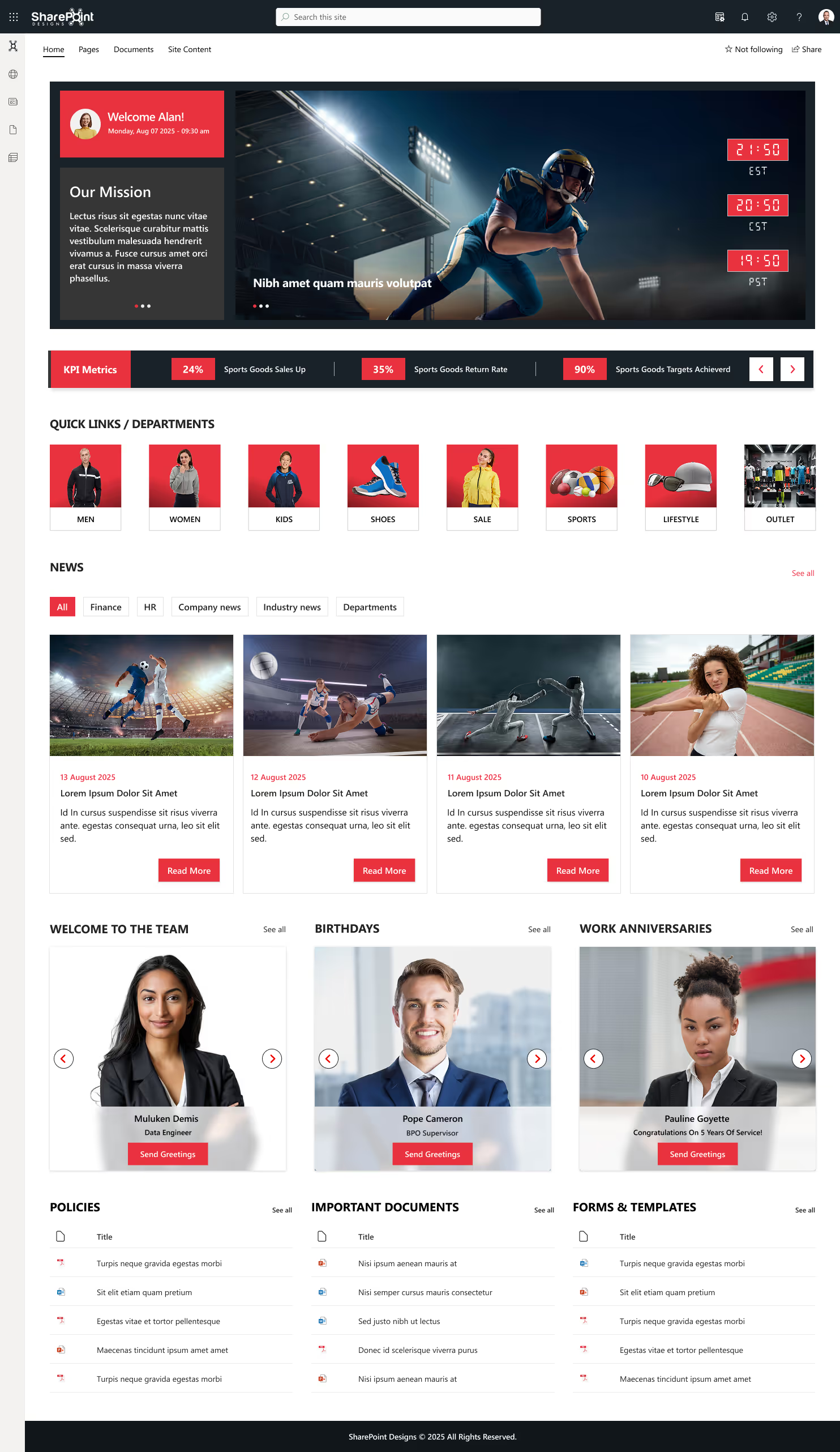
Features:
- You will have access to all company policies and announcements.
- Links to software such as project management tools, payroll apps, and IT ticketing systems.
- Customizable dashboards for personalized experiences.
Real-World Impact:
Picture yourself entering an online platform where you can find all the latest company updates, submit vacation requests, and access project information. Centralizing data minimizes the time spent looking for it.
2. Document Management Sites: Organize Your Digital Assets
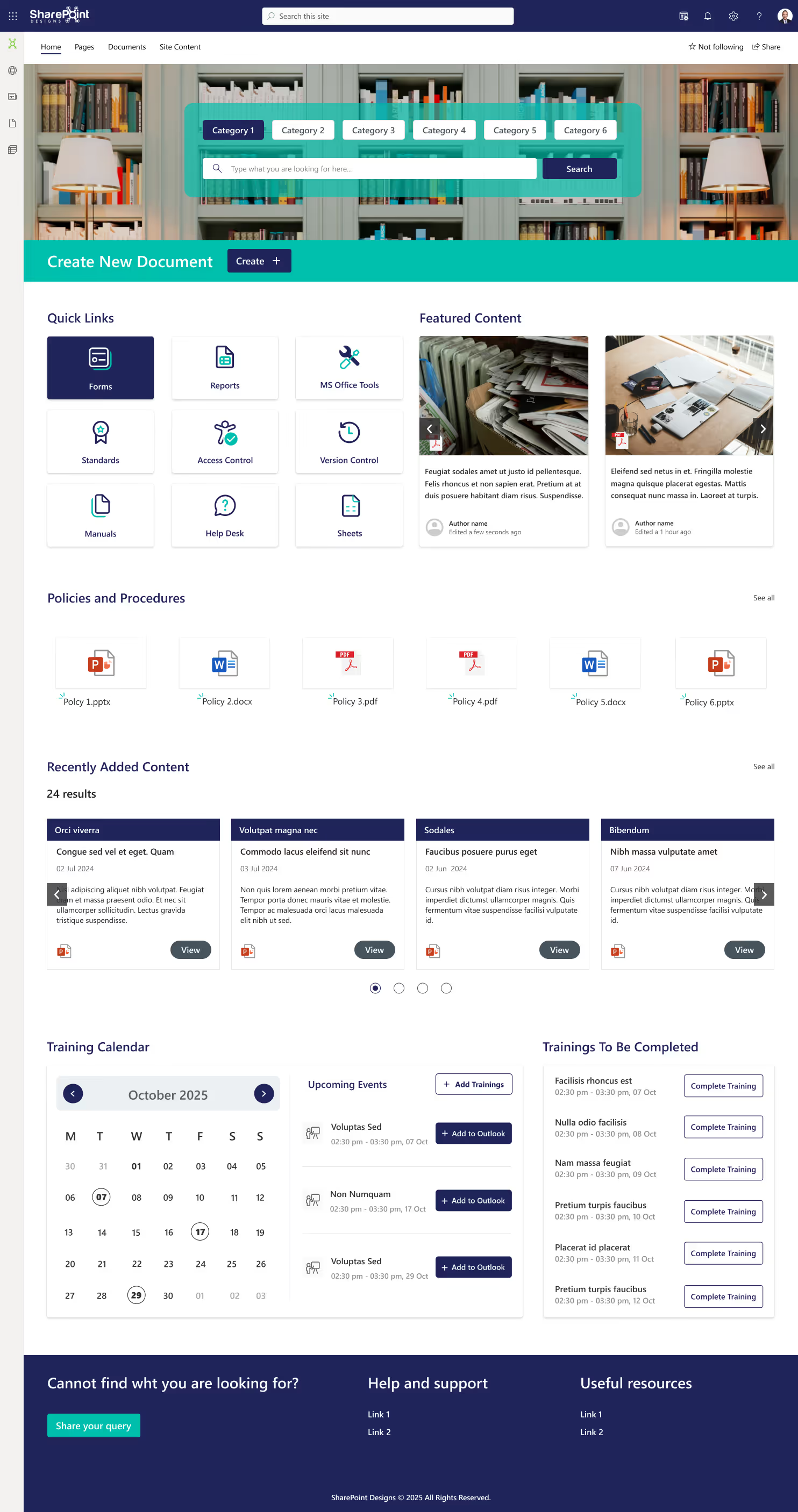
Every organization faces a difficult task in managing documents. SharePoint document management sites offer an easy way for employees to upload, retrieve, and share files.
Features:
- Tag metadata to enhance searchability
- History of previous versions to restore and track any changes.
- Document approval workflows can be automated.
Real-World Impact:
The consulting firm stores client contracts, project deliverables, and documents on a document-management site. This ensures that the most recent version of each item is available at all times and that approved workflows are followed automatically.
3. Knowledge Base: Making Organizational Wisdom Accessible
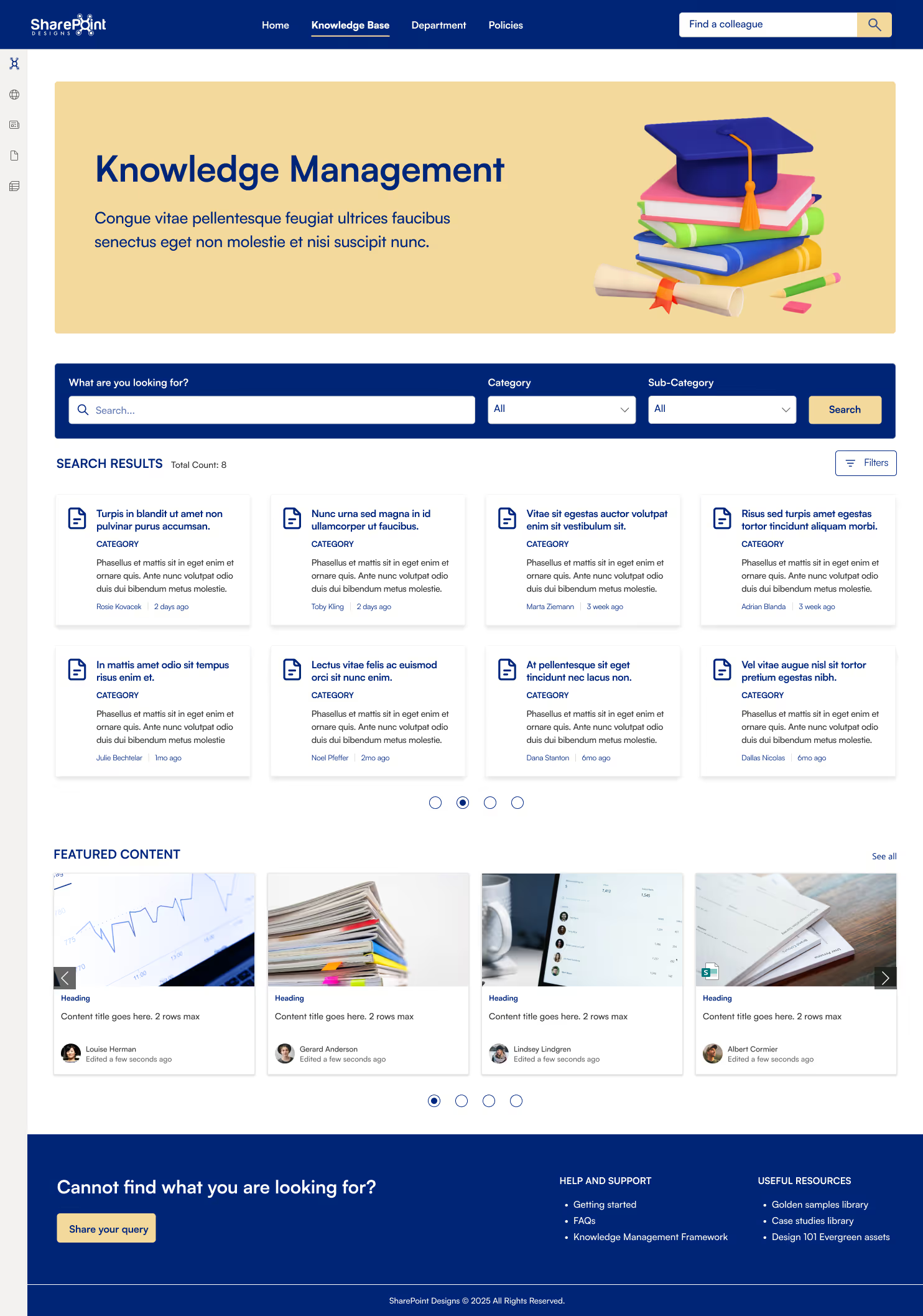
This valuable information is often trapped in email or personal notebooks. SharePoint knowledge bases are a great place to store this helpful information.
Features:
- Use Wiki pages to collect expertise.
- Guides, FAQs, and troubleshooting documentation are easily accessible through searchable libraries.
- Tools for feedback and continuous improvement
Real-World Impact:
A team of IT professionals can create a Knowledge Base that documents fixes to recurring issues. It reduces tickets and allows employees to solve the problems on their own.

Explore the best examples of SharePoint sites: 16 practical applications
Microsoft SharePoint offers many essential collaboration, information sharing, and communication features.
As we gear up to say goodbye to 2024, it’s time for our annual rewind, think Top 10 Best/Worst lists of everything from movies to food to cities. But hold your horses, because today we’re doing something extra special: Top 10 Intranet Web Parts of 2024!
And hey, if you’re wondering, “What in the world is an intranet? And what’s a web part?”
Don’t sweat it, we’ve got you covered.
What is an intranet?
An intranet is like a private website or network that only people working in your company, can use.
Think of it like a club with a secret password. Once you're inside, you can share files, send messages, and access important tools and information, but only the people who are part of the group can join. It keeps everything safe, organized, and easy to find without letting strangers see what’s inside.
What is an intranet webpart?
Webparts are like apps, divided into sections you can add to make the page more useful and fun for everyone in the group!
Imagine the school bulletin board, where you can stick different things on it, like a calendar, a weather chart, photos of students who won a inter-school game, or a list of fun events. A web part works the same way, lets you add things like news, announcements, quick links or charts to a page so everyone in the group can see and use them. It’s a way to make the page more useful and customized for what people need! Here in this blog, we present the top intranet tools that will help to increase collaboration and productivity in your organization.
Top 10 Intranet Webparts of 2024
These are the best SharePoint web parts that help streamline company intranet, enhance workplace communication, optimize employee engagement, improve workplace efficiency.
1. Hero Section with a personalized welcome banner
The hero section is what makes or breaks a website or an intranet! Make your employees feel welcome with a personalized greeting with their name using our custom SharePoint intranet webpart. Throw in a catchy background image or your company video that represents the Vision / mission / values of the company along with a CTA button to make complete use of the hero section without overcrowding it! Adding festive themes and colorful backgrounds has been trending in 2024.

2. Clock with different time zones
Got a client meeting in London while you’re sipping coffee in New York? Or maybe you’re trying to catch up with colleagues from all corners of the globe? Introducing our super user-friendly custom SharePoint web part! With it, you can easily track 4 or more time zones; perfect for scheduling meetings, managing deadlines, or just knowing when to stop texting your friends in far-off places. Whether you’re working with teams in Asia, Europe, or beyond, you can customize it to fit your needs. No more time zone confusion; just clear, stress-free coordination.

3. Birthday Webpart
A webpart, designed to help you remember and send witty, humorous, and heartfelt greetings to your colleagues on their special occasions. With a vast collection of pre-written messages, clever jokes, and customizable templates, the Birthday reminder component ensures you'll never miss a chance to brighten someone's day with a brilliant and memorable message.
For more details click here -> Birthday Webpart

4. Custom Weather Webpart
Imagine starting a conversation with your colleague from a different location with the phrase, "Such a beautiful day, isn't it?". When in reality they're bracing for a category 5 storm. A Web Part designed to help you stay up to date on the weather, not just for your current location, but also for your other facilities or your client locations. You can configure the SharePoint list with your organization's different locations across the globe. Add in some cool animations for a trendy look and feel.
For more details, click here -> Weather Webpart

5. Facilities / Locations
Got branches all around the world? Then its important to know a few key things about each location: like who’s in charge, what’s happening at the office or why everyone is offline from that location (may be, due to a severe weather condition).
By adding this webpart you can ensure smooth communication within the company, regardless of geographical distance. It makes information easily accessible, employees can connect with the right teams more efficiently, ask relevant questions, and work together effectively.


Top 10 Intranet Webparts of 2024
As we gear up to say goodbye to 2024, it’s time for our annual rewind, think Top 10 Best/Worst lists of everything from movies to food to cities.



.svg)





