Tech Ideas & Best Practices
About the client
Daikin, a global air conditioning manufacturing company was looking for an innovative approach to collaborating and conducting interactive discussion topics among employees across the globe.
Challenges
An interactive and engaging platform for employees to discuss various topics that include industry-related, People related Hobbies, or other interests. Employees should be able to comment, view others' posts, and post likes. The discussion board should be as simple as using a social networking forum.
Our Solution
Though SharePoint has a default discussion board, we at SharePoint Designs built a custom webpart including Power Automate flows provides all the below features and gives the best user experience.
Discussion post owner and admin privileges
- Using a custom form, any user who has access to SharePoint can initiate a discussion topic and attach files to the discussion post and notify others through an automated email when the discussion is created.
- The discussion post owner can edit or delete his post.
- The Post owner will get notified when other users post like or comment on the discussion topic.
- Ability to close or reopen each discussion.
- Admin can Pin topics so that users can view them on the top on the discussion board page.
Discussion post users
- All users can like, comment and tag other SharePoint users or user groups on the discussion board post. Users will be able to edit or delete their comments.
- Tagged users get notified through an automated email.
- Users can view and download the attachments on the discussion post.
- Ability to Pin topics of their choice, search with keywords, share the discussion post link, and translate the contents.
Benefits
A very innovative and interactive tool that engages employees to actively participate in discussions, and contests. The organization that values their employees' feedback are always ahead in the competition. Discussion Board acts as an open forum to discuss with many people at a time.
Technologies
SPFx, Power Automate

Intranet Discussion Board as interactive as a social networking site!!!
Daikin, a global air conditioning manufacturing company was looking for an innovative approach to collaborating

About the client: Daikin, a global air conditioning manufacturing company, was looking for an innovative approach to collaborate and share knowledge with its employees across the globe.
Challenges
- A Proper document management system that classifies information based on pre-defined categories and allows users to access documents across the site
- A user-friendly site page so users can preview the documents attached, download, comment & tag other users.
- Enable users to click and search pre-defined categories on the site pages
- Restrict other users from viewing sensitive or confidential documents
- There should be an option to delete pages automatically based on the expiry date.
Our Solution
- SharePoint Designs understood the requirements and captured them as detailed user stories. As a first step, an upload form captured all the information required to create the site page in the SharePoint library. Each field in the upload form was metadata on the site page for search.
- The user who creates the page updates the mandatory information and need-to-know information on the upload form. Using the upload form, the user can upload any files and folder up to 5GB. The user has an option to notify users regarding the page upload through the upload form. Using Power Automate Flow, an automatic email with the brief content of the upload is sent to the users immediately.
- The user is also allowed to restrict access to all employees by using the “Who can access” field. The site page will be visible only to those user groups mentioned in the form.
- The created site page is detailed and allows users to like, comment, and tag other users. Tagged users will receive an automated email containing the link to the site page.
- The site page contains metadata, which allows the user to click and search the site pages library.
- Automatic page deletion is enabled through Power Automate flow based on the expiry date updated on the upload form.
- All users are enabled to download the files without opening them.
- The person who created the site page can delete his page without navigating to the site page library
- Using Power Automate, a flow is executed to identify any expired site pages and gets deleted on the mentioned date.
Admin Features
The site admins are provided with additional features to perform the below functions
- Option to edit or delete the site page of other users.
- Manage permissions by restricting or providing access even after the page is published
- Edit and delete other user comments
Benefits
The site page is power packed with so many details in a well-planned design and layout that the reader finds it very smooth to navigate to each segment of the page, click and search metadata and move on to the following pages in the chosen folder. Anyone who wants to share knowledge with other colleagues can use the upload form & share information.
Technologies Used:
SPFx custom webpart, Power Automate

How SharePoint Designs simplified site page creation with power packed features
Daikin, a global air conditioning manufacturing company, was looking for an innovative approach
Your current document management system (DMS) is not up to your expectations: there is still a lot of manual work involved to organize, search or retrieve files. Your important files are getting overwritten, and you are unable to keep the version history intact. Interdepartmental collaborations are a total mess. Your staff’s productivity takes a hit because they are busy sorting and organizing files most of the time. The server keeps failing and the current DMS is wasting your time and the company’s money.
Do not lose hope yet...
At SharePoint Designs we would like to share a case study on how we helped an accounting firm with a DMS that combines Microsoft's SharePoint technology with artificial intelligence (AI).
Problem
The account firm wanted several years worth of hard copy documents digitized, organized and placed in various folders. They files needed to be named appropriately with the corresponding dates of creation, organization name etc., for easy search and retrieval.
This was usually a manual task where in the staff, after scanning the documents, creates appropriate folders and subfolders to organize them. Then, the individual renames each of the files based on its type, the client it belongs to, date of creation, and version history. The documents could belong to a miscellaneous collection of financial, legal, letter, collateral, or other types. This strenuous process is not feasible or efficient for large firms that need hard copies digitized for various procedures.
Solution
SharePoint Design’s team arrived at a simple solution to automate this manual task by leveraging technology to create an AI metadata recognition system. For instance, the AI software reads the scanned documents line by line. It recognizes the unique elements in the document as instructed by a software code like date, organization’s name, logo, type of document, etc.
Accordingly, it creates tags based on keywords like date, document type, and organizational name to create folders and subfolders to rename the files and save them correspondingly. If there are different versions of the same file, the software retains the version history as well.
For instance, at the most basic level, this customized solution can do the following for you. Let’s assume that there are there are various edited versions of an invoice billed to an ABC Company. The AI software would create a folder for the company and subfolders for the year and month. Under these folders, there may be a subfolder named “invoices”. In this folder, the software may save the corresponding invoices by giving names such as “ABC. 3.9.2019. Invoice-1”, “ABC. 3.9.2019. Invoice-2,” etc.
More commonly, the accounting staff at various firms are usually indecisive about how to structure various documents, especially if the clientele is massive. In fact, the templates and formats of various documents would have changed over the years as well. Leave it to AI to do such immensely complicated tasks with ease. Years of machine learning and robust research with software codes has equipped the AI software to recognize documents even if they have extremely modified templates.
Technology
Our firm has combined SharePoint DMS platform with Azure Search API and Azure Cognitive Services to bring about a tailored solution for our client’s problem.
The SharePoint platform has multiple products that can be integrated with one another to get hybrid solutions for your most complex business problems. You can store and access files in a well-organized fashion.It works on multiple devices, let’s you collaborate with multiple users who can have a single log-in to access all apps.
With seamless workflows, user permissions and zero server problems, you can maintain document security, confidentiality and compliances. You could also do data analysis and reporting on all the content you have stored on SharePoint. It is extendable and its scope is expandable for you to build customized solutions for your unique business needs.
Azure is a cloud-solutions service that hosts all your data, applications, softwares, tools with a cloud or hybrid server. No need to set up expensive hardware anymore. All you have to do is just pay a monthly subscription to manage everything through Azure. Azure’s cognitive services help build intelligent applications with features like facial and speech recognition, visual detection, intuitive search solutions, etc. With the help of Azure AI, all your data can be read and analyzed without hassles to bring out the correct business outcomes for you.
So, free yourself from manual labor and become a decision-making authority to give your company that outstanding competitive edge in the market.

We saved 10000+ man hours for a firm with document management solutions.
Your current document management system (DMS) is not up to your expectations

Microsoft flow is a cloud-based workflow engine, Using Flow end users can create cross application workflows (no code workflows). Flow is a part of office 365 E3 suite. It is a successor of SharePoint designer workflows. Complex level Flows can be promoted to an Azure logic app.

Microsoft Flows Vs SharePoint Designer Workflows

Anatomy of Microsoft Flow
- Flow Designer
- Connectors, Triggers & Actions
- Variables & Data Flow
- Expressions
- Branching, Error Handling & Scopes
Flow Designer – Create a Flow from Browser or Mobile Application
Desktop Version
- Go to https://flow.Microsoft.com
- Sign-in with Office 365 Account
- Start from existing template or import from disk or create from scratch (both in desktop & mobile browsers)

Mobile Version
- Install flow mobile app, sign in
- Create new flow (template or from scratch).

Connectors
Connectors Wrapper around an API that allows Flow to talk with other services.It exposes Triggers & Actions.
Standard Connectors – included as part of E3
- Microsoft Connectors (SharePoint, Azure Blob storage, SQL Server.)
- Non-Microsoft Connectors (Twitter, Slack.)
- https://us.flow.microsoft.com/en-us/connectors/?filter=&category=standard
Premium Connectors – additional cost
- Microsoft Connectors (HTTP with Azure AD.)
- Other Connectors (Salesforce, MySQL.)
- https://us.flow.microsoft.com/en-us/connectors/?filter=&category=premium
Custom Connectors – additional cost , development
- ISV, System Integrators, End users can create custom connectors to integrate any system/application/service.
- https://us.flow.microsoft.com/en-us/connectors/?filter=&category=custom
Triggers
Run based on user action or event
- From other apps in office 365 – PowerApps, SharePoint, etc.
- From SQL
- From dedicated Flow button

Run on a schedule
- Flow also run based on time schedule, From every minute to 1 am on Days.

Run by HTTP GET/POST to URL generated by flow
- Call another Flow
- Call from any application/service/agent that can make HTTP calls

Scenarios & Types of Triggers
Triggers - Scenarios
- Simple: Flows start with a Trigger.
- Advanced: Flows can have more than 1 trigger (async actions)
- Custom: Flows can have custom triggers
Types
Polling Trigger
- Periodically checks the service
- Checks count as executions
Push Triggers
- Listen for data on an endpoint or wait for event.
Actions
- Execute CRUD operations with workflow context
- SharePoint: Create Item, Delete Item, Create File.
- SQL: Insert Row, Update Row, Delete Row, Get Row.

- Transform Data
- Inline – using expressions (e.g. string operations, math operations.)
- Other services – Html to text.


Send Notification
- Send mobile notification, send email notification etc.
Call other Flow
- Chain Flows to create complex Flows.
Variables
- Use Variables connector*
- Initialize & then set value
- Supported value types (Boolean, String, Object, Array, Float).
Variables are NOT always necessary!
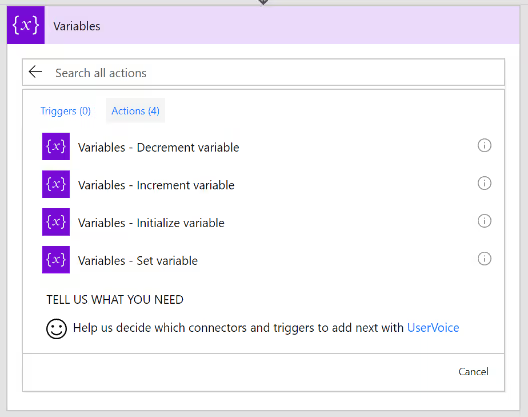
Why variables are not always necessary?
- Data Flows from each step and is available for all later steps
- ‘Add Dynamic Content’ allows us to select outputs from previous steps
- Certain outputs show up based on the types of the inputs and outputs.

Expressions
- Expressions can be used in most of the fields to transform data inline
- IntelliSense available as you type

Branching
- If-then-else

- Switch

For-Each
- By default, parallel
- Parallel (20 exec)
- Supports sequential

Do-Until
- Emulate State machines
- Help in approvals & more

- Parallel branches

Error Handling
- Actions can be set to run if previous action fails/times out.

Scopes
- Logically group actions
- Allow advanced error handling for a group of actions
- Scope boxes are in brown boxes.


Getting Started With Microsoft Flow
Microsoft flow is a cloud-based workflow engine, Using Flow end users can create cross application workflows. Flow is a part of office 365 E3 suite. It is a successor

Flow Template Overview
Flow templates are prepacked reusable flows for various business scenarios. Here is the link to View default templates already available in Microsoft Flow.
- From existing template in the public template gallery
- Search against the public template gallery
- Access this gallery from Modern SharePoint List/Library
- Filter & Embed the gallery in any page or application
- From existing template in a private template gallery
- Not available. Idea available in user voice.
- Discover flow templates

Discover Flow Templates from Template Gallery
There was one of many built in templates to build your flow from scratch for example Sending email to manager, send remainders to myself, Get weather of the current location, and lot more…
Navigate to templates and take a look at it choose your template customize it Save and run your flow with no code.

Templates – Discover from Modern User Interface (SharePoint)
In SharePoint user are able to create a flow from the modern UI with the help of flow button it suggest the default templates already available in the template gallery.

Templates – Discover (From Classic Page)
- Filter & embed the gallery in any application (not just in SharePoint or Office 365)
- Send the context of the current component (e.g. list name, library etc.) to the gallery
Microsoft Provides the SDK and use embedded IFrame source to integrate the Flow button in SharePoint list classic view. It works same as modern User Interface like able to pick the flow templates from classic window.

Templates – Create and Monitor the Flows
Create a flow that performs one or more tasks automatically after it's triggered by an event. We can create a Flow without using the default templates.
Below we created the simple approval flow template from the blank template. It triggers the flow when the SharePoint list item has been created then send email to the approve and capture the approval status send it to the initiator who create the item.
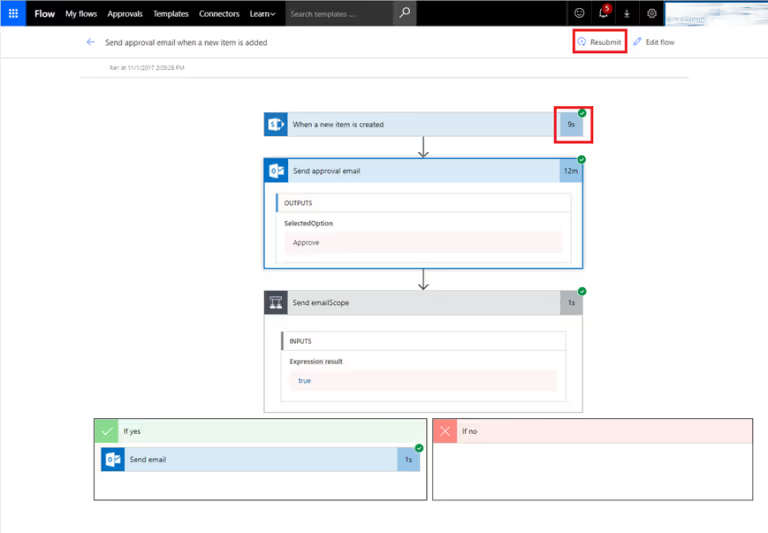
Templates – Publish
A flow which has run successfully can be published to public template gallery
- Sends the flow for review with Microsoft
- Takes days to weeks.
- Only generic use cases are usually accepted


Flow integration with non-existing templates
Flow templates are prepacked reusable flows for various business scenarios. Here is the link to View default templates already available in Microsoft Flow.



.svg)





