Published Date -

How Does AI Document Classification Organise Family Office Files?
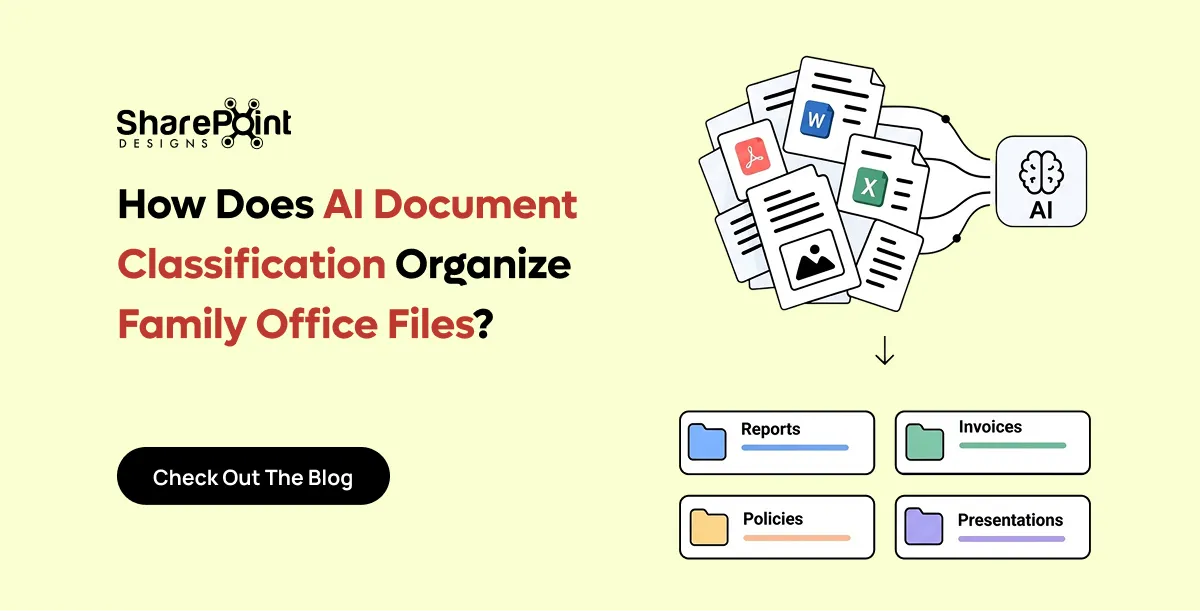
AI document classification reads a document's content and decides what it is and where it belongs. In a family office, that means identifying the document type, such as a lease or a K-1. It also means identifying the entity it relates to, such as a trust, LLC or property. The system then applies metadata and files the document in the right place. A person confirms anything the AI is unsure about.
What Is AI Document Classification?
AI document classification is the automated labelling of documents by their content rather than their file name. A language model reads the text, recognises the document type and extracts key facts. Those facts include parties, dates, amounts and entity names. The system then writes them into metadata fields. Good classification turns an unstructured upload into a governed, searchable record that is linked to the right entity.
Traditional filing depends on the person who saves the file. They choose a folder, type a name and hope colleagues follow the same logic. Classification moves that decision from the person to the system.
Three capabilities sit underneath most classification tools:
- Document type recognition. The model decides whether a file is a lease, an operating agreement, a tax return or an insurance policy.
- Entity extraction. The model finds names, addresses, tax identifiers and account references inside the text.
- Metadata population. The system writes the results into structured columns, such as Entity, Document Type, Tax Year and Expiry Date.
Microsoft now builds this into SharePoint. Its autofill columns feature uses large language models to extract, summarise or generate content from uploaded files. It then saves the results as metadata automatically. Classification is therefore no longer a specialist add-on. It is becoming a standard part of document management.
Classification works best on a well-structured tenant. Our free AI Ready SharePoint Score shows how prepared an environment is before AI is switched on.
Why Do Family Offices Struggle to File Documents Correctly?
Family offices struggle because one document often relates to several entities at once. A single lease can involve a property LLC, a holding trust and a family member as guarantor. Folder trees force one location per file. Staff therefore duplicate files or file them inconsistently. Over time, nobody can say with confidence which version is current or which entity it belongs to.
The typical family office manages a dense web of structures. These include trusts, LLCs, partnerships, foundations, operating companies, properties and individual family members. Each structure generates its own steady stream of documents.
Common pain points include:
- Multi-entity documents. A capital call notice may affect a fund interest, a holding LLC and a trust beneficiary.
- Many contributors. Accountants, attorneys, advisers and family members all send documents by email.
- Long retention horizons. Tax filings, trust deeds and property records must stay findable for decades.
- High sensitivity. Estate plans and financial statements need strict, role-based access.
- Small teams. Most family offices have few staff, so manual filing competes with higher-value work.
The result is familiar. Documents sit in inboxes, personal drives and generic "Scans" folders. Search returns twenty near-identical files. Audits and tax deadlines become stressful document hunts.
How Does AI Decide Which Entity a Document Belongs To?
AI decides by matching facts inside the document against a register of known entities. The model extracts names, addresses, tax identifiers and account numbers. It then compares them with the family office's entity list. When a strong match appears, the system proposes that entity with a confidence score. When matches conflict or are weak, the document goes to a person for review.
The entity register is the critical ingredient. Without it, the AI can recognise "a lease" but cannot know which of twelve property LLCs owns the building.
The Classification Flow, Step by Step
- Step 1: Capture. A user drags a file into the system, or a rule picks it up from an email inbox.
- Step 2: Read. The system extracts text, including text from scanned images, using optical character recognition.
- Step 3: Identify type. The model classifies the document, for example "Commercial Lease" or "Schedule K-1".
- Step 4: Extract facts. The model pulls out parties, property addresses, tax years, amounts and key dates.
- Step 5: Match the entity. The system compares extracted facts against the entity register and scores each candidate.
- Step 6: Propose a destination. The system suggests the library, folder and metadata values.
- Step 7: Confirm or auto-file. High-confidence results file automatically. Lower-confidence results wait for one-click confirmation.
- Step 8: Log. The system records who filed what, when, and what the AI recommended.
What Signals the AI Uses
Strong entity signals include a legal entity name, an employer identification number, a property address and a policy or account number. Weaker signals include a family member's first name, an email sender or a file name. A well-designed system weights strong signals far more heavily than weak ones.
Should Family Offices File by Folder or by Metadata?
Family offices should file primarily by metadata and use folders only as a light, familiar wrapper. Metadata lets one document carry several entity tags at once, which folders cannot do. Folders still help people browse, so a hybrid works best. In practice, keep a shallow folder structure by entity and let metadata handle document type, year, status and cross-entity links.
A folder answers one question: where is this file? Metadata answers many questions at once: what is it, who does it relate to, when does it expire, and who can see it?
AI classification makes the metadata approach practical. The old objection to metadata was that people never fill in the fields. When the AI fills them in, that objection largely disappears.
For a wider view of where different Microsoft 365 tools fit, see our guide to choosing between SharePoint, OneDrive and Teams for company documents.
What Does an Entity-Centric Information Architecture Look Like in SharePoint?
An entity-centric information architecture treats each trust, company, property and family member as a first-class record. Documents link to those records through metadata rather than living only inside a folder. In SharePoint, the entity register is a list. Document libraries use lookup columns that point to it. AI classification then fills those columns automatically when documents arrive.
A practical metadata model for a family office usually includes the following columns:
This model supports the views family office staff actually need. Examples include "every document for Maple Street Holdings", "all K-1s for tax year 2025" and "leases expiring in the next 180 days".
Which Family Office Documents Can AI Classify Reliably?
AI classifies standardised documents very reliably and needs more human review on bespoke legal agreements. Tax forms, account statements and insurance certificates follow predictable layouts, so accuracy is high. Leases, operating agreements and trust deeds vary widely in wording and structure. For those, the AI should propose a classification and a person should confirm it before filing.
Reliability improves over time. Each confirmation or correction gives the system a clearer picture of how the office files documents.
Some offices go further and build a custom agent for the edge cases. Our AI agents built on Microsoft Copilot can handle multi-step filing rules, such as routing a capital call to finance before it is filed.
What Are the Main Options for AI Filing in a Family Office?
Family offices generally choose between three approaches. The first is a purpose-built family office platform. The second is a standalone metadata-driven document management system. The third is AI classification built natively into Microsoft 365. The right choice depends on where documents already live, how many tools the office wants to run, and how much control it needs over its data.
How Does DocVault Handle AI Classification Inside Microsoft 365?
DocVault, our AI-powered SharePoint document management system, runs inside the client's own Microsoft 365 tenant. It applies Copilot-powered auto-tagging and titles, governed templates, version approvals, audit trails and automated retention. Documents never leave the tenant. Because DocVault uses existing Microsoft 365 licences, a family office adds AI classification without adding a separate platform.
For family offices, the most relevant DocVault capabilities are:
- AI auto-tagging and titles. Copilot reads documents and applies consistent metadata and naming.
- Natural-language search. Staff ask "show me the Maple Street lease" instead of guessing folder paths.
- Dynamic filters. Users narrow results by entity, document type, status or date in a few clicks.
- Review and expiry tracking. The system sends pre-expiry and overdue notifications for leases, policies and agreements.
- Role-based permissions. Estate documents stay restricted while routine records stay widely accessible.
- Full audit trail. Every upload, edit, approval and access event is logged.
DocVault also supports compliance requirements, including SOX, ISO 27001, GDPR and HIPAA controls. Our post on document control in SharePoint for ISO, SOX and GDPR explains how those controls work in practice.
How Should a Family Office Roll Out AI Document Classification?
A family office should roll out AI classification in five stages. First, build the entity register. Second, agree the metadata model. Third, test on a sample of real documents. Fourth, set confidence thresholds. Fifth, migrate historical files in batches. Testing on the office's own leases, K-1s and trust documents matters most, because accuracy on real documents is the only meaningful benchmark.
- Step 1: Build the entity register. List every trust, company, property, account and family member, with legal names and identifiers.
- Step 2: Agree the metadata model. Define the columns, allowed values and collections before any AI runs.
- Step 3: Test on real samples. Run 20 to 50 representative documents and measure how often the AI picks the right entity and type.
- Step 4: Set confidence thresholds. Decide which document types may auto-file and which always need confirmation.
- Step 5: Migrate in batches. Classify historical content collection by collection, reviewing exceptions as you go.
Choosing the right migration tool affects how much clean-up the AI must do later. Our comparison of SharePoint migration tools covers the main options.
Our SharePoint document management solution covers the design and migration work behind these stages. Before starting, the free DMS Compliance Score tool gives a quick baseline of current document controls.
What Governance Controls Should Surround AI Filing?
AI filing needs four governance controls: human review for low-confidence results, role-based access, a complete audit trail and automated retention. These controls matter more in a family office than in most organisations. A misfiled trust document can expose sensitive family information. A deleted tax record can create real legal and financial risk.
- Human in the loop. The AI proposes; people decide on anything ambiguous or sensitive.
- Access by role and entity. Permissions should follow the entity and sensitivity metadata, not only the folder.
- Audit trail. The system should log the AI's recommendation alongside the final human decision.
- Retention policies. Tax, trust and property records need defined retention periods and protected disposal.
Classified documents also become far easier to search and reuse. Our AI knowledge management system for SharePoint builds on the same metadata to answer staff questions directly.
Microsoft Purview handles retention natively in Microsoft 365. Our guide to Microsoft Purview retention for SharePoint documents explains how to set it up correctly.
faqs

Venkatesh Maran

Founder and CEO of SharePoint Designs, a Microsoft ISV with 6 products live on AppSource. We build products that solve the problems Microsoft left on the table. Intranets that people actually use. Document management systems that don't fight your workflows. Knowledge platforms that surface what matters. And now, AI agents built on Microsoft Copilot that take the repetitive work off your team's plate. Every product we build gets designed around your brand, your culture, and how your teams actually work. Trusted by enterprises across 23 countries, primarily in the US and Europe, with deep expertise in SharePoint, Power Platform, Microsoft Copilot, and Microsoft 365. Over 15 years in the ecosystem and still going. Our mission is simple: make work more fun.






.svg)