Published Date -

5 Custom SharePoint Quick Links Layouts to Elevate Intranet Navigation
Quick Links aren’t just about getting from point A to point B, they are about making navigation effortless, engaging, and even a little exciting.
Imagine your intranet where every click feels smooth, every layout looks polished, and every user finds what they need without the clutter. From sleek boxed designs to dynamic interactive panels, these Quick Links layouts aren’t just functional, they’re stylish upgrades that bring personality and flow to your digital workspace.
Summary
This guide highlights five SharePoint Quick Links layouts includes Horizontal Boxed, Dropdown Menu, Two-Row Boxed, Department-Based, and Interactive Side Panel that make intranet navigation fast, clear, and visually polished. Each option blends clean design with usability to help users find what they need without clutter. You can mix and match these layouts and implement them quickly using the referenced SharePoint Intranet Templates.
1. Horizontal Boxed Layout

- Sleek and streamlined, this layout lines up your quick links like a well-dressed team of icons and titles.
- Clean, consistent, and perfect for top-of-page navigation, it delivers fast clicks with a fresh, flowing look.
2. Quick Links with Dropdown Menu
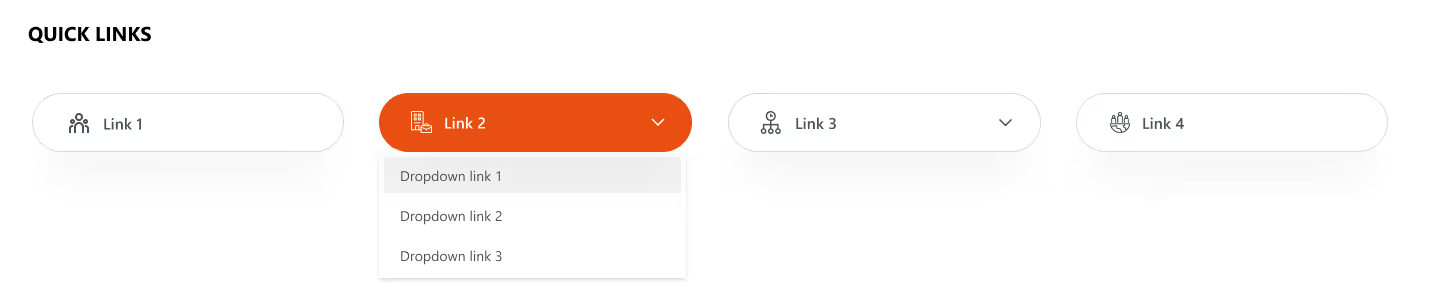
- Turn things up a notch with icons, titles, and a smart dropdown.
- Compact yet clever, this layout lets you pack in more links without clutter.
- Just click, expand, and boom; navigation made simple and stylish.
Explore our SharePoint Intranet Templates to implement these Quick Links layouts instantly.
3. Two-Row Boxed Quick Links
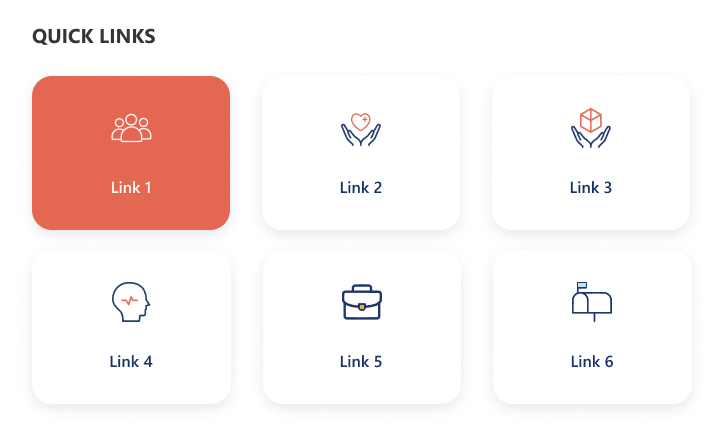
- Balanced and tidy, this design stacks your links in two neat horizontal rows.
- With crisp icons and clear titles, it’s perfect for organizing more content in a way that’s stylish, accessible, and easy on the eyes.
4. Department-Based Quick Links
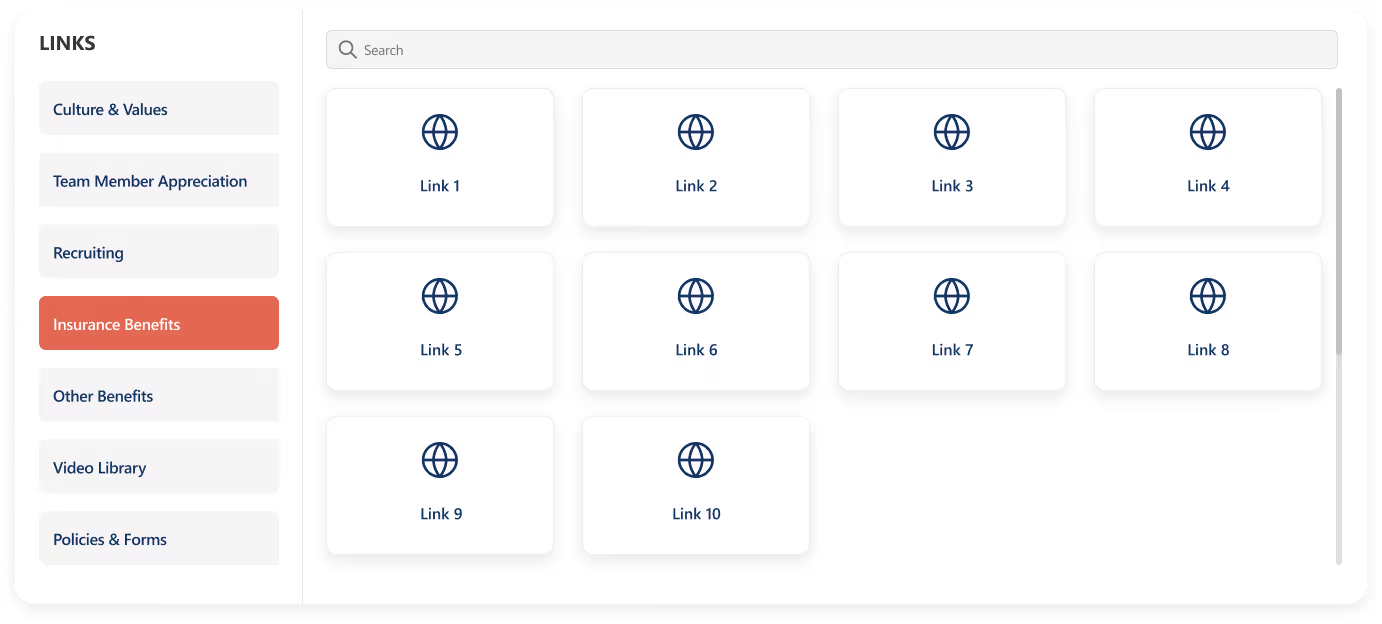
- Built for clarity and speed, this layout stacks departments vertically on the left for quick switching, while the right side features a handy search bar for precision.
- Below, a clean boxed display shows the selected department’s links.
- Add a custom web part title on top for your own flair.
5. Interactive Side Panel Quick Links

- More than just links, this layout brings interactivity to life.
- Click a quick link and a sleek side panel slides in with extra options, dropdowns, and details.
- Personalize it with a custom title for a modern, dynamic, and feature-packed experience.
Conclusion
Whether you go for sleek rows, smart dropdowns, department-based clarity, or an interactive side panel that surprises with every click, each layout adds its own personality to your intranet.
The best part? You can mix, match, and customize to fit your style. So why settle for boring links when you can turn navigation into an experience that’s fast, fun, and unforgettable.
faqs

Agnes Prismitha

Agnes Prismitha is a Product Ambassador with 1.8 years of experience in building collaborative digital workplace solutions. She works closely with both technical teams and stakeholders to ensure solutions meet business needs and encourage product adoption.





.svg)