How Ardena Replaced its Paid LMS With a SharePoint Learning Platform - Eliminating Subscription Costs
%201.avif)
Client: Ardena
Industry: Pharmaceutical CDMO / Bioanalytical CRO Life Sciences
Headquarters: Ghent, Belgium
Employees: 500 -1,000 professionals across GMP/GLP facilities in Europe and the US
Project type: Custom SharePoint LMS Design, Development & Integration
Implementation partner: SharePoint Designs
Technology stack: SharePoint Online, SPFx, Power Automate, Microsoft Teams, Microsoft Graph
Case Study Summary
Ardena, operating in multiple countries, faced high annual LMS subscription fees, manual webinar tracking, and poor training visibility. SharePoint Designs built a custom LMS in Ardena’s SharePoint using Microsoft technologies, eliminating third-party licensing costs. The new system cut costs, provided real-time training dashboards, and automated Teams webinar attendance.
At a Glance: Results
About Ardena
Ardena is a specialist pharmaceutical CDMO (Contract Development & Manufacturing Organization) and bioanalytical CRO, dedicated to advancing precision medicines and complex therapeutics.
Operating across GMP/GLP-certified facilities in Belgium, the Netherlands, Spain, Latvia, and the United States, Ardena guides pharmaceutical companies from emerging biotech to tier-one pharma corporations through the full drug development lifecycle.Ardena’s service portfolio covers drug substance development and manufacturing, drug product formulation and manufacturing, nanomedicines, bioanalysis, clinical supply, and CMC regulatory support.
Backed by GHO Capital, Ardena serves a global client base of 500+ customers across Europe, the US, Japan, and South Korea, with revenue exceeding $250M.With a workforce of scientists, analysts, project managers, quality and regulatory professionals, manufacturing operators, and business staff across multiple countries, Ardena’s training and compliance management requirements are substantial. GxP-regulated environments require documented, auditable training completion records, making the reliability and accessibility of the LMS infrastructure a quality assurance matter rather than just an HR convenience.
The Challenge
A paid LMS that didn’t fit the Microsoft 365 world Ardena already lived in
Ardena’s SharePoint intranet was already the organization’s central digital workplace. Staff accessed news, documents, HR resources, and internal tools through SharePoint, all within the familiar Microsoft 365 environment they used every day for Teams, Outlook, and collaboration.The LMS sat outside all of that.
It was a separate platform, on a separate URL, with a separate login experience. To access training, employees had to leave the intranet, navigate to another system, and authenticate again. For a workforce that was already working across multiple sites and time zones, this friction was a consistent adoption barrier.Beyond the user experience, four specific operational problems drove the decision to find an alternative:
- Recurring subscription costs have no strategic value. The third-party LMS was consuming an annual licensing budget without offering capabilities beyond what Ardena’s existing Microsoft 365 investment could support with the right implementation. As the organization grew through expansion and acquisition, the per-user licensing cost scaled accordingly, adding pressure to an already-stretched L&D technology budget.
- No real-time visibility into training for HR or line managers. HR and people managers could not see, at any given moment, who had completed which courses, which mandatory training was overdue, or where onboarding progress stood for new joiners.
Getting a training completion report required either manual data pulls from the LMS or waiting for a scheduled report. For an organization operating in a GxP-regulated environment where training compliance directly affects inspection readiness, this lack of real-time visibility was documented as a risk. - Microsoft Teams webinar attendance required manual tracking. Ardena ran a significant proportion of its internal training through Microsoft Teams webinars the natural tool for a distributed, multi-site workforce. But the third-party LMS had no native connection to Teams. After every webinar, an administrator manually cross-referenced the Teams attendance report against the LMS enrollment list, updated completion records, and chased any discrepancies.
This was time-consuming, error-prone, and entirely unnecessary given that Microsoft Graph exposes Teams meeting attendance data via API. - The LMS was a siloed island in an otherwise connected Microsoft 365 ecosystem. Ardena’s broader digital workplace strategy was built on maximizing the Microsoft 365 investment already in place. A standalone LMS that stored user data externally, couldn’t surface training tasks on the intranet homepage, and had no connection to SharePoint permissions or Entra ID groups, was structurally at odds with that direction.
The appointment of a dedicated Chief Information Officer in late 2025 brought renewed focus on eliminating redundant vendor dependencies and deepening the Microsoft 365 integration across all operational systems.
Why Ardena Chose SharePoint Designs
The evaluation was straightforward once the problem was clearly framed. Ardena was not looking for a better LMS vendor. They were looking to eliminate the need for an LMS vendor entirely by building the capability they actually needed directly into the Microsoft 365 environment they already owned.The alternative of purchasing a Microsoft-native LMS product (such as LMS365 or Learn365) was considered.
These products provide a SharePoint-integrated learning experience and eliminate the friction of separate logins. However, they still carry per-user subscription costs ($5–$15 per user per month, depending on the tier), require vendor dependency for product roadmap and pricing, and deliver a templated product rather than a solution designed around Ardena’s specific workflows, intranet architecture, and compliance reporting needs.
SharePoint Designs proposed a custom-built LMS using only native Microsoft 365 technologies, SPFx for the intranet-embedded interface, Power Automate for workflow automation and notifications, Microsoft Graph for Teams webinar attendance integration, and SharePoint lists and libraries for all data storage and reporting. No third-party licensing. No external data storage. No vendor dependency beyond Microsoft.
The decision drivers:
- Elimination of ongoing subscription costs versus a one-time implementation investment
- Full data sovereignty, all training records stored within Ardena’s own Microsoft 365 tenant
- Custom-built to Ardena’s intranet architecture, not a generic product applied to it
- Teams webinar attendance automation as a core deliverable, not a future roadmap item
- Role-based dashboard design for HR, managers, and employees exactly matching Ardena’s reporting needs
- GxP compliance reporting built in from the start
The Solution
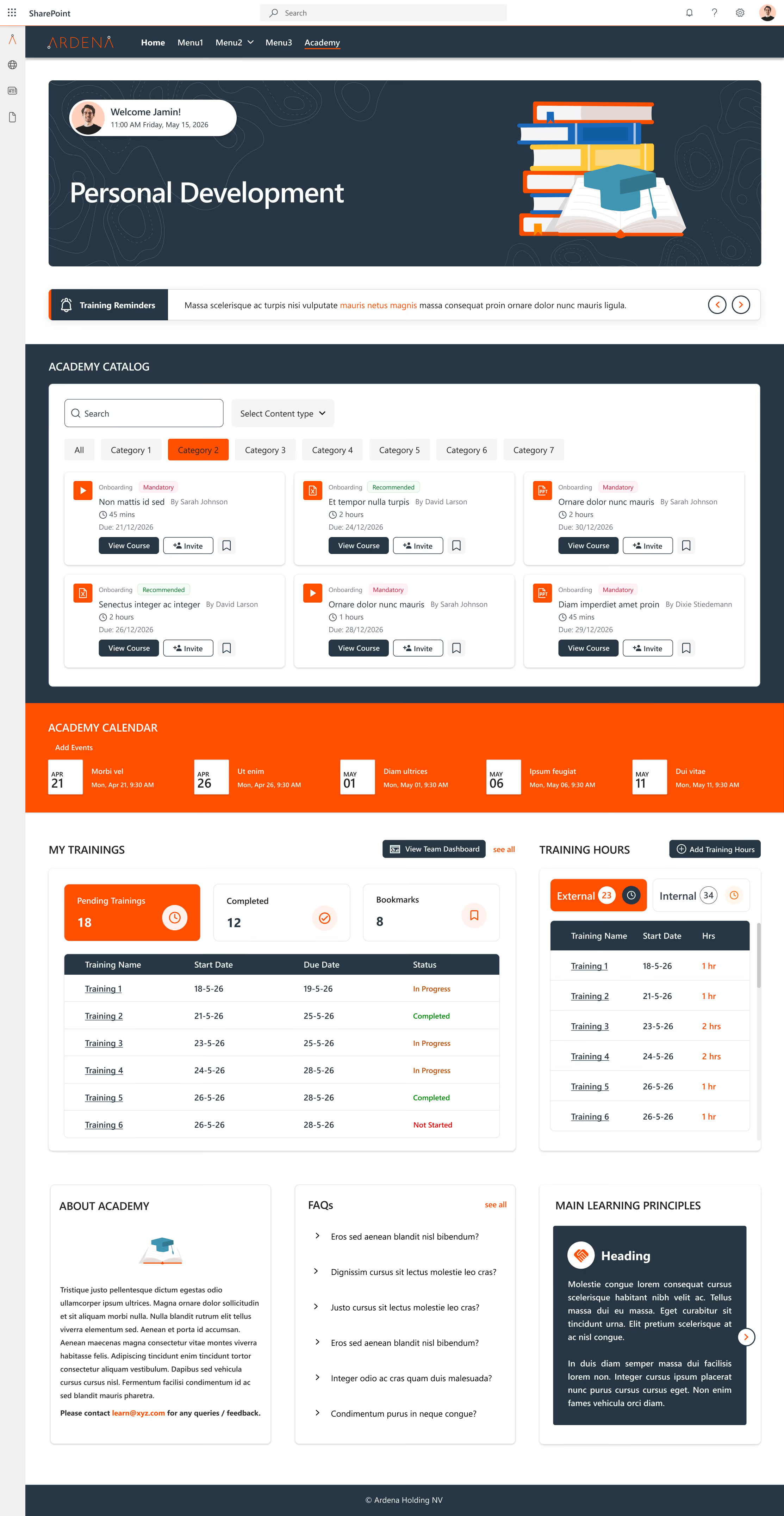
SharePoint Designs designed and delivered a custom Learning Management System fully embedded within Ardena’s existing SharePoint intranet. The solution was built entirely on native Microsoft technologies, with no third-party tools introduced.
Architecture Overview
The LMS lives within the Ardena intranet as a set of SPFx (SharePoint Framework) web parts deployed on dedicated learning pages. From the perspective of an Ardena employee, the learning platform is simply another section of the intranet they already use, accessible from the intranet navigation with no separate login, no new URL, and no unfamiliar interface.All training data course enrollments, completion records, assessment results, webinar attendance, and certificates are stored in structured SharePoint lists and libraries within Ardena’s own Microsoft 365 tenant. Data never leaves the organization’s environment.
Core Features Delivered
SharePoint-Embedded Course Catalog and Learner Interface
The course catalog is surfaced as an SPFx web part on the Learning section of the Ardena intranet. Employees browse available courses, view descriptions and prerequisites, self-enroll, and track their own progress all without leaving the intranet. Courses are structured as SharePoint pages with embedded Microsoft Stream videos, SharePoint-hosted documents, Microsoft Forms assessments, and completion acknowledgment buttons.
The learner’s personal training homepage shows their enrolled courses, completion status, upcoming deadlines for mandatory training, and earned certificates personalized using Microsoft Entra ID group membership, so each employee sees content relevant to their role and site.
Role-Based Training Dashboards for HR and Managers
HR administrators and people managers see a different view of the LMS from their role-specific intranet homepage. Power BI reports embedded directly on the management dashboard show:
- Enrollment and completion rates by course, department, and site•
- Mandatory training compliance status, who is current, who is approaching deadline, who is overdue, filterable by team, role, and location•
- New joiner onboarding training progress across all active new hires• Certification expiry tracking with 60/30/7-day countdown indicators•
- Audit-ready compliance reports exportable for regulatory inspection documentation
These dashboards update in real time as completion records are logged. HR no longer requests reports; they open the intranet homepage, and the data is up to date.
Automated Microsoft Teams Webinar Attendance Tracking
This was one of the highest-value deliverables in the engagement. The integration works as follows:When a Teams webinar is created and registered as a training event in the LMS course catalog, a Power Automate flow monitors it via the Microsoft Graph API.
When the webinar concludes, the flow automatically retrieves the full attendance report from Graph, matches attendees against the enrolled learner list using their Microsoft Entra ID, marks completion records for all attendees who meet the configured minimum attendance threshold, and logs the attendance record with a timestamp to the compliance tracking SharePoint list. Partially attending learners receive a Teams notification prompting them to complete any remaining course elements.
The result: a process that previously required 30–60 minutes of manual administrator work after every webinar now completes automatically within minutes of the session ending, with no human intervention.
Compliance and Audit-Ready Reporting
For a GxP-regulated organization, training records must be traceable, timestamped, and retrievable on demand.
The LMS compliance reporting module provides:
- Complete training completion history per employee with date, course version, assessment score (where applicable), and acknowledgment timestamp•
- Mandatory training register showing required courses by role and current compliance status across the workforce•
- Certificate generation for completed courses with automated expiry and renewal notification•
- Exportable audit packages covering specified date ranges, employee groups, or individual compliance records, formatted for regulatory inspection documentation
All compliance records are stored as immutable SharePoint list items. Access to modify historical records is restricted to administrators with full audit logging via Microsoft Purview.
Automated Enrollment and Notification Workflows
Power Automate manages the operational workflows that keep the LMS running without constant administrator attention:
- When a new employee is created in the HR system, their role and site metadata triggers automatic enrollment in the mandatory training courses for their position induction, GxP awareness, site safety, and role-specific modules with personalized Teams notifications directing them to the LMS
- Upcoming training deadlines trigger reminder notifications via Teams at 30 days, 14 days, and 3 days to the learner and their manager
- Course completions trigger certificate generation and update the compliance dashboard in real time
- Training content updates trigger notifications to all learners who have previously completed the course, prompting re-completion where required for the updated version
Implementation Approach
The project was delivered through an iterative methodology with regular stakeholder review points, ensuring alignment with Ardena’s existing intranet architecture and operational expectations at every stage.
Stage 1 - Discovery and Requirements (Weeks 1–2)
Structured workshops with HR, L&D, IT, QA, and departmental managers to map current training workflows, identify mandatory training requirements by role, document compliance reporting obligations, and define the precise data points required in HR and manager dashboards. Microsoft Graph API capabilities and Teams webinar data structures were assessed during this phase to confirm the automation approach before development began.
Stage 2 - Solution Design (Weeks 3–4)
SharePoint information architecture for the LMS was designed to integrate cleanly with Ardena’s existing hub and site structure. SPFx web part specifications were produced for the learner interface, course catalog, and management dashboard components. Power Automate workflow designs were documented for stakeholder review and sign-off before development started. The Teams webinar attendance automation was prototyped and validated against a live Ardena Teams environment.
Stage 3 - Iterative Development (Weeks 5–12)
Development was phased: learner interface and course catalog first, followed by enrollment and notification workflows, then the management dashboards, and finally the Teams webinar attendance automation. Each component was reviewed by nominated HR and IT stakeholders before the next phase began, enabling incremental feedback and reducing rework at the end.
Stage 4 - Compliance Reporting and Audit Configuration (Weeks 13–14)
The compliance reporting module was configured and validated against Ardena’s documented audit requirements. Microsoft Purview audit logging was configured for the LMS data environment. The export formats for audit packages were tested and signed off on by the QA team.
Stage 5 - Testing and Controlled Rollout (Weeks 15–16)
User acceptance testing with a nominated group of learners, managers, and HR administrators across multiple sites. Issues identified and resolved. Controlled rollout to the full employee base with a guided first-login experience and role-specific quick-reference guides.
Technology Stack
Every technology listed below was already included in Ardena’s Microsoft 365 licensing.
Additional third-party licensing cost: €0.
Client Perspective
“We had an LMS that worked technically. But it sat outside everything else we used. Our HR team couldn’t see training status without pulling a report. Every Teams webinar meant someone had to spend an hour manually updating attendance records. And we were paying for it every year, on top of a Microsoft 365 investment that should have delivered everything we needed. SharePoint Designs built something that actually fits our workflow. The attendance automation alone saved us more time in the first month than I expected. And having training status visible on the management dashboard rather than buried in a separate system changed how our managers engage with L&D compliance.”
- HR Operations Lead, Ardena
Key Lessons From This Project
- The “existing LMS” conversation is really a build-vs-buy decision. For organizations already on Microsoft 365 with a SharePoint intranet in place, the question is not “which LMS should we buy?” but “what would it cost to build exactly what we need versus continuing to pay for something that doesn’t quite fit?” For Ardena, the build option delivered better outcomes at lower long-term cost.
- Microsoft Graph unlocks automation that LMS vendors can’t match natively. The Teams webinar attendance integration was possible only because Microsoft Graph exposes Teams meeting data via API. No third-party LMS, including Microsoft-native products like LMS365, provides this level of seamless, automatic attendance capture for Teams webinars. Custom development on the Microsoft platform beat the product alternatives on this specific requirement.
- Embedding the LMS in the intranet is not cosmetic; it drives adoption. Learners who do not have to change context, navigate to a separate URL, or authenticate again are significantly more likely to complete training when prompted. The friction of switching to a separate platform is a genuine adoption barrier, particularly for staff in manufacturing or laboratory environments who access the intranet on shared workstations during shift transitions.
- Real-time dashboards change the HR behavior, not just the data. The shift from “request a report” to “look at the dashboard” changed how Ardena’s HR team and people managers engaged with training compliance. Managers who previously checked training status only when prompted by an HR reminder now proactively manage their team’s compliance because the information is visible on their intranet homepage every day.
- For GxP-regulated environments, building compliance reporting into the architecture from the start is non-negotiable. The audit-ready reporting module was not added at the end of the project it was specified in discovery, designed alongside the learner interface, and validated by QA before rollout. Retrofitting compliance reporting into an LMS after it is live is significantly harder and more expensive than designing for it from the beginning.
About SharePoint Designs
SharePoint Designs is a Microsoft-certified implementation partner specializing in custom SharePoint intranet solutions, Microsoft 365 workflow automation, and native LMS development for organizations across life sciences, healthcare, financial services, manufacturing, and professional services. We build on what you already own using SharePoint, Power Automate, Power Apps, Power BI, Microsoft Teams, and Microsoft Graph with no third-party add-ons required.
For life sciences organizations, we have specific expertise in GxP-aligned document governance, compliance reporting architecture, and pharmaceutical-grade audit trail configuration within Microsoft 365.
Schedule a free consultation →
Related reading:





.svg)





