Published Date -

SharePoint Intranet for Healthcare (2026): Complete Guide for Hospitals, Clinics & Health Systems
What is the Best Intranet for Healthcare in 2026?
The best intranet for healthcare in 2026 is Microsoft SharePoint, properly implemented by a specialist partner. Key differentiators include HIPAA security, granular role-based access, seamless EHR integration, and a customized, branded employee experience, all provided without extra vendor licenses for organizations already on Microsoft 365.
Platforms like Simpplr, Staffbase, and Unily target healthcare but can't replace your Microsoft 365 subscription. SharePoint delivers those features with stronger compliance, direct integration with Teams, Outlook, and Power Platform, and workflows customized to your environment.
Healthcare IT leaders: If you use Microsoft 365, you already have the top healthcare intranet platform. You need expert implementation, not another vendor.
Quick Comparison: Intranet Platforms for Healthcare
Why Healthcare Intranets Are Different From Every Other Industry
Healthcare organizations face intranet challenges that no other vertical deals with at the same scale.
The U.S. expects a shortage of over 500,000 registered nurses by 2033. Most clinical staff are rarely at desks and must be reached quickly. Intranets that require desktop logins during long shifts are ignored. Only mobile-first platforms succeed in healthcare.
HIPAA and ePHI compliance is non-negotiable. A data breach in a corporate intranet is a PR problem. A healthcare intranet breach involving protected health information (PHI) triggers mandatory federal breach notification and fines up to $1.9 million per violation category. Your intranet must be architected for compliance from day one, not retrofitted after launch.
Shift-based communication creates dangerous information gaps. A policy update published at 9am reaches the day shift. Night shift nurses starting at 7pm may not see it for 16 hours unless the intranet actively surfaces it on login. Healthcare intranets must handle time-sensitive, shift-aware communication. According to the American Hospital Association, hospitals with more engaged staff deliver measurably safer care and better patient outcomes, linking intranet effectiveness directly to clinical quality.
Multiple departments with radically different needs. Doctors need fast access to clinical protocols and prescription portals. Nurses need shift reports and care plans. HR needs policy management and onboarding workflows. Administrators need real-time operational dashboards. A single homepage layout fails all of them.
Regulatory documentation requires a lifecycle, not just storage. Clinical SOPs, formularies, infection control guidelines, and accreditation documents must be versioned, approved, and retired on a documented schedule. SharePoint handles this natively. A communication-first platform does not.
The Core Problem: Most Healthcare Intranets Are Built Wrong
Across 100+ intranet deployments in hospital networks, multi-site health systems, clinics, and aged care providers, the same failure pattern appears consistently:
The intranet launches as a communication portal. It has a news section, a document library, and quick links. After 6 months, usage drops. Staff returns to email, WhatsApp, and printed handouts. Leadership asks why adoption failed.
The reason is structural, not technical. An intranet not built around the actual daily workflow of each clinical role will fail. The right approach starts with one question: what does each role need to complete their job in the first 10 minutes of their shift?
- A floor nurse clocking in needs today’s patient census, active alerts, shift handover notes, and emergency protocols
- A ward administrator needs to review pending approvals, staff scheduling updates, and HR announcements.
- A department head needs the status of compliance documentation, team performance data, and departmental news.
- A new staff member needs onboarding tasks, a training calendar, and their manager’s contact information.
When those answers drive design, adoption follows because the intranet is useful, not just available.
What a Healthcare SharePoint Intranet Looks Like in Practice
SharePoint Designs has built healthcare intranets across seven distinct design approaches, each tailored to different clinical environments, organizational cultures, and branding requirements. All seven run on the same SharePoint foundation.
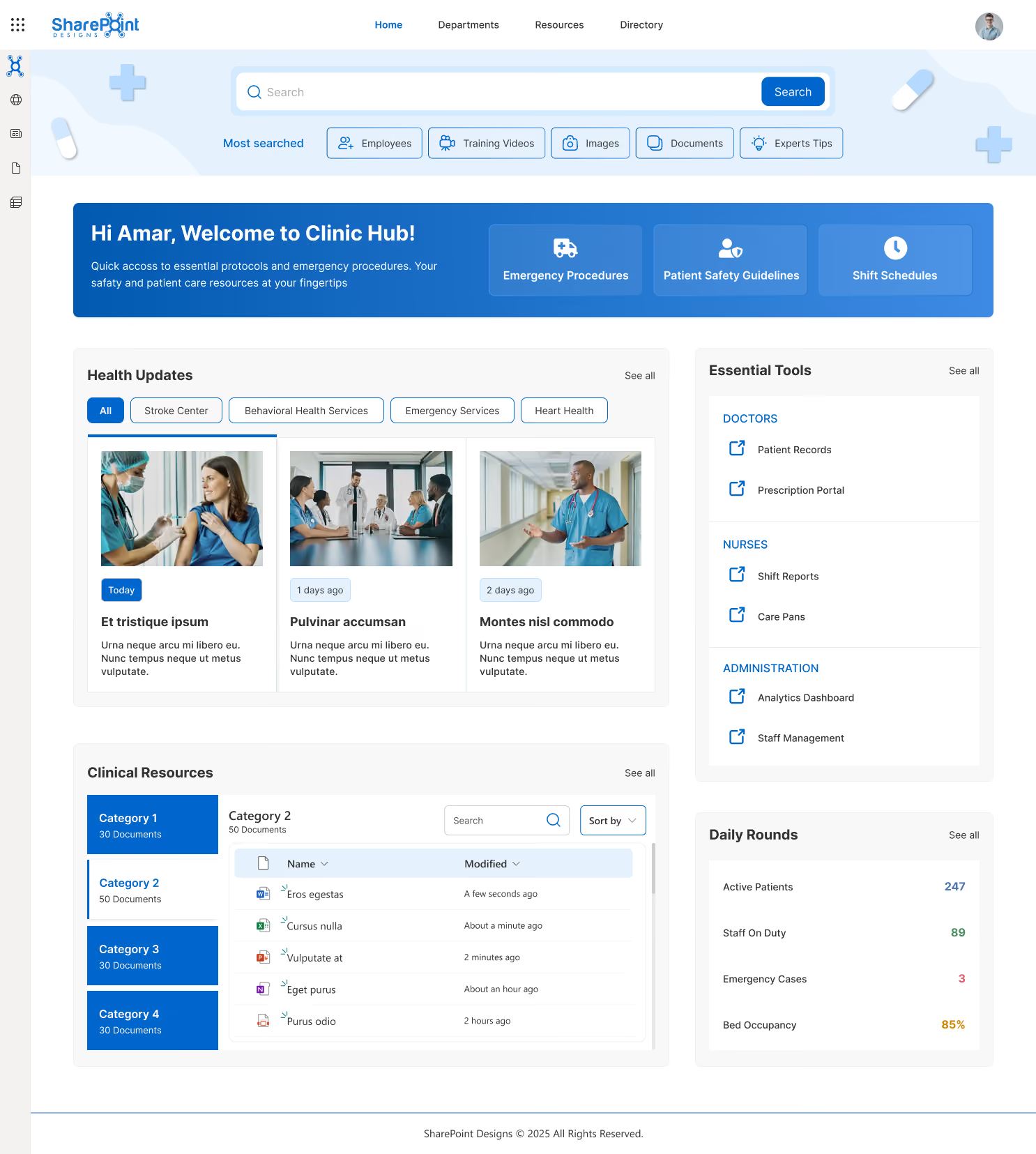
Design 1 - Clinic Hub: Acute Care & Multi-Department Hospitals
Built for acute care hospitals and multi-department clinical environments. The homepage centers on role-specific quick access: Emergency Procedures, Patient Safety Guidelines, and Shift Schedules are pinned in the hero section.
Health Updates are filterable by service line: Stroke Center, Behavioral Health, Emergency Services, and Heart Health. A right-side panel separates doctor tools (Patient Records, Prescription Portal) from nurse tools (Shift Reports, Care Plans) and administrative tools (Analytics Dashboard, Staff Management).
A Daily Rounds widget surfaces live operational metrics: Active Patients, Staff on Duty, Emergency Cases, and Bed Occupancy. This is the most operations-dense design, suited to high-acuity hospital environments.
Design 2 - Vision: Large Health Networks (500+ Staff)
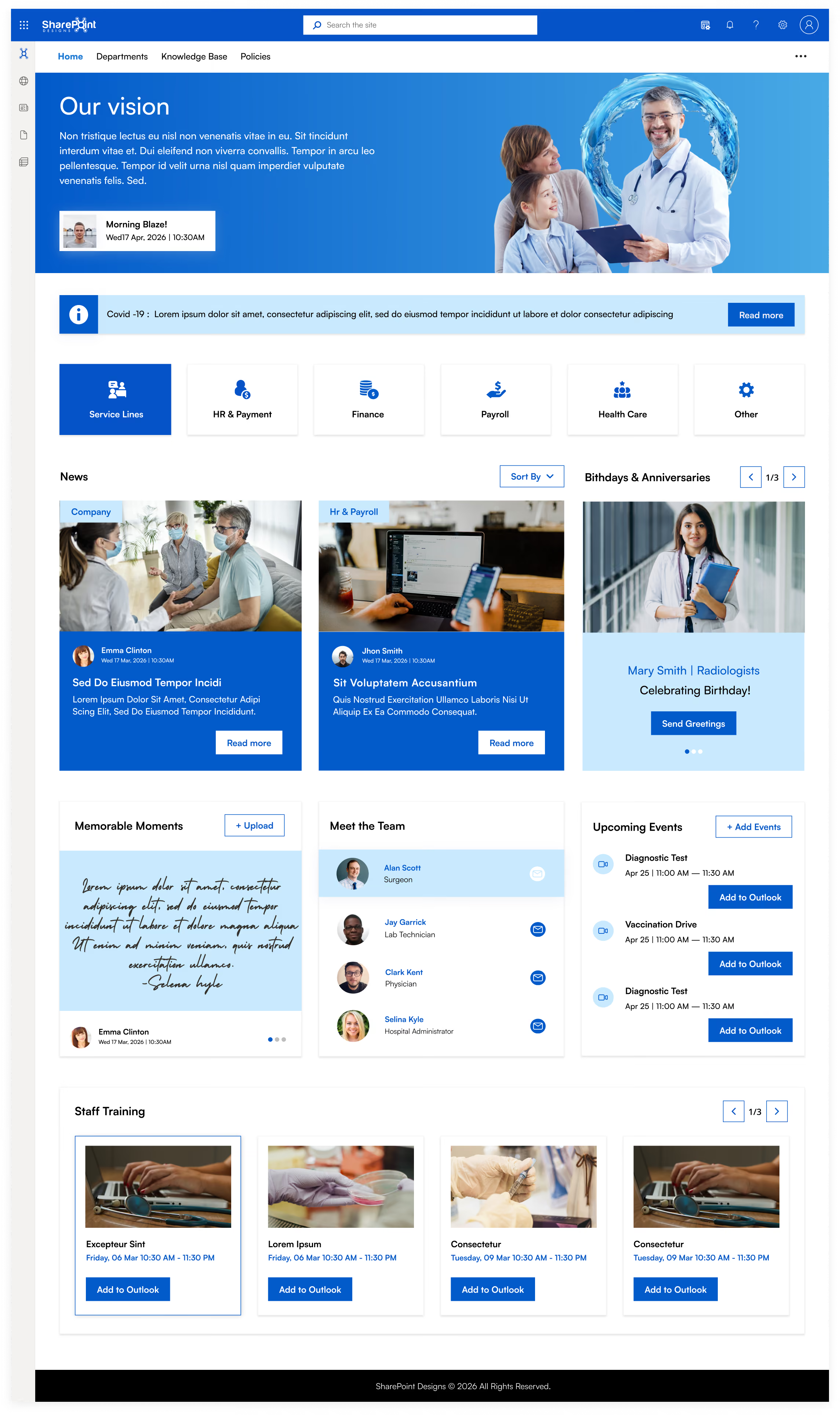
Built for multi-location health systems where leadership communication and cultural alignment are priorities. The full-width hero banner carries personalized daily briefing and leadership vision messaging. A service line navigation row lets each department (HR & Payment, Finance, Payroll, Health Care) operate as its own subsite while remaining connected to the central hub.
The Meet the Team and Memorable Moments sections drive connection across distributed sites. Birthdays & Anniversaries and Staff Training, with direct Outlook calendar integration, are consistently among the highest-used features after launch because they make the platform feel human, not institutional.
Design 3 - Women’s Health & Specialty Clinics
Built for specialty healthcare providers: OB/GYN practices, fertility clinics, maternity hospitals, and women’s health centers. The design language (purple palette, specialty-specific department filters: Obstetrics, Gynecology, Fertility IVF, Maternity Care) signals immediately that this was designed for this organization.
The People Directory includes an org chart filterable by specialty. The calendar surfaces relevant appointments (Prenatal Checkup, Ultrasound Scan) with direct Outlook integration. Service Awards recognize long-tenure staff as a meaningful driver of retention in specialist clinical environments.

Design 4 - Compassionate Care: Community & Family Health
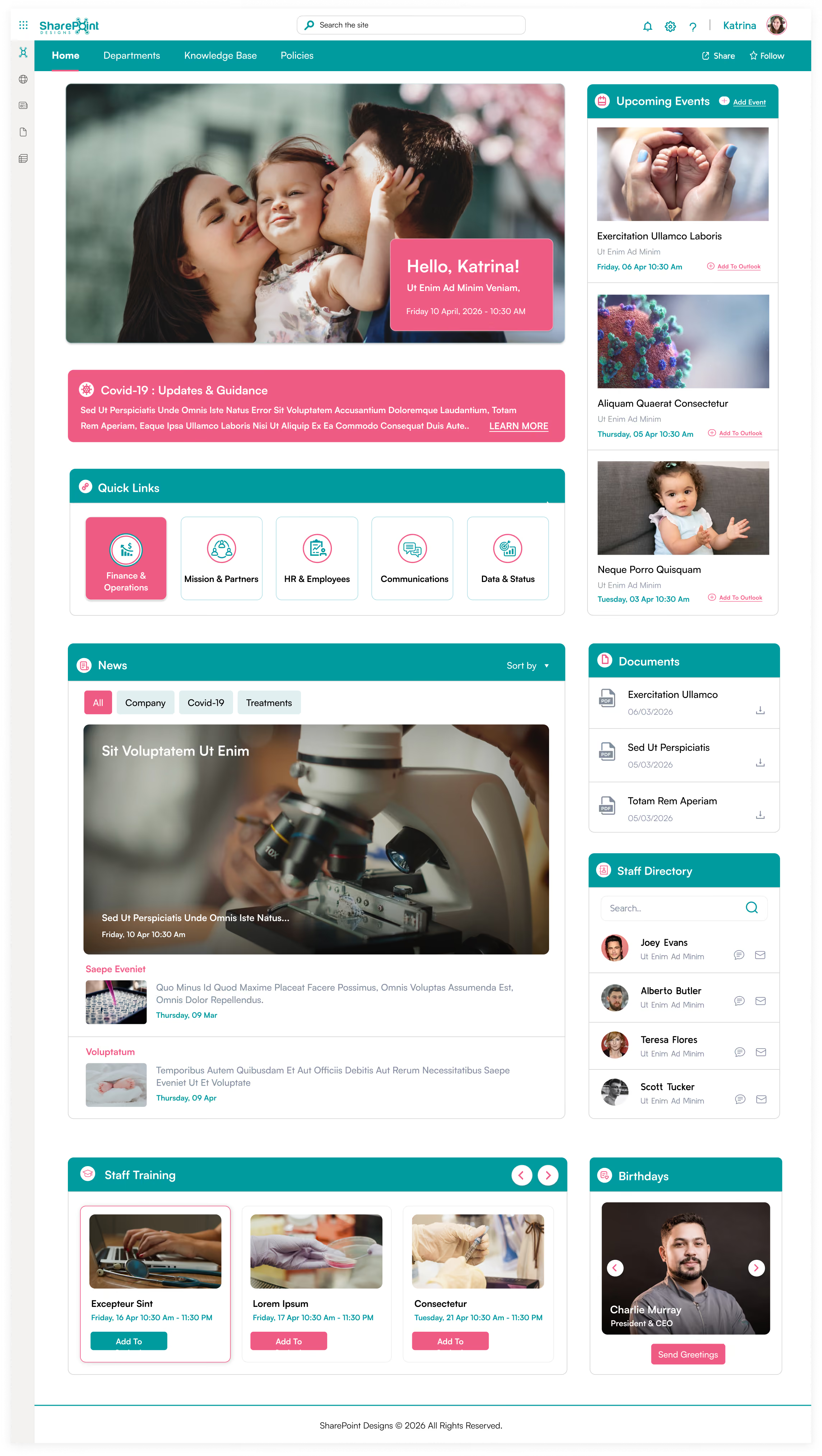
Built for community health centers, family medicine practices, and organizations where patient-centered culture is central to the brand. Quick Links segment by role: Finance & Operations, Mission & Partners, HR & Employees, Communications, Data & Status.
The News section supports filtered views for Company, Covid-19, and Treatments content. Documents are surfaced on the homepage with direct download links; clinical staff never navigate a document library.
The warm hero imagery and Birthdays section reinforce a community feel, which better drives adoption in smaller clinical environments than any feature set.
Design 5 - Research & Pharma: Science-Led Healthcare
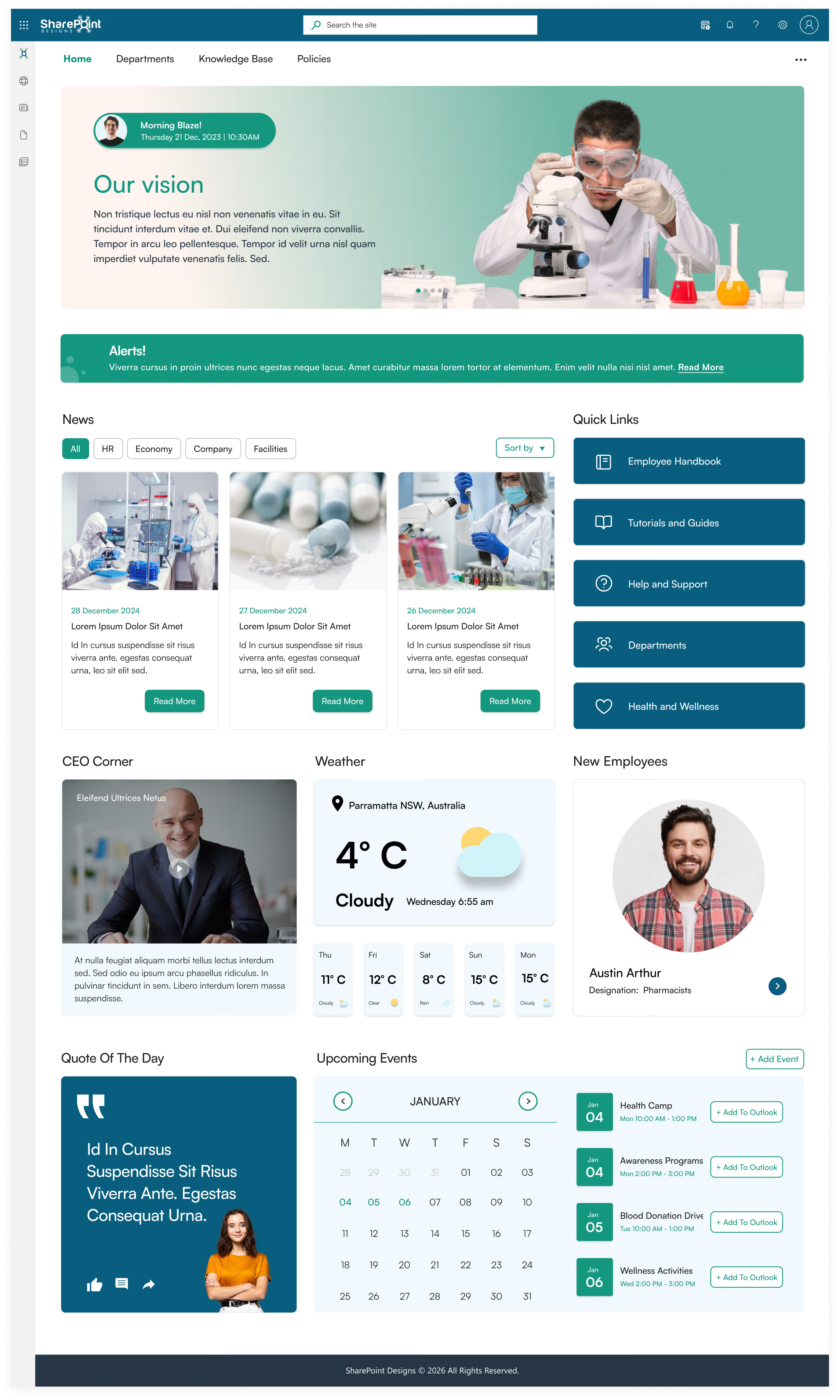
Built for pharmaceutical companies, research hospitals, and clinical research organizations. The homepage leads with a CEO Corner video section and lab-focused hero imagery.
Quick Links structure research workflows: Employee Handbook, Tutorials and Guides, Help and Support, Departments, Health and Wellness. A live weather widget supports staff traveling between campuses.
New Employees are highlighted to improve onboarding visibility in organizations with higher researcher turnover. The Quote of the Day section reinforces culture in a format that resonates with research-oriented teams.
Design 6 - Enterprise Hospital Network
The most feature-complete design for large enterprise hospital systems. The personalized hero greeting with vision statement carousel creates immediate personal relevance.
Below it: an Announcements scroller for urgent all-staff communications, Quick Links divided across clinical and operational categories, a My Apps section surfacing role-specific tools (Call Center Web, Front Desk, Payroll, XM Fax, Duo Central), New Joiners, Birthdays & Anniversaries, Testimonials, Company Directory, Calendar, and Events all on a single scrollable homepage.
The Testimonials carousel lets staff share organizational moments, a proven driver of cultural engagement in large, distributed hospital networks.

Design 7 - Mental Health & Behavioral Services
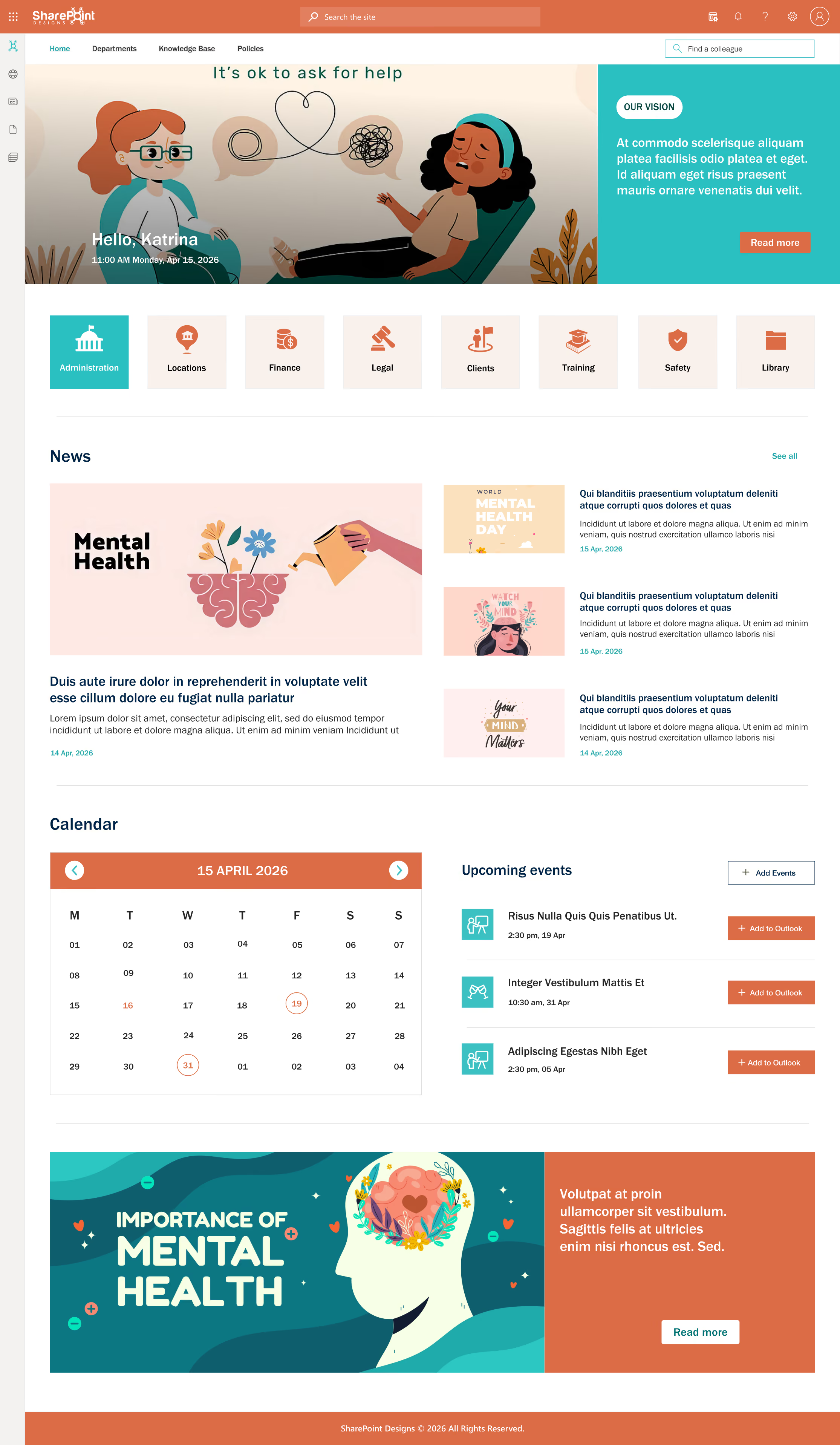
Built for mental health organizations, behavioral health services, and wellbeing-focused healthcare providers. The calm color palette (coral, teal, white) is deliberate, as clinical staff in this sector respond differently to high-intensity blue corporate designs.
Navigation reflects the specific needs of behavioral health: Administration, Locations, Finance, Legal, Clients, Training, Safety, and Library. A full-width mental health awareness banner at the bottom normalizes the organization’s focus on staff and patient wellbeing.
The Calendar and Upcoming Events sections are prominent because scheduling is operationally central to behavioral health service delivery.
HIPAA Compliance in a SharePoint Healthcare Intranet
This is where SharePoint outperforms every standalone healthcare communication platform.
Microsoft signs a Business Associate Agreement (BAA). Under HIPAA, any vendor handling PHI on behalf of a covered entity must sign a BAA. Microsoft provides a BAA for Microsoft 365 that covers SharePoint Online, available to all M365 Enterprise customers at no additional cost. Staffbase and Simpplr require separate BAA negotiations with narrower coverage.
Role-Based Access Control (RBAC) is native. SharePoint’s permission architecture restricts clinical content by role, department, floor, or individual. A nurse on Ward 3 sees Ward 3 content. A cardiologist sees the cardiology site. An HR manager sees HR policy libraries. Administrative staff without clinical clearance see nothing they shouldn’t. This granular access control is built in, not an add-on.
Sensitivity Labels for ePHI content. Through Microsoft Purview (included in M365 E3 and above), SharePoint applies sensitivity labels to documents and pages containing ePHI. These labels enforce encryption, restrict sharing, and generate audit events when labeled content is accessed. For HIPAA compliance reporting, this capability is essential.
Comprehensive audit logging. SharePoint Online maintains a complete audit log: who accessed which document, when a file was downloaded, when permissions changed, and when a sensitivity label was modified. This log is available in the Microsoft Purview compliance portal and is exportable for regulatory audit, exactly what a HIPAA audit requires.
Data Loss Prevention for PHI patterns. Microsoft 365 DLP policies detect PHI patterns in SharePoint content such as social security numbers, medical record numbers, and diagnosis codes, and automatically apply restrictions or alert administrators when sensitive data is handled improperly. No standalone intranet platform offers this depth of data governance.
Multi-Factor Authentication and Conditional Access. Through Microsoft Entra ID, SharePoint access can be enforced with MFA and conditional access: only managed devices, only from approved networks, with session timeouts appropriate for shared clinical workstations. For environments where staff use personal devices, these controls are essential.
Clinical Use Cases That Separate SharePoint From Generic Platforms
Emergency Protocol Distribution With Confirmation
When an emergency protocol changes a new sepsis pathway, a revised mass casualty response procedure, or an updated anaphylaxis treatment guideline, that update must reach every relevant clinical staff member and be confirmed as received.
In a SharePoint Designs-built intranet, the workflow is fully automated: the protocol document is updated in SharePoint (new version replaces old, previous version automatically archived) → Power Automate triggers a targeted Teams notification to affected staff groups → staff acknowledge receipt via a SharePoint form → acknowledgement is logged in a compliance tracker → HR and compliance can run a real-time report showing exactly who has and hasn’t acknowledged.
No manual email chains. No paper sign-off sheets.
Incident Reporting and Near-Miss Tracking
Healthcare organizations are required to maintain confidential incident-reporting systems for near misses, adverse events, and safety concerns. SharePoint Designs builds Power Apps-based incident reporting forms embedded directly in the intranet, accessible from any device. Reports are submitted confidentially, routed to the appropriate safety officer via Power Automate, and stored in a restricted SharePoint list.
Trend analysis dashboards in Power BI surface patterns that inform quality improvement programs. The entire workflow runs within the Microsoft 365 environment, with no additional vendor contracts required.
Staff Credentialing and License Expiry Automation
Expired clinical licenses pose a regulatory and patient-safety risk. SharePoint lists store staff credential data, nursing licenses, specialist certifications, CPR certifications, and mandatory training completions with expiry dates.
Power Automate sends automated reminders to staff and managers at 90, 30, and 7 days before expiry. HR has a real-time dashboard of all upcoming expirations. This replaces the spreadsheet-based tracking most healthcare organizations currently use, eliminating the associated error risk.
Policy Acknowledgment and Compliance Tracking
Annual HIPAA training, infection control policy reviews, and mandatory code of conduct acknowledgments are required for every healthcare organization that manages a required cycle of policy acknowledgments.
SharePoint Designs builds structured workflows: policy is published → targeted communication is sent to required staff → staff click to confirm they have read and understood → completion is logged → managers see real-time completion dashboards → HR runs compliance reports ahead of accreditation reviews.
This is the difference between a communication platform and a compliance infrastructure.
Department-Specific Subsites on a Connected Hub
A hospital intranet that serves all departments from a single homepage serves none of them well. SharePoint’s hub-and-spoke architecture lets each department, Cardiology, Oncology, Emergency, Radiology, Pharmacy, and ICU, have its own subsite with its own news, documents, team directory, and quick links, while remaining connected to the central hospital hub for organization-wide communications and policies.
Department managers publish their own content without IT involvement. Governance rules prevent content that violates organizational standards. Network-wide search returns results from every department site simultaneously.
SharePoint vs Competing Healthcare Intranet Platforms
SharePoint vs Simpplr
Simpplr markets heavily to healthcare and lists itself prominently among the best intranet platforms for healthcare workers. What their marketing doesn’t address: Simpplr is a communication and employee experience platform, not a clinical workflow system. For a small clinic needing a polished news feed and staff directory, Simpplr works. For a hospital system that needs HIPAA-compliant document management, clinical protocol distribution with acknowledgment tracking, Power Automate workflow automation, credentialing management, and EHR integration,, Simpplr requires substantial workarounds and adds $30,000–$100,000+ in licensing per year on top of the Microsoft 365 subscription you already pay for.
SharePoint vs Staffbase
Staffbase is genuinely strong for frontline communication. Their mobile app reaches workers without corporate email, and their omnichannel publishing (push notification, email, digital signage) is class-leading for large distributed workforces.
For a hospital network where communication reach is the primary need, Staffbase is a legitimate option. Where it falls short: it is not a document management system, has limited workflow automation, and does not handle the compliance governance infrastructure that clinical environments require. Like Simpplr, it adds significant licensing cost to an M365 investment already in place.
SharePoint vs Unily
Unily is built on top of the SharePoint infrastructure. Choosing Unily means paying for a design and UX layer on top of Microsoft’s platform at $150,000 to $300,000+ per year.
According to the 2025 Gartner Magic Quadrant for Intranet Packaged Solutions, the report evaluates several vendors in the intranet market.
SharePoint Designs offers design quality similar to that shown in seven distinct healthcare intranet examples, with the investment focused on implementation, resulting in lower ongoing costs for clients. rather than annual platform fees.
SharePoint vs Claromentis
Claromentis offers cloud and on-premise deployment, appealing to organizations with strict data residency requirements. It has reasonable document management and e-learning capabilities. However, its M365 integration is limited. Organizations deep in the Microsoft ecosystem, such as Teams, Outlook, Power BI, and Power Automate, will find Claromentis siloed from the tools their staff already use daily.
What to Demand From a Healthcare Intranet Partner?
Not all SharePoint partners have healthcare experience. Implementing an intranet for a logistics company and implementing one for a 2,000-staff hospital are fundamentally different projects. Every healthcare organization should ask:
Have you built intranets specifically for clinical environments?
Ask for healthcare-specific case studies. A partner without healthcare deployments will learn on your project at your cost.
Can you demonstrate HIPAA-compliant architecture?
They should walk you through: how sensitivity labels are applied, how RBAC is structured for clinical versus administrative roles, how audit logging is configured, and what the BAA process with Microsoft involves.
Do you build workflow automation for clinical processes?
Policy acknowledgment, incident reporting, credential tracking, and onboarding checklists are what make a healthcare intranet genuinely useful. A partner that only builds pages and navigation is building a brochure, not a digital workplace.
What is your adoption methodology?
Building it is 50% of the job. The other 50% is ensuring clinical staff actually use it. Ask for specific adoption strategies: change management plans, department champion programs, training materials, and post-launch support.
Can you integrate with our existing systems?
HR systems (Workday, SAP), shift management tools (Kronos, Deputy), EHR platforms (Epic, Cerner), and payroll systems all need to surface relevant data on the homepage. A partner without integration experience delivers an island, not a connected digital workplace.
SharePoint Designs Healthcare Intranet: What We Deliver
SharePoint Designs has deployed healthcare intranets for hospitals, multi-site health networks, specialty clinics, pharmaceutical research organizations, aged care providers, and community health centers.
Our healthcare engagements include:
- Clinical workflow mapping with nursing and physician input before design begins
- HIPAA-compliant architecture including sensitivity labels, RBAC, DLP, audit logging, and BAA coordination
- Role-based personalized homepages for clinical, administrative, and leadership staff
- Power Automate workflows for policy acknowledgement, incident reporting, credentialing, onboarding, and approval routing
- Mobile-first design accessible from the SharePoint app and Microsoft Teams
- Structured adoption programs including department champions, training materials, and 90-day post-launch support
- Ongoing governance management so organizations maintain momentum after launch
Measured result across healthcare deployments: Average 40% increase in intranet adoption within 90 days of launch. Clinical staff time spent searching for protocols and documents reduced by 60%. Compliance policy acknowledgment completion rates reach 94% within the first review cycle.
Healthcare Intranet Checklist: What to Require in 2026
Before selecting any healthcare intranet platform, verify that it delivers:
- HIPAA-compliant deployment with signed BAA from the cloud provider
- Role-based access control separating clinical, administrative, and leadership content
- Genuine mobile access without requiring desktop sessions
- Shift-aware communication surfaces critical updates when each shift logs on
- Document version control with mandatory review cycles and a complete audit trail
- Policy acknowledgment workflows with compliance tracking and reporting
- Integration with EHR, HR, and scheduling systems
- Emergency alert capability with department-specific targeting
- Staff directory filterable by specialty, department, and role
- Workflow automation for clinical and administrative processes
- Onboarding workflow tracking with task completion dashboards
- Content governance with expiry dates and ownership assignment
- Adoption analytics showing usage, most-visited content, and search patterns
- Multi-factor authentication and conditional access for device management
Summary
Healthcare is not a forgiving environment for technology that doesn’t work. When a nurse can’t find an emergency protocol, or a department head can’t confirm staff have acknowledged a safety update, the consequences extend beyond operational inconvenience.
SharePoint, implemented correctly by a partner with genuine healthcare experience, delivers:
- The only intranet platform with a native Microsoft BAA for HIPAA compliance
- Role-specific personalized experiences for every clinical and administrative role
- Automation of the workflows healthcare organizations currently manage manually
- Native integration with every Microsoft 365 tool your staff already uses
- A total cost of ownership 60–80% lower than standalone healthcare intranet platforms over five years
The seven healthcare intranet designs in the SharePoint Designs lookbook represent what’s possible when deep clinical understanding meets expert SharePoint implementation. Each one was designed around one question: what makes the first 10 minutes of a clinical shift more efficient?
See our work:
Related reading:
faqs

Venkatesh Maran

Founder and CEO of SharePoint Designs, a Microsoft ISV with 6 products live on AppSource. We build products that solve the problems Microsoft left on the table. Intranets that people actually use. Document management systems that don't fight your workflows. Knowledge platforms that surface what matters. And now, AI agents built on Microsoft Copilot that take the repetitive work off your team's plate. Every product we build gets designed around your brand, your culture, and how your teams actually work. Trusted by enterprises across 23 countries, primarily in the US and Europe, with deep expertise in SharePoint, Power Platform, Microsoft Copilot, and Microsoft 365. Over 15 years in the ecosystem and still going. Our mission is simple: make work more fun.




.svg)